Introduction: The Discussion Section
About the Discussion Section:
The discussion section is largely review and practice of everything that was covered during lecture in the previous week, plus some greater depth.
This is the time when you ask questions that you didn't during lecture--leave nothing to chance!
The general discussion format is to review topics at the high level, examine a bunch of examples that illustrate them, and then practice them by hand.
About My Role as Your TA:
I am always available to email; don't hesitate to ask for any clarifications.
My office hours are all on Wednesdays from 11:30am - 12:30pm, then from 4:30pm - 6:30pm in Boelter 2432. If you can't make those hours, and can't take advantage of the other TA office hours, email me to set up an appointment.
I grade the *style and comments* of your assignments, but not the correctness... so if you have time, entertain me with fun comments... but you know... focus on getting things right first...
Site Features:
You can now add notes inside the website so that you can follow along and type as I say stuff! Just hit
SHIFT + Nand then click on a paragraph to add an editable note area below. NOTE: the notes you add will not persist if you close your browser, so make sure you save it to PDF when you're done taking notes! (see below)The site has been optimized for printing, which includes the notes that you add, above. I've added a print button to the bottom of the site, but really it just calls your printer functionality, which typically includes the export to PDF.
Class Tips, Revisited
I've been instructed by the Professor to remind you of the class tips. Even though you are the elite discussion section, here they are again below (in red because important):
Read Things... Well
Make sure you're precise in your coding and your interpretations of the assignments and lectures or you will be sad.
Start Early
It really will take longer than you think... the rule of thumb is to multiply the time you think it will take by 3, and then ignore that figure because it will probably take longer.
Develop Incrementally
Add bits of code at a time, then compile, and run. You will isolate bugs more quickly and understand what your code is doing.
Getting Started
Configuring Your Development Environment
In order to compile code in C++, you'll need to configure what's called your development environment.
Development Environment
What is a development environment?
Development EnvironmentA collection of your chosen tools, software components, compilers, editors, etc. that you use to develop software.
Once you have installed your preferred compiler, you're ready to start coding.
CompilationWhat is the compilation process?
CompilationThe process by which you translate your human-readable source code into machine-executable machine code.
If you haven't yet set up your
clang++ / g++ |
Visual C++ 2012 / 2013 |
|
|---|---|---|
On a Mac / Linux |
[Mac] The compiler comes with Apple's XCode Tools, though this is typically already installed. [Linux] You can find the g++ for Linux tutorial on our Course Page. |
You have a couple of options for using Visual Studio:
|
On Windows: |
Follow the tutorial under (for some reason) g++ for Linux on our Course Page. |
NB: If you are running Windows 8, make sure you download Visual C++ 2012 / 2013, and not the one labeled for Windows 8! The full process for using Visual C++ 2012 on your PC can be found on our Course Page under Visual C++ 2012 / 2013 on the left. This process describes but one (school sanctioned) means of acquiring MSDN products:
|
Compiling and running your first c++ program
Using XCode:
Here I defer to the guide crafted by our professor located on the Course Page and under title XCode on a Mac.
That said, I will deliver a live demo of XCode compilation... now.
Using Visual C++:
Here I defer to the guide crafted by our professor located on the Course Page and under title Visual C++ 2012.
That said, I will deliver a live demo of Visual C++ 2012 compilation (if I have internet access)... now.
No demo for Linux, but if you're using a flavor of Linux, chances are you already know how to compile (relevant XKCD).
A Brief Trip into Hardware
How many computer scientists does it take to change a lightbulb?
None, it's a hardware problem.
That said, it never hurts to know what's happening "under the hood" of your code, so let's take a quick detour into hardware.
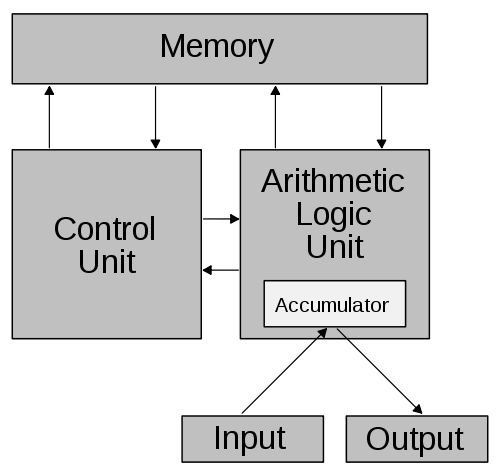
The following image depicts the standard Von Neumann computer architecture displaying the processor, memory, and I/O:
Memory
Primary memory (RAM) is the type of hardware that contains program information for fast and active access.
Secondary memory refers to other, slower-access devices like hard drives.
With respect to memory, the process of programming generally follows these steps:
You write your source code and save it somewhere on a hard drive (secondary memory).
You compile your source code into machine code, which creates another file on the hard drive.
When you run your compiled machine code, the program is loaded into RAM (primary memory).
The processor then performs the Fetch, Decode, Execute cycle on your program in RAM.
So now let's examine what happens in the CPU by first describing its components:
What are the roles of the Control Unit and Arithmetic Logic Unit (ALU) aboard the CPU?
The ALU performs any mathematical computations that are hard coded into it (addition, subtraction, negation, etc.) and the CPU fetches, decodes, and executes instructions from memory and employs the ALU when an instruction requires it.
Fetch, Decode, Execute: The Instruction Cycle
So what happens to the code once it's been loaded into RAM? Let's look at how memory is structured.
Below, you can see that each block of memory is indexed, meaning that each block is assigned a value, or address, that uniquely identifies it.
You can think of blocks of memory as being boxes that each have a unique name and hold data in the form of bits.
A bit is the atomic unit of information storage in memory that is either a 0 or a 1. A byte consists of 8 bits.
Each block of memory holds a byte of data. This data is just that... raw data. It is within the context of a running program and processor instructions that it gains meaning.
| Index | Memory Block |
|---|---|
0 |
0100 1000 |
1 |
0110 1011 |
2 |
1010 0001 |
3 |
... |
For example, in a 32-bit architecture, the smallest addressable unit in any address is 1 byte. Additionally, the CPU on a 32-bit architecture will operate on 4 bytes at a time, or 4 consecutive memory addresses. So, above, a single instruction might include memory blocks 0, 1, 2, and 3 on a 32-bit machine.
In a 32-bit architecture, a single word might look like:
10000111110001000100111110101001
In many architectures, (and without diving into detail) the first 5 bits will map to an instruction (like add, negate), and the rest of the bit string will indicate arguments to that instruction.
On how many bytes will a CPU of a 64-bit architecture operate at a time?
8 bytes.
Fetch: The Control Unit pulls 4 or 8 bytes of data from memory depending on whether it's a 32- or 64-bit architecture.
Decode: The Control Unit then determines what instruction is in the newly fetched data.
Execute: The Control Unit executes the newly decoded instruction, often using the ALU for methods like addition and moving memory blocks around. After execution, the Control Unit will fetch the next instruction, restarting the cycle.
tl;dr Your program gets thrown into main memory when it's run, after which the CPU will successively execute the instructions in machine code until it is done.
Starting with C++
Let's begin with the traditional first C++ program: hello.cpp
  #include <iostream>
  using namespace std;

  int main () {
      cout << "Sup, World?" << endl;
  }
This program does one simple thing: greets the world by printing out the string "Sup, World?" Let's examine what's going on a line at a time:
Is the above code fragment in source code or machine code?
Source code -- it is the human-readable format that has yet to be compiled into machine code.
| Line | What's Happening? |
|---|---|
#include <iostream> |
In order to use the I/O library that we want to print out a message, we need to make sure we have the proper tools. If I went to address a crowd, and forgot my loudspeaker, then I wouldn't be able to talk to them. Similarly, if I want to print something out, and I forgot my iostream, I wouldn't be able to. #include |
using namespace std; |
Almost everyone we know has a name, but that doesn't always mean that it's clear who we're talking about. If I tell you that, "Ben said you were cool," you might not know what Ben I'm talking about. If I instead provide a context for the name, as in, "Ben, that guy that sat next to you in CS31 said you were cool," it might make more sense. Similarly, if I want to talk about certain names for functions, variables, and other references in the context of a particular namespace, then I need to specify the context. A namespace allows you to group entities like functions, variables, and other references under a name (see example below). |
int main () { |
We are declaring a function with name main that is expected to return a value of type int. Don't worry, we'll talk more about functions, types, and returns later. For now, just know that every c++ program must have a main method. Note the opening curly-bracket that is associated with the main method. |
cout << "Sup, World?" << endl; |
We are directing the string "Sup, World?" to the standard output stream with a new line attached at the end. The new line, designated endl, moves the print cursor to the next line, like hitting "Enter" on your keyboard. |
} |
The closing curly-bracket for the main method that says, "Here's the end of this method block (the code that's in the method)." |
Observe below how we can define our own namespaces. In each namespace, I declare a variable named x of type int, but with different values assigned to them. Then, in the main method, I refer to each different x by its associated namespace. If I said x without the namespaces, the compiler wouldn't know which I was talking about.
  #include <iostream>
  using namespace std;

  namespace imANamespace {
      int x = 1;
  }

  namespace soAmI {
      int x = 2;
  }

  int main () {
      cout << imANamespace::x << endl;
      cout << soAmI::x << endl;
  }
Errors
During your coding career, you will encounter all manner of errors. Learning to debug these will make your life much easier.
Compilation / Syntax Errors: Errors in which the programmer has violated a portion of the language syntax (the language structure). These will prevent the code from compiling.
What are some common syntax errors?
Missing semicolons at ends of statements
Missing brackets around blocks
Missing namespace or #include definitions
Misspelled variables or names
Runtime / Logic Errors: Errors that might compile successfully, but encounter an error during runtime that either causes the program to break or produces unexpected (read: wrong) results.
What are some common runtime errors?
Division by 0
Overflow (e.g. trying to hold a really big number in an int variable that exceeds its bounds)
Find the error in the following code snippet. Is it a syntax error or a runtime error?
  int main () {
      double stuff = 1.0;
      int elligentProgrammer = 1;

      cout << I am very smart << endl;
  }
What could possibly go wrong during runtime with the following program?
  #include <iostream>
  using namespace std;

  /*
   * Program that takes in a numerator
   * and divisor and spits back the
   * quotient... -_-
   */
  int main () {
      double numerator,
             divisor,
             result;

      // First, prompt the user for the
      // numerator and divisor
      cout << "Please enter the numerator: ";
      cin >> numerator;
      cout << "\nPlease enter the divisor: ";
      cin >> divisor;
      result = numerator / divisor;
      cout << "\nThe quotient is: " << result << endl;
  }
Variables & Types
We're used to using variables in algebraic expressions: in 2x + 3, we know that x represents some number.
In programming, variables are not much different, except that I need to specify what kind of variable I'm using.
Variables can be of a variety of types, whether it's an integer number (no decimal), a decimal number, a string of characters, etc.
Variable Declaration
When we want to name a variable and use it in our program, we declare it using the following syntax:
<type> <name>;
Optionally, we can assign a value to our variable when we declare it (see below).
  // Declaring a variable of type int
  // means that it is an integer with no decimal
  int x;

  // We can also declare multiple variables at once
  int hereBeAnInt,
      andAnotherInt;

  // Or assign them
  double testAssignment = 5.01,
         reallyDescriptiveVariableNameThatLeavesNothingToTheImagination = -10.0;

  // NOTE: Variables must consist of alphanumeric
  // values plus underscores and CANNOT begin
  // with a number; the following will NOT compile:
  int 2legit2int = 2;
I've been talking for awhile, and I know how horrible that must be for you. Let's do an exercise:
Write a program that declares three doubles, adds the first two together, and then divides this value by the third. Print out the result.
Will the following code compile? If so, what value will be printed?
  #include <iostream>
  using namespace std;

  int main () {
      int x;
      cout << x << endl;
  }
What did we learn from the above?
When a primitive variable is not initialized (i.e., set to some value like int x = 5;), it will have unpredictable junk value.
Will the following code compile? If so, what value will be printed?
  #include <iostream>
  using namespace std;

  int main () {
      int x = 0.5;
      cout << x << endl;
  }
What did we learn from the above?
When a value that is incompatible with a variable type is attempted to be placed in that variable, type coercion may be well defined. This is when a value of type A has behavior that allows it to be stored in variable of type B. In this example, when a double is attempted to be placed in an int, we shave off the decimal.
Will the following code compile? If so, what value will be printed?
  #include <iostream>
  using namespace std;

  int main () {
      int hereIsAVariableName = 0.5;
      cout << hereIsaVariableName << endl;
  }
What did we learn from the above?
Case matters! Be precise!
Will the following code compile? If so, what value will be printed?
  #include <iostream>
  using namespace std;

  int main () {
      double i_declare_war-or-just_this_var = 1;
      cout << i_declare_war-or-just_this_var << endl;
  }
What value will be printed out by this program?
  #include <iostream>
  using namespace std;

  int main () {
      int numerator = 5,
          divisor = 2,
          result = numerator / divisor;
      cout << result << endl;
  }
What about this one?
  #include <iostream>
  using namespace std;

  int main () {
      int numerator = 5,
          divisor = 2;
      double result = numerator / divisor;
      cout << result << endl;
  }
Best Practices
Just because your code compiles and runs doesn't mean that you're really coding well. Here are some great practices to help you throughout your career.
Comment Before You Code
Comments
Comments are parts of the source code that are included mostly for human readability and information, but are ignored by the compiler, and subsequently, during runtime.
What are some other reasons to add comments to your code?
Other programmers looking at your code can easily see what each segment does.
Users of your code and library can see how to interface with it.
Comments can organize your thoughts before you implement them in code.
  #include <iostream>
  using namespace std;

  int main () {
      // Here is an example of a line-item comment
      // Anything after the two slashes is ignored

      /*
       * Here is an example of a block comment
       * Anything between the first slash-asterisk and
       * asterisk-slash is ignored. The asterisks on
       * the left are for aesthetic appeal only
       */

      // This program sucks and does nothing
  }
Often, when approaching a tough programming assignment, it is easy to get lost in your own code or even your own logic.
Instead, try to put the code into plain English first, and then go back and translate. This will help with incremental development as well.
Try to use the Comment Before You Code technique in designing the following program: an application that prompts the user for their birthday and then reports it back to them.
One Change, One Place
Determine what is wrong with the following code, and then rewrite it to correct the stylistic flaw using the tools we've learned so far (Hint: What would happen if I wanted to convert the inches to another unit?):
  #include <iostream>
  using namespace std;

  /*
   * This program displays the heights of
   * various objects in inches and converts
   * them to centimeters
   */
  int main () {
      double me = 72.1,
             myCar = 45.3,
             empireStateBuilding = 17444.5625,
             searsTower = 20484.0;

      // Now, report the converted values
      // Note that the \n is equivalent to appending
      // << endl; to the end of the printout
      cout << "I am " << (me * 2.54) << "cm tall.\n";
      // Weird spacing here for presentation display
      cout << "My car is " <<
           (myCar * 2.54) <<
           "cm tall.\n";
      cout << "The Empire State Building is " <<
           (empireStateBuilding * 2.54) <<
           "cm tall.\n";
      cout << "The Sears Tower is " <<
           (searsTower * 2.54) <<
           "cm tall.\n";
  }
Some Clean Shorthand
You can use some shorthand in variable assignments to look cool and save time.
  #include <iostream>
  using namespace std;

  int main () {
    int x = 1;
    x = x + 1; // x will be 2

    // OR, you can do
    int y = 1;
    // += means "add this value to what's in y already"
    y += 1;

    // OR, you can do
    int z = 1;
    // ++ means "increment this value by 1 *after*
    // returning its current value"
    z++;

    cout << x << endl;
    cout << y << endl;
    cout << z << endl;
  }
Homework Tips
Here are some tips previous students have said that they wished they knew before starting the homework.
You will lose points for code without comments! It doesn't have to be documented to the extreme, but any sufficiently complicated code should have an attached explanation.
If a homework says to explain something "in only a couple sentences," you will lose points for going into a long-winded dissertation.
Do you have a question about some project behavior? It's almost always in the spec (CTRL+F is your friend!).
Whenever you have a bug and need to ask for help, first try to localize where the bug is happening. This will likely solve your problem, and if not, will direct whoever is helping you.
That's it for today! Looking forward to a great quarter.