Questions from Week 1
Q: On XCode, the text "Running" is displayed after the program printout, and on VS, the text "Press any button to continue...". Is this just a quirk of the debug console in each IDE?
A: Yes. No need to worry about it confounding your answers.
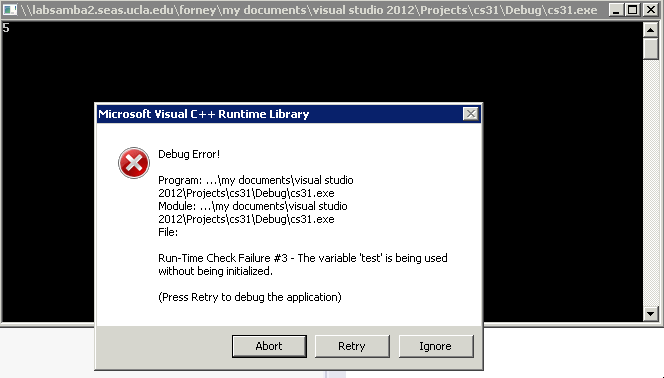
Q: What happens when we try to overload a variable defined in the std namespace?
This question deals with our later discussion of scope; consider the following example and find the answer to this particular question with explanation to follow:
Will the following code compile? If so, what will it print out?
  #include <iostream>
  using namespace std;

  int main () {
      int cin = 5,
          test;

      cout << cin << endl;

      cout << "Enter a number: ";
      // What will be in test after this line?
      cin >> test;
      cout << test << endl;
  }
Will I get different outcomes from compiling the above program via Visual C++ 2012 vs g++?
Fix the above code segment to avoid an error (aside from [properly] renaming the cin local variable); you may only make an addition to the code.
Introduction to Operators
Operators are symbolic keywords used to compute values between operands, or the arguments to the operators.
Unary vs. Binary Operators: Unary operators... well... operate on a single argument value, whereas binary operators operate on two. Binary operators have an lvalue and an rvalue, on the left and right sides of the operator, respectively.
What are some binary operators that we've gone over in class?
Assignment ( = ): Assigns the rvalue to the variable designated by the lvalue.
Addition ( + ): Returns the sum of the lvalue and the rvalue.
Subtraction ( - ): Returns the difference of the lvalue and the rvalue.
Multiplication ( * ): Returns the product of the lvalue and the rvalue.
Insertion ( << ): Inserts the data in the rvalue into the stream in the lvalue.
Extraction ( >> ): Extracts the data from stream in the lvalue into the target in the rvalue.
Scope Access ( :: ): Returns the entity named by the rvalue in the scope named by the lvalue.
What is the lvalue and rvalue of the below expression?
x = 5;
lvalue = x
rvalue = 5
That said, we've also talked about some unary operators--operators that expect only one operand:
What are unary operators that we've gone over in class?
Negation ( - ): Returns the negative of the rvalue.
Increment ( ++ ): Increments either the lvalue or rvalue (depending on which side of a variable the ++ is on) by 1.
Decrement ( -- ): Decrements either the lvalue or rvalue (depending on which side of a variable the ++ is on) by 1.
An interesting property about increment and decrement is that, while they are unary operators, they may appear on either side of a *variable* with different outcomes.
Postfix increment / decrement (x++;) returns the current value of the variable before incrementing.
Prefix increment / decrement (++x;) increments the current value of the variable before returning.
Will the following code compile? If so, what will it print out?
  #include <iostream>
  using namespace std;

  int main () {
      int x = (++5)++;

      cout << x << endl;
  }
Precedence
What does operator precedence mean?
The order in which operators evaluate their operands. Precedence is a property of each operator.
What if I gave you the following set of instructions: "Wash the car, dry the car, and do your homework."
In what order will you perform the tasks?
Chances are you'll do one of the following:
Wash the car, then dry the car, and then do your homework.
Do your homework, then wash the car, and then dry the car.
Some of you anarchists might want to wash the car, then do your homework, then dry the car because
But, the rest of us tend to group the washing and drying of our cars together, even though we could do our homework before or after.
Grouping decides the order in which equal-level precedence operations will be carried out. In C++, we determine groups by using parentheses ().
While there's some ambiguity in my command above (homework can be done before or after cleaning the car), we don't want undefined behavior in our code.
So, we introduce another concept to determine the direction in which our instructions are to be read:
Associativity: The direction in which operators evaluate their operands; can be left to right (e.g. 5 + 3 + 2) or right to left (e.g. i = 5;)
So, for each operator in C++, we define its precedence (lower precedence levels are evaluated first) and its associativity (the direction in which it evaluates its arguments).
Here is the complete C++ list of operators and their precedences (taken from here if you want more info):
NOTE: This precedence list is a RULE OF THUMB. There are some exceptions to precedence level to be considered...
| Precedence | Operator | Description | Associativity |
|---|---|---|---|
| 1 | ::
|
Scope resolution | Left-to-right |
| 2 | ++ --
|
Suffix/postfix increment and decrement | |
()
|
Function call | ||
[]
|
Array subscripting | ||
.
|
Element selection by reference | ||
->
|
Element selection through pointer | ||
| 3 | ++ --
|
Prefix increment and decrement | Right-to-left |
+ -
|
Unary plus and minus | ||
! ~
|
Logical NOT and bitwise NOT | ||
(type)
|
Type cast | ||
*
|
Indirection (dereference) | ||
&
|
Address-of | ||
sizeof
|
Size-of | ||
new, new[]
|
Dynamic memory allocation | ||
delete, delete[]
|
Dynamic memory deallocation | ||
| 4 | .* ->*
|
Pointer to member | Left-to-right |
| 5 | * / %
|
Multiplication, division, and remainder | |
| 6 | + -
|
Addition and subtraction | |
| 7 | << >>
|
Bitwise left shift and right shift | |
| 8 | < <=
|
For relational operators < and <= respectively | |
> >=
|
For relational operators > and >= respectively | ||
| 9 | == !=
|
For relational = and != respectively | |
| 10 | &
|
Bitwise AND | |
| 11 | ^
|
Bitwise XOR (exclusive or) | |
| 12 | |
|
Bitwise OR (inclusive or) | |
| 13 | &&
|
Logical AND | |
| 14 | ||
|
Logical OR | |
| 15 | ?:
|
Ternary conditional | Right-to-left |
=
|
Direct assignment (provided by default for C++ classes) | ||
+= -=
|
Assignment by sum and difference | ||
*= /= %=
|
Assignment by product, quotient, and remainder | ||
<<= >>=
|
Assignment by bitwise left shift and right shift | ||
&= ^= |=
|
Assignment by bitwise AND, XOR, and OR | ||
| 16 | throw
|
Throw operator (for exceptions) | |
| 17 | ,
|
Comma | Left-to-right |
Summary
Evaluate lower precedence operators first, and in the event of a precedence level tie, operate from left to right.
We only know a few of those right now, so let's practice instead:
Will the following code compile? If so, what will it print out?
Note precedence levels: (=, 15), (+, -, 6), (*, 5)
  #include <iostream>
  using namespace std;

  int main () {
      int a = 5,
          b = a = a + 5 * 2; // "Parallel Assignment"

      cout << a << endl;
      cout << b << endl;
  }
Will the following code compile? If so, what will it print out?
Note precedence levels: (=, 15), (+, -, 6), (*, 5)
  #include <iostream>
  using namespace std;

  int main () {
      int x = -3,
          y = 5,
          z = 8 * (x = y - 4);

      cout << x << endl;
      cout << z << endl;
  }
Remember, we said there will be exceptions to precedence level... What will the following code print out?
Note precedence levels: (=, 15), (+, -, 6), (++, 2 (postfix) or 3 (prefix))
  #include <iostream>
  using namespace std;

  int main () {
      int x = 5,

          // x++ says "increment after returning"
          // What is the value in x
          // after the line below?
          y = x++,

          // ++x says "increment before returning"
          // What about its value now?
          z = ++x;

      cout << x << endl;
      cout << y << endl;
      cout << z << endl;
  }
Strings
Strings: objects that represent a sequence of characters.
We use strings to hold text data. Unlike types int and double, which are native to the C++ language, strings are a std library feature class.
Here are some example strings:
  #include <string>
  using namespace std;

  int main () {
      string me = "Andrew",
             blank = "",
             space = " ",
             newLine = "\n";
      // What do I do with all these
      // strings? :(
  }
String Concatenation: The process by which we add strings to each other, end to end. To do so, we simply use a +.
What will the following program output?
  #include <iostream>
  using namespace std;

  int main () {
      string me = "Andrew",
             blank = "",
             space = " ",
             newLine = "\n",
             result,
             nothing;

      result = me + "iscool";
      cout << result << endl;
      cout << "-----" << endl;

      result = me + blank + blank + "=reallycool";
      cout << result << endl;
      cout << "-----" << endl;

      result += result;
      cout << result << endl;
      cout << "-----" << endl;

      cout << nothing << endl;
  }
Will the following code compile? If so, what will it output?
  #include <iostream>
  using namespace std;

  int main () {
      string test = "hi";
      int five = 5;

      cout << test << five << endl;
  }
Will the following code compile? If so, what will it output?
  #include <iostream>
  using namespace std;

  int main () {
      string test = "hi";
      int five = 5;
      test = test + five;

      cout << test << endl;
  }
Will the following code compile? If so, what will it output?
  #include <iostream>
  using namespace std;

  int main () {
      string test = "hello",
             goodbye = "goodbye",
             awkwardExchange = test << goodbye;

      cout << awkwardExchange << endl;
  }
There are some cool properties that we can use with strings, like find out their length and determine individual letters.
String Length: We can determine how many characters are in a string by using its .length() method.
What will the following code segment output?
  #include <iostream>
  using namespace std;

  int main () {
      string me = "Andrew",
             blank = "",
             space = " ",
             newLine = "\n",
             result;

      cout << me << ": " << me.length() << endl;
      cout << "blank" << ": " << blank.length() << endl;
      cout << "space" << ": " << space.length() << endl;
      // What will newLine.length() return?
      cout << "newLine" << ": " << newLine.length() << endl;
      cout << "result" << ": " << result.length() << endl;
  }
Character Access: We can retrieve the ith character of a string via the syntax: stringName[i]
What will the following code segment output?
  #include <iostream>
  using namespace std;

  int main () {
      string me = "Andrew";

      // me[i] returns the ith letter
      cout << me << "="
           << me[1] << me[4] << me[3] << me[2]
           << endl;
  }
Streams
Streams describe an abstract concept of data flowing into and out of different sources and destinations.
Think of an actual river that flows from a source to a destination--the stream can be considered the river itself.
Therefore, we can think of our interaction with code using a console in the following way:
cout is like the stream ending, being displayed to the standard output (by default, the console)
cin is like the stream beginning, seeking what the user puts into the stream (by default, the keyboard)
  #include <iostream>
  using namespace std;

  int main () {
      // Hey! No peeing in the stream!
      cout << "pee";
  }
cout Formatting
So, just as we might build dams and other means of controlling water flow, so might we modify the way that our cout stream behaves.
Manipulating cout Display:
cout << std::fixed; tells the cout stream to format numbers with fixed number of digits.
cout << std::scientific; tells the cout stream to format numbers with scientific notation.
cout.precision(n) tells the cout stream to only display n digits and round appropriately (if in default formatting), or the number of digits past the decimal if in fixed / scientific notation.
Note that these options are flags that affect *only the behavior of cout following them* and override any flags set beforehand.
What does the following code segment output?
  #include <iostream>
  using namespace std;

  int main () {
      double x = 10.123456789;

      cout << "Default: " << x << endl;

      cout.precision(2);
      cout << "Prec(2): " << x << endl;

      // [!] Scientific notation
      cout << scientific;
      cout << "Scie(2): " << x << endl;

      // [!] Fixed floating point
      cout << fixed;
      cout << "Fixd(2): " << x << endl;

      cout.precision(5);
      cout << "Fixd(5): " << x << endl;

      cout.precision(15);
      cout << "Fix(15): " << x << endl;
  }
Input Formatting
Returning to our water stream example, just as we may use different lures while fishing to get different fish out of a stream, so do we need different tools to extract different data from the input.
There are a number of different tools we can access the standard input stream. The following are the two we'll use in this class:
The cin >> var; command accesses input characters, ignores whitespace, and ignores the newline at the end of the user's input. We use this for gathering numerical input, and storing it in variable "var".
The getline(cin, s); command consumes all characters up to, and including, the new line character. It then throws away the new-line, and stores the resulting string in s. We use this for gathering string inputs. [Requires the string library]
Although the two different input gathering tactics seem pretty straightforward, there's one issue with using cin >> var; and then after using getline(cin, s);
Since cin >> var; leaves a newline, and getline(cin, s) consumes all characters up to and including a new line, using the first before the second will cause the leftover newline character to be interpretted as hitting enter without any text on the second.
To illustrate this problem, see the following example:
  #include <iostream>
  #include <string>
  using namespace std;

  int main () {
      string inputString;
      int inputInt;

      cout << "Enter a number: ";
      cin >> inputInt;
      cout << "Input was: "
           << inputInt << endl;

      cout << "Enter a string: ";
      getline(cin, inputString);
      cout << "Input was: "
           << inputString << endl;
  }
To fix this, we want to consume the extra newline left behind by our numerical input technique.
cin.ignore(n, pattern) ignores n characters or until the first encountered instance of pattern from the input stream.
NOTE: We ONLY use cin.ignore(n, pattern) when we've used cin and then directly after use getline!
Fix the input gathering code from above.
Conditionals
Conditionals direct the flow of our programs by evaluating a statement as either true or false, and then taking appropriate action.
Below, you'll find the anatomy of the if statement:
  if (conditional)
    statement;
This simply says, "Determine whether or not the expression in the condition is true or false, then execute the statement if it is true."
Since statements can also be blocks of code, we can execute multiple statements in the if-block via the syntax:
  if (conditional) {
    statement;
  }
You can also create a branch via the "else" keyword.
  if (conditional) {
    // Execute everything in here if
    // conditional was evaluated to true
  } else {
    // Execute everything in here if
    // conditional was evaluated to false
  }
We can even chain if-statements together to form an if-ladder:
  if (conditional1) {
    // Execute everything in here if
    // conditional1 was evaluated to true
  } else if (conditional2) {
    // Execute everything in here if
    // conditional1 was evaluated to false AND
    // conditional2 was evaluated to true
  } else {
    // Execute everything in here if
    // conditional1 was evaluated to false AND
    // conditional2 was evaluated to false
  }
But what does a conditional look like?
Almost any expression can be a conditional, but we'll start by looking at comparisons like "greater than," "less than," and "equal to."
If you're ready, let's do some examples... which is to say that if you're not ready, we will not do some examples:
What will the following code segment output?
  #include <iostream>
  using namespace std;

  int main () {
      int a = 5;

      if (a > 5) {
          cout << "Hooray! I'm true!";
      } else {
          cout << ":( I'm false...";
      }
  }
return
Although we'll talk more about the return statement later, just know that when used in the main method, it will terminate the program. When used in int main() we typically return 1; when the program exited in error.
What will the following code segment output?
  #include <iostream>
  using namespace std;

  int main () {
      string test = "hello";

      if (test == "hello") {
          cout << "Your greeting upsets me.\n";
          return 0;
      }
      cout << "Anyone here?\n";
  }
What will the following code segment output?
  #include <iostream>
  using namespace std;

  int main () {
      string test = "hello";

      if (test != "hello")
          cout << "Your greeting upsets me.\n";
          return 0;

      cout << "Anyone here?\n";
  }
The above example is why I suggest to *always* use the bracketed syntax for your if-statements, even if it is only a single line.
Compound Conditions
We can evaluate multiple conditions using the and ( && ) and or ( || ) operators.
Logical And ( && )
If the lvalue and rvalue of the && are BOTH true, then the logical And evalues to true.
Logical Or ( || )
If EITHER the lvalue OR rvalue of the || is true, then the logical Or evalues to true.
What will the following code segment output?
  #include <iostream>
  using namespace std;

  int main () {
      string test = "hello";
      int x = 5,
          y = 2;

      if (test.length() != 4 && x == 5) {
        cout << "The day is mine!" << endl;
      } else {
        cout << "The day will eventually be mine." << endl;
      }

      if (y % 2 == 1 || x % 2 == 1) {
        cout << "Something's odd around here..." << endl;
      } else {
        cout << "Even I don't think this will print." << endl;
      }
  }
We can also compare strings using the ==, !=, <, >, etc. operators.
To test if a string is empty, we can compare it to the empty string (s == "") or see if its .length() == 0.
Ternary Conditional
We can perform conditional evaluations inline with the code without using the if block. The syntax is (conditional) ? statement_if_true : statement_if_false;
What will the following code segment output?
  #include <iostream>
  using namespace std;

  int main () {
      string test = "hello",
             stuff = "stuff",
             result = (test == stuff) ? "equal" : "not equal";

      cout << result << endl;
  }
Iteration
What's wrong in the code below?
  #include <iostream>
  using namespace std;

  int main () {
      int x = 0;

      cout << "I can count to 7!" << endl;
      // (Spoiler: I can't)
      cout << x++ << endl;
      cout << x++ << endl;
      cout << x++ << endl;
      cout << x++ << endl;
      cout << x++ << endl;
      cout << x++ << endl;
      cout << x++ << endl;
  }
Nobody got time to repeat all that!
Often times, we want to repeat some segment of code a certain number of times without physically writing out each iteration.
while (condition) {...}
The while loop executes its code block over and over until its condition is false.
What does the following code segment output?
  #include <iostream>
  using namespace std;

  int main () {
      int x = 0;

      while (x < 7) {
          cout << x << endl;
          x++;
      }
  }
What does the following code segment output? Will it suffer from a runtime error?
  #include <iostream>
  using namespace std;

  int main () {
      int x = 0;

      // Get your CTRL+C ready...
      while (x >= 0) {
          cout << x << endl;
          x++;
      }
  }
For Loop Just like a while loop, except we initialize the iterator, define the conditional, and define the post-iteration behavior all in the signature. The syntax is:
  for (int i = value; conditional; post_loop_action) {
    // Code block
  }
What does the following code segment output?
  #include <iostream>
  using namespace std;

  int main () {
      int iterations = 10;
      for (int i = 0; i < iterations; i++) {
          if (i % 2 == 0) {
              cout << i << endl;
          }
      }
  }
Design a function that prints out a plus sign composed of '+' characters that is n lines high and n lines wide. We'll have the user provide n via prompt, and output an error if n is even. Fill out the code fragment below.
  #include <iostream>
  #include <string>
  using namespace std;

  /*
   * Gathers a dimension n from a user and prints
   * an n x n plus sign composed of '+' characters; e.g.
   * n = 5
   *   +
   *   +
   * +++++
   *   +
   *   +
   */
  int main () {
      int dimensions;

      cout << "Input an odd dimension: ";
      // [!] Get dimensions from user here
      ???

      // [!] Error checking; input must be odd
      if ( ??? ) {
          cout << "Invalid dimensions!" << endl;

          // [!] If it was even, should we continue?
          ???
      }

      // [!] Iterate through an n x n grid to print each
      // character
      for (int i = 0; ???; i++) {
          for (int j = 0; ???; j++) {
              // [!] The condition for printing a '+'
              // Hint: we might have a compound logical statement
              if ( ??? ) {
                  cout << "+";

              // Otherwise, we'll print a space ' '
              } else {
                  cout << " ";
              }
          }

          // Print a new line for the next row
          cout << endl;
      }
  }
Project 2
For Project 2, if you haven't yet looked at it, you'll be creating a phone-charge calculator for text message rates.
Some general hints:
Read the spec, and then read it again... especially if you think something isn't clear.
Develop incrementally! Test what you have before you proceed.
Note: the example calculator's error messages will differ from your own; make sure you do what the spec says!
Beware! There is also a written, *homework 2* component of the project on the spec's page! Don't miss it!