Questions from Week 5
Q: What makes unit tests thorough?
Well, unit tests are specific to the functions you're testing, but there are a few good rules of thumb for thoroughly testing a program:
If your program uses functions that can be tested individually, test that these are functioning properly first!
-
For functions that expect string inputs, test arguments with at least the following:
Special characters and punctuation
Uppercase and lowercase letters
Numbers
Spaces (especially, starting and ending with spaces)
-
For functions that expect numeric inputs, test arguments with at least the following:
Some int / double x less than -1
Some int / double x equal to -1
Some int / double x equal to 0
Some int / double x equal to 1
Some int / double x greater than 1
-
For functions that handle arrays, test arguments with at least the following:
Index limits less than and equal to 0
Index accesses greater than the index limit (if applicable)
String arrays with empty string elements
Numeric arrays with 0 and negative elements
Design unit tests for the following program that expose its bug.
  #include <iostream>
  #include <string>
  #include <cctype>
  using namespace std;

  string funkyFunc (string s);

  int main () {
      // TODO: Design tests for funkyFunc
      // in a void unitTests function that
      // test it thoroughly and exposes its bug
  }

  // Takes in a string of numbers and returns a new
  // string consisting of every number incremented by
  // one. If a character is not a number, omit it
  // from result.
  // If a number is 0, skip the next character.
  string funkyFunc (string s) {
      string result;
      for (int i = 0; i < s.length(); i++) {
          if (isdigit(s[i])) {
              if (s[i] == '0') {
                  i++;
              }
              result += (s[i] + 1);
          }
      }
      return result;
  }
Introduction to cstrings
C++ strings are so nice, why do I have to learn about this new crap?
No... seriously... why do we have to learn this stuff?
Aside from you being devoted CS academics, there is a practical reason for learning about cstrings: many libraries (especially legacy ones) that you may wish to interface with will use cstrings and you need to know how they're different from C++ strings.
Which segues nicely to the next question...
What are the main differences between C++ strings and cstrings?
cstrings have a null-terminating character indicating their conclusion, C++ strings do not.
cstrings require the programmer to define their space allocation, C++ strings allocate memory dynamically.
cstring functions are from the cstring library, but string functions are from the string library.
What exactly does it mean for a cstring to be "null-terminated?"
A string that is "null-terminated" means that the end of the string is indicated by the 0-byte, AKA the null character, null terminator, etc.
The null character, regardless of character encoding schema, is always represented as '\0' and has character code 0.
So, how can we have strlen function for cstrings but not for other types of arrays, like arrays of ints?
The 0-byte is special for cstrings and allows us to count the number of characters up until the first '\0'. We don't have the same luxury for an array of, say, ints because that would mean never being able to store the value 0.
So let's take a look at how we can play with cstrings. The methods for doing so may be different, but the general ideas are the same:
Declaring cstrings:
We can declare cstrings just as we would any other type of array:
char <name>[size];
Initializing cstrings:
We can initialize cstrings using a variety of tactics, but the best way is:
char <name>[] = "<string_to_initialize>";
Remember that because cstrings are just arrays of characters, we must define size at compile time.
This is, of course, assuming that we have not initialized the cstring.
Warning! Because cstrings are null-terminated, we must leave space for the extra 0-byte at the end.
So, let's look at some examples:
Will the following code compile? If so, what will it output?
  #include <iostream>
  #include <string>
  using namespace std;

  int main () {
      char c[3];
      cout << c << endl;
  }
Will the following code compile? If so, what will it output?
  #include <iostream>
  #include <string>
  using namespace std;

  int main () {
      // Play on words, not typo:
      char acters[3] = "";
      cout << acters << endl;
  }
Will the following code compile? If so, what will it output?
  #include <iostream>
  #include <string>
  using namespace std;

  int main () {
      char acters[3] = "cat";
      cout << acters << endl;
  }
Will the following code compile? If so, what will it output?
  #include <iostream>
  #include <string>
  using namespace std;

  int main () {
    char acters[3] = "ca\0";
    cout << acters << endl;
  }
So what's the rule of thumb? Don't null terminate your own strings when you initialize with the double quote notation.
That said... what happens when we place null characters inside of our strings?
Will the following code compile? If so, what will it output?
  #include <iostream>
  #include <string>
  using namespace std;

  int main () {
      char acters[6] = "c\0a\0t";
      cout << acters << endl;
      cout << acters[2] << endl;
  }
Now, if we were being particularly masochistic, we could also initiate cstrings using the array curly-bracket notation.
Will the following code compile? If so, what will it output?
  #include <iostream>
  #include <string>
  using namespace std;

  int main () {
      // Do you have a char in the world?
      char inTheWorld[] = {'y', 'e', 's', '!'};
      cout << inTheWorld << endl;
  }
Well, apparently you should have cared to null terminate your cstring!
Will the following code compile? If so, what will it output?
  #include <iostream>
  #include <string>
  using namespace std;

  int main () {
      // Sorry :(
      char inTheWorld[] = {'y', 'e', 's', '!', '\0'};
      cout << inTheWorld << endl;
  }
We can also leave space for additional characters in our cstrings:
Will the following code compile? If so, what will it output?
  #include <iostream>
  #include <string>
  using namespace std;

  int main () {
      // I'm running out of fun variable names
      char broiled[6] = {'m', 'm', 'm', '\0'};
      cout << broiled << endl;
  }
Will the following code compile? If so, what will it output?
  #include <iostream>
  #include <string>
  using namespace std;

  int main () {
      char broiled[6];
      broiled = {'m', 'm', 'm', '\0'};
      cout << broiled << endl;
  }
Will the following code compile? If so, what will it output?
  #include <iostream>
  #include <string>
  using namespace std;

  int main () {
      char broiled[6];
      broiled = "mmm";
      cout << broiled << endl;
  }
Well that's obnoxious... are you sure we can't just use C++ strings?
Yes I'm sure, stop complaining.
What we can do, however, is single element assignment:
Will the following code compile? If so, what will it output?
  #include <iostream>
  #include <string>
  using namespace std;

  int main () {
      char broiled[6];
      broiled[0] = 'm';
      broiled[1] = 'm';
      broiled[2] = 'm';
      broiled[3] = '\0';
      cout << broiled << endl;
  }
We'll talk about more graceful ways to do this later...
Because cstrings are so similar to strings, we can even initialize strings with them!
Will the following code compile? If so, what will it output?
  #include <iostream>
  #include <string>
  using namespace std;

  int main () {
      char stuff[] = {'h', 'i', ':', ')', '\0'};
      string s = stuff;

      cout << s << endl;
      s = "OVERWRITTEN!!!11!!111!";
      cout << s << endl;
  }
...which is nice, because if we do, in the future, decide to switch everything to C++ strings, we can fairly easily.
Subsequently, we can use some string operations whenever strings are expected:
Will the following code compile? If so, what will it output?
  #include <iostream>
  #include <string>
  using namespace std;

  int main () {
      string cat = "cat";
      char dog[] = "dog";

      cout << cat + dog << endl;
  }
But what about when they're not?
Will the following code compile? If so, what will it output?
  #include <iostream>
  #include <string>
  using namespace std;

  int main () {
      char cat[] = "cat";
      char dog[] = "dog";

      cout << cat + dog << endl;
  }
Alright, so you're all pros now, see if you can solve THIS:
What does the following code output?
  #include <iostream>
  #include <string>
  using namespace std;

  int main () {
      const int MAX_CSTR_SIZE = 6;
      // Just kidding, I've got loads of fun
      // var names
      char taker[MAX_CSTR_SIZE] = "<:)~";
      char rot[] = ">:)";

      // The mysteriously vanishing devious face
      for (int i = 0; taker[i] != '\0'; i++) {
          int j = i;
          do {
              cout << rot[j++];
          } while (j < 5 && rot[j] != '\0' && rot[j] == taker[j]);
          cout << endl;
      }
  }
cstring Library
Remember all of those nice tricks with strings being able to compare equivalence using ==, get the length using .length(), etc.?
We get to learn them all over with different names and constraints yay!
For this, we'll need the cstring library, which we get by saying #include <cstring>
This library comes with a variety of important functions, the most important of which are to follow:
strlen
strlen or "string length" behaves similarly the stl string .length() method. It returns the number of characters before the first null character in a cstring.
Here are some examples:
What does the following code output?
  #include <iostream>
  #include <string>
  #include <cstring>
  using namespace std;

  int main () {
      char strlenMeBro[] = "sup";
      char strlenSux[] = "hey\0you";
      char imSoEmpty[] = {'\0'};

      cout << strlen(strlenMeBro) << endl;
      cout << strlen(strlenSux) << endl;
      cout << strlen(imSoEmpty) << endl;
  }
Will the following code compile? If so, what will it printout?
  #include <iostream>
  #include <string>
  #include <cstring>
  using namespace std;

  int main () {
      string strlenMeBro= "sup";

      cout << strlen(strlenMeBro) << endl;
  }
So be wary! Don't try to use any cstring library functions on stl strings.
strcmp
strcmp or "string compare" behaves differently than the stl string comparison operators like ==, <, >=. It returns a number that determines if the first argument is less than (some value < 0), greater than (some value > 0), or equal to (= 0) the second.
So what do we mean by comparing strings?
We start at each cstring's first element and compare the two element by element.
If the two elements are the same character, keep looking down each cstring. If they both null-terminate at the same time, return 0.
If the two elements differ, and the first one is a lesser character code than the second, return some int less than 0.
If the two elements differ, and the first one is a greater character code than the second, return some int greater than 0.
Will the following code compile? If so, what will it print out?
  #include <iostream>
  #include <string>
  #include <cstring>
  using namespace std;

  int main () {
      char strcmpMeBro[]= "sup";
      char strcmpMeToo[] = "sup";

      cout << strcmp(strcmpMeBro, strcmpMeToo) << endl;
  }
Will the following code compile? If so, what will it print out?
  #include <iostream>
  #include <string>
  #include <cstring>
  using namespace std;

  int main () {
      char strcmpMeBro[]= "sup";

      cout << strcmp(strcmpMeBro, "sup") << endl;
  }
Will the following code compile? If so, what will it print out?
  #include <iostream>
  #include <string>
  #include <cstring>
  using namespace std;

  int main () {
      char strcmpMeBro[]= "sup";
      char strcmpLOUD[] = "SUP";

      // Will these two output the same thing?
      cout << strcmp(strcmpMeBro, strcmpLOUD) << endl;
      cout << strcmp(strcmpLOUD, strcmpMeBro) << endl;
  }
Will the following code compile? If so, what will it print out?
  #include <iostream>
  #include <string>
  #include <cstring>
  using namespace std;

  int main () {
      char strcmpMeBro[]= "sup";
      char strcmpSux[] = "sup\0man";

      cout << strcmp(strcmpMeBro, strcmpSux) << endl;
      cout << strcmp(strcmpSux, strcmpMeBro) << endl;
  }
strcpy
strcpy or "string copy" takes the cstring in the source and copies it into the destination.
Warning! The function parameters request the destination first, followed by the source.
For example:
Will the following code compile? If so, what will it print out?
  #include <iostream>
  #include <string>
  #include <cstring>
  using namespace std;

  int main () {
      char strcpyMeBro[]= "sup";
      char copyToHere[4];
      strcpy(copyToHere, strcpyMeBro);
      strcpyMeBro[0] = 'S';
      strcpyMeBro[1] = 'U';
      strcpyMeBro[2] = 'P';

      cout << copyToHere << endl;
      cout << strcpyMeBro << endl;
  }
Will the following code compile? If so, what will it print out?
  #include <iostream>
  #include <string>
  #include <cstring>
  using namespace std;

  int main () {
      char strcpyMeBro[]= "sup";
      char copyToHere[4] = strcpyMeBro;
      strcpyMeBro[0] = 'S';
      strcpyMeBro[1] = 'U';
      strcpyMeBro[2] = 'P';

      cout << copyToHere << endl;
      cout << strcpyMeBro << endl;
  }
Will the following code compile? If so, what will it print out?
  #include <iostream>
  #include <string>
  #include <cstring>
  using namespace std;

  int main () {
      // Did you leave room for dessert?
      char dessert[]= "banana!";
      // banana left over from Halloween
      char stomach[7];
      strcpy(stomach, dessert);

      cout << stomach << endl;
  }
strcat
strcat or "string concatenate" adds the second argument to the end of the first argument, similar to the + operator defined on C++ strings.
Will the following code compile? If so, what will it print out?
  #include <iostream>
  #include <string>
  #include <cstring>
  using namespace std;

  int main () {
      char strcatMeBro[100] = "sup";
      char toBeAdded[] = " my main bro?";
      // This is how kids talk these days,
      // yes?
      strcat(strcatMeBro, toBeAdded);

      cout << strcatMeBro << endl;
  }
Will the following code compile? If so, what will it print out?
  #include <iostream>
  #include <string>
  #include <cstring>
  using namespace std;

  int main () {
      char strcatMeBro[100] = "sup";
      strcat(strcatMeBro, strcatMeBro);

      cout << strcatMeBro << endl;
  }
Will the following code compile? If so, what will it print out?
  #include <iostream>
  #include <string>
  #include <cstring>
  using namespace std;

  int main () {
      // 0_o
      char strcatMeBro[100] = "sup\0";
      char toBeAdded[] = " my main bro?";
      strcat(strcatMeBro, toBeAdded);

      cout << strcatMeBro << endl;
  }
Will the following code compile? Is there any undefined behavior? What will it print out?
  #include <iostream>
  #include <string>
  #include <cstring>
  using namespace std;

  int main () {
      // 0_o
      char strcatMeBro[] = "sup";
      char toBeAdded[] = " my main bro?";
      strcat(strcatMeBro, toBeAdded);

      cout << strcatMeBro << endl;
  }
That's about as much of the cstring library as I can take for now...
That means there's only one thing left to do: a massive example!
What does the following code output?
  #include <iostream>
  #include <string>
  #include <cstring>
  using namespace std;

  int main () {
      char numz[] = "0123456789";
      const char replacer[] = "!";
      int i;

      do {
          i = strlen(numz);
          numz[i / 2] = '\0';
          strcat(numz, replacer);
          cout << numz << endl;
      } while (i > 2);
  }
Functions & cstrings
Functions handle cstrings the same way they do other arrays:
So, we'll want to learn how functions handle cstrings, and the answer is, of course, the same way we handle other arrays.
By default, are cstrings passed by reference or value? By default, are C++ strings passed by reference or value?
cstrings are passed "by reference (kinda, we pass a pointer)", while stl strings are passed by value.
For some reason I made a really elaborate example to illustrate this.
What does the following code print out?
  #include <iostream>
  #include <string>
  #include <cstring>
  using namespace std;

  string camelcaseAndAppend (string s, char c[]);

  int main () {
      string s = "howsit";
      char c[] = " nada bra";

      cout << camelcaseAndAppend(s, c) << endl;
      cout << "s: " << s << endl;
      cout << "c: " << c << endl;
  }

  // Realized too late that
  // it's not really camelcasing... oh well
  string camelcaseAndAppend (string s, char c[]) {
      // Begin by camelcasing the two arguments
      // NOTE: Should typically be abstracted
      for (int i = 0; i < s.length(); i++) {
          if (i % 2 == 0) {
              s[i] = toupper(s[i]);
          }
      }

      // Note: save strlen because I don't want
      // to recompute it every time I loop
      int cLen = strlen(c);
      for (int i = 0; i < cLen; i++) {
          if (i % 2 == 0) {
              c[i] = toupper(c[i]);
          }
      }

      return s + c;
  }
Long story short, just remember that cstring parameters get modified if we change them internally!
Quick question then: what would happen if I changed the parameters in the above code to be strings instead of char arrays?
  #include <iostream>
  #include <string>
  #include <cstring>
  using namespace std;

  string camelcaseAndAppend (string s, string c);

  int main () {
      string s = "howsit";
      char c[] = " nada bra";

      cout << camelcaseAndAppend(s, c) << endl;
      cout << "s: " << s << endl;
      cout << "c: " << c << endl;
  }

  string camelcaseAndAppend (string s, string c) {
      // Begin by camelcasing the two arguments
      // NOTE: Should typically be abstracted
      for (int i = 0; i < s.length(); i++) {
          if (i % 2 == 0) {
              s[i] = toupper(s[i]);
          }
      }

      for (int i = 0; i < c.length(); i++) {
          if (i % 2 == 0) {
              c[i] = toupper(c[i]);
          }
      }

      return s + c;
  }
Multi-dimensional Arrays
Multi dimenstional arrays are just like normal arrays except that instead of having, for example, ints and strings as elements, they have arrays of ints and arrays of strings as elements.
So how do we declare multi-dimensional arrays? Let's start by looking at 2D arrays:
A 2D array must be declared by optionally specifying the number of rows, but necessarily specifying the number of columns:
int i[ROWS][COLUMNS];
...where ROWS is optionally specified, but COLUMNS is required.
A 2D array is initialized using the following syntax:
int i[ROWS][COLUMNS] = {{row_00, row_01, ...}, {row_10, row11, ...}, ..., {row_i0, row_i1, ...}};
We can access the ith row and jth column of a 2D array using the syntax:
some2DArray[i][j];
Notice, we define elements of a 2D array as arrays themselves!
This means that if I reference a row, say i[1] in the example above, I get back a 1D array.
Here's an example initialization:
  #include <iostream>
  #include <string>
  using namespace std;

  int main () {
      // Odd spacing for presentation
      int i[][3] =
          {
              {1, 2, 3},
              {4, 5, 6},
              {20, -1, 0}
          };
  }
Here, I say, "Compiler, I'd like you to infer how many rows I want from my initialization, but each column should have no more than 3 elements."
Pictorially:
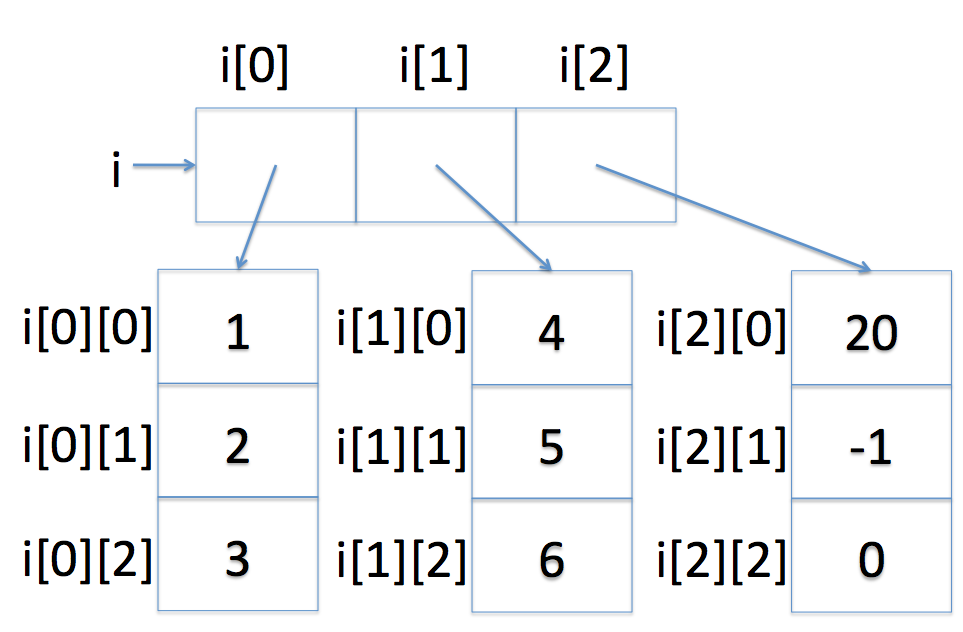
This is a nice mental representation that will help us program, but how is our 2D array being stored in memory?
Pictorially:
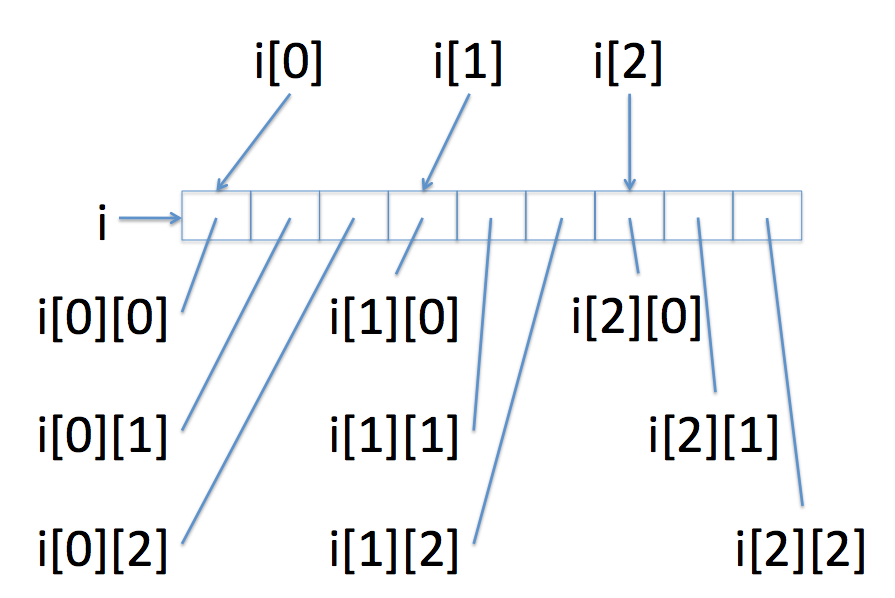
Andrew, that is one of, if not the, worst illustrations I've ever seen. What did you do, make that in PowerPoint?
Save that design talk for North campus, punk!
Back on topic...
So, knowing how our 2D arrays are represented in memory, why is it necessary for us to define all array dimension sizes other than the first?
Because our 2D array is represented contiguously in memory, meaning, in the above example, I have 9 contiguous ints (3 ROWs x 3 COLUMNs), I wouldn't know how much column space to leave between starts of rows. I get to leave the number of rows blank because I can infer from my initialization how many I'll need, and simply stick a new row of ints onto the end of wherever the last one left off.
So, knowing that, would the following be a legal declaration?
Will the following code compile?
  #include <iostream>
  #include <string>
  using namespace std;

  int main () {
      int derp[][3];
  }
So, what does an array of cstrings look like? How many dimensions does it have?
  #include <iostream>
  #include <string>
  using namespace std;

  int main () {
      char s[2][3] = {"hi", "yo"};

      cout << s[0] << endl;
      cout << s[1] << endl;
  }
So, if we have to define functions that take in multi-dimensionar arrays as parameter inputs, then we must also define all array dimensions except for the first.
Here's an example:
  #include <iostream>
  #include <string>
  using namespace std;

  const int MAX_CSTRING_SIZE = 4 + 1;
  void cMakeUpper (char c[][MAX_CSTRING_SIZE], int n);

  int main () {
      char c[][MAX_CSTRING_SIZE]
          = {"test", "your", "fun"};
      cMakeUpper(c, 3);

      cout << c[0] << endl;
      cout << c[1] << endl;
      cout << c[2] << endl;
  }

  // Mutates an array of cstrings no
  // longer than MAX_CSTRING_SIZE,
  // and makes the first n of
  // those cstrings uppercase
  void cMakeUpper (char c[][MAX_CSTRING_SIZE], int n) {
      // Iterate through each cstring
      for (int i = 0; i < n; i++) {
          // And then look at each
          // character in that cstring
          for (int j = 0; c[i][j] != '\0'; j++) {
              c[i][j] = toupper(c[i][j]);
          }
      }
  }
Now, just to make sure you've got it... what is a 3D array of, let's say, ints?
It's an array of an array of an array of ints O_O
So, how many dimensions of an n-dimensional array do you need to define, and which ones?
You must define at least n - 1 dimensions, which are all except the first dimension.
This holds for n-dimensional array initializations and function parameters, but not simple declarations without initialization!
Challenge: Knowing what you know about how multi-dimensional arrays are oriented in memory, what will the following print out? (warning: don't do this in your own code)
  #include <iostream>
  #include <string>
  #include <cstring>
  using namespace std;

  int main () {
      char c[][5] = {
          "cat",
          "in",
          "the",
          "bat?"
      };

      c[2][5] = 'h';

      for (int i = 0; i < 4; i++) {
          cout << c[i] << endl;
      }
  }
Practice Problems
Just a few simple examples to whet your appetite...
Design a function, csReverse, that takes in a cstring and reverses the order of characters in it.
  #include <iostream>
  #include <string>
  #include <cstring>
  using namespace std;

  void csReverse (char c[]) {
      // [!] Save the cstring size
      int size = ???;

      // [!] We'll flip each character from the
      // front with the ones at the end, moving our
      // iterator inwards...
      // What should be our terminating condition?
      for (int i = 0; ???; i++) {
          // Save c[i] into a temp variable
          char holder = c[i];

          // [!] Set c[i] to the one on the end
          // (remember we're iterating inwards)
          c[i] = c[ ??? ];

          // [!] Then set that equal to the holder
          c[ ??? ] = holder;
      }
  }

  int main () {
      char c1[] = "testz";
      char c2[] = "!";
      char c3[] = "";

      csReverse(c1);
      csReverse(c2);
      csReverse(c3);

      cout << c1 << endl;
      cout << c2 << endl;
      cout << c3 << endl;
  }
Design a function, multiCStringAppend, that takes in an array of cstrings and a single cstring, and appends toAppend to each of n elements of target.
  #include <iostream>
  #include <string>
  #include <cstring>
  using namespace std;

  const int MAX_CSTRING_SIZE = 20 + 1;

  /*
   * Appends cstring toAppend to each cstring in target
   */
  void multiCStringAppend (char target[][MAX_CSTRING_SIZE], char toAppend[], int n) {
      // Simply iterate through all n elements in
      // the target...
      for (int i = 0; i < n; i++) {
          // ...and append toAppend to each element
          ???
      }
  }

  int main () {
      char c1[][MAX_CSTRING_SIZE] =
      {
          "test",
          "my",
          "function!"
      };

      multiCStringAppend(c1, " yay!", 3);

      for (int i = 0; i < 3; i++) {
          cout << c1[i] << endl;
      }
  }
Design a function multiCStringReverse that uses your csReverse function on every element of an input array of cstrings.