Multi-class Design
So let's return to our 2D K'tah! that we've been designing.
Last week, we used a simple Zombie class to make Zombie objects with a name and health.
But now, let's add a little. Specifically, we want our Zombies to have properties: name, health, x, y, where x, y are a Zombie's Cartesian x, y coordinate in
a grid maze.
Modifying our class, we now have:
  class Zombie {
    constructor (name, x, y) {
      this.name = name;
      this.x = x;
      this.y = y;
      this.health = 100;
    }

    takeDamage (damage) {
      this.health -= damage;
    }
  }
OK looks good!
Now let's consider a couple things about the 2D K'tah we want to make...
Are Zombies the only objects we'll want to track in our 2D K'tah? If no, what are some other objects we might want to make classes for?
No silly! We'll want objects representing things like Players, Powerups, Walls, Abilities, etc.
Multi-Class Design
There are many ways to design applications involving multiple classes; some are better than others, so we'll examine some guidelines herein.
In the previous section, we mentioned that we'll probably want a bunch of classes to template our objects.
So let's choose one of those classes and make it now! I choose... Powerups!
Design a Powerup class that has an x position, a y position, and a type (the type might be "ammo" or "health" or some such... we'll handle that later).
  class Powerup {
    constructor (type, x, y) {
      this.type = type;
      this.x = x;
      this.y = y;
    }
  }
Now, obviously we'll be using both of these classes inside of the same game. So let's compare them.
What is similar between the Zombie and Powerup classes? What is different between them?
Similar: they both have x, y coordinates. Different: Zombies have a name, health, and takeDamage method; Powerups have a type.
Examine the similarities once more. Can you consider other classes that might also share these properties?
Yes! Any agent in our game is going to have an x, y coordinate. This includes Players, Walls, etc.
From a clean-code perspective, what's wrong with redefining the similarities between every class?
We must keep our code DRY (don't repeat yourself)! The reasons are many, including: 1) if we want to make a change to the similarities across the board, we would have to individually change every class that possessed them; 2) we need to type the same code multiple times, and we're lazy!
So, what do we do?! Are we cursed to this horrid existence of repetition in the case of shared behaviors and properties?
No, there's some magic that can save us...
Inheritance
Do you have your dad to thank for that receding hairline? Did you inherit it from him?
Do you have all of your mom's old hand-me-down toys growing up? Did you inherit them from her?
The notion of inheritance is very natural to us; we are receiving something that someone "above" us passed down.
In programming, the notion of class inheritance describes the way that superclasses (ancestor / base classes) pass down properties and behaviors to their subclasses (descendants / derived classes).
In JavaScript, a superclass is a class that "passes down" its properties and methods to any subclasses that extend it.
In this capacity, superclasses define the general properties and behaviors whereas subclasses specialize properties and behaviors; behaviors and properties of a superclass can be overriden in the subclass by redefining a property / method with the same name.
Let's consider an intuitive example:
Suppose I want to design Dog and Cat classes for my new PetWars Flash game, but the two share quite a bit in common (e.g., a name, an age, an owner, etc.). That said, they still have a fair amount that is different (e.g., a Dog barks whereas a Cat... mews? meows? hisses? what does a Cat do really?)
I could define these properties separately in each class, but this would yield the same problems we discussed above.
Instead, I could consider making a Pet superclass under which Dog and Cat would be subclasses.
We could use the Pet superclass to abstract their commonalities like their name, age, and owner, and then have them each inherit these properties.
Pictorially, we might represent this structure like:
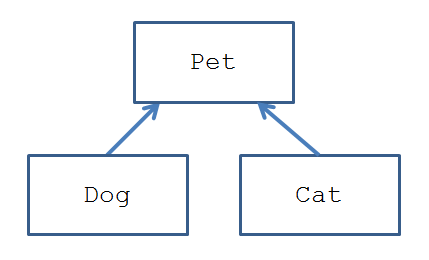
So, to actually implement this, we use the JavaScript syntax of class extension.
The extend keyword, when used in a class definition, denotes that the defined class will serve as a subclass to the "extended" superclass.
The syntax for class extension is as follows:
  class SubClassName extends SuperClassName {
    // SubClassName definition here
  }
There's one more component that we need to pull off this inheritance structure:
When a subclass is defined to extend a superclass, we must call the superclass' constructor inside of the subclass'. To do this, we use the super keyword.
The syntax for calling the superclass constructor inside of the subclass constructor is as follows:
  class SubClassName extends SuperClassName {
    constructor (subclassArg) {
      super(superclassArg); // [!] Must be done first before:

      // Any subclass configurations done here, e.g.
      this.x = subclassArg;
      // ...
    }
  }
Use the extension inheritance syntax to create a Pet superclass from which two subclasses, Dog and Cat, inherit. Then, give Dogs a breed property and a bark method, and Cats a meow method.
  class Pet {
    constructor (name, age, owner) {
      this.name = name;
      this.age = age;
      this.owner = owner;
    }
  }

  class Dog extends Pet {
    constructor (name, age, owner, breed) {
      // Note that the superclass constructor
      // is called first, before any additional
      // configurations! Error otherwise.
      super(name, age, owner);
      this.breed = breed;
    }

    speak () {
      alert("Woof! I love you " + this.owner);
    }
  }

  class Cat extends Pet {
    constructor (name, age, owner) {
      // See how much work using the superclass
      // constructor saves us?
      super(name, age, owner);
    }

    speak () {
      alert("I will destroy you eventually, " + this.owner);
    }
  }

  let daisy = new Dog("Daisy", 15, "Andrew", "Terrier"),
      regibald = new Cat("Regibald", 100, "Andrew");

  // Now, note what gets alerted!
  daisy.speak();
  regibald.speak();
So what're the takeaway messages for the above example?
Use superclasses to abstract the commonalities between subclasses. It's clean code, saves you work, and easier to change if need-be in the future.
Subclasses can still specialize their properties and methods apart from the superclass to make them different.
We'll look at some more uses of inheritance next! In the meantime, we can practice:
Create a superclass Ktahbject that abstracts the commonalities between our Zombie and Powerup classes from above. Then, modify Zombie and Powerup to extend this new Ktahbject class, changing their constructors accordingly.
The instanceof Operator
Sometimes we want to interact with instances of different classes differently!
For example, maybe I have a collection of Pets and I want to make every Dog bark because they're happy, sweet animals but every Cat will remain silent because they're disdainful helions.
To do something like this, we can use the instanceof operator.
The instanceof operator returns true if the provided lvalue instance is an instance, or a descendant, of the given rvalue class.
The syntax for using the instanceof operator is:
  // Asks if the given instance is either
  // a member or descendant of the given
  // class
  instanceName instanceof ClassName
Note: the given ClassName must be an existing Class.
So, let's look at a few examples, using our Pet, Dog, and Cat classes above:
  // Used with the given Dog, Cat, and
  // Pet definitions above...

  let daisy = new Dog("Daisy", 15, "Andrew", "Terrier"),
      regibald = new Cat("Regibald", 100, "Andrew");

  daisy instanceof Dog      => true
  daisy instanceof Pet      => true
  daisy instanceof Cat      => false
  regibald instanceof Cat   => true
So, let's try an example together where we can see this in action.
Suppose you have the following array of Pets; design a script that iterates through each element and has Dogs bark and Cats meow.
  // Used with the given Dog, Cat, and
  // Pet definitions above...
  // That's a lot of Pets!
  let menagerie = [
    new Dog("Spot", 10, "Andrew", "Jack Russel"),
    new Dog("Yenrof", 2, "Andrew", "Husky"),
    new Cat("Yenrof", 100, "Yenrof"),
    new Dog("Zomdog", 150, "ZomB")
  ];
Static Methods
Sometimes we have a method that we want to add to a class because it's semantically related, but doesn't make sense as a "command" to a particular instance of that class.
For example, in the player Card class we designed earlier, maybe we want a scorePokerHand method that takes in 5 cards and provides a numerical ranking for its quality
in Poker.
This method wouldn't make sense as a method of an instance, but it certainly makes sense as a method of the Card class itself.
When we want to define a method that belongs to a class in general rather than a particular instance of that class, we can tag that method as static.
We define static methods just like we do normal class methods, but with the added static keyword before its definition.
  "use strict";

  class ClassName {
    constructor (...) {...}

    static staticMethodName (params) {
      // Method body here
    }
  }

  // Calling that static method:
  ClassName.staticMethodName(args);
The primary difference between static and non-static methods is that we call static methods as a property of the class, but non-static ones as a property of an instance.
Additionally, static methods do not have access to an instance's properties through the this keyword.
Add an isFlush(cards) static method to the Card class such that we return true whenever all cards in the input array of cards have the same suit. False otherwise.
  "use strict";

  class Card {
    constructor (suit, rank) {
      this.suit = suit;
      this.rank = rank;
    }

    static isFlush (cards) {
      let suitMatch = cards[0].suit;
      for (let c = 0; c < cards.length; c++) {
        if (cards[c].suit !== suitMatch) {
          return false;
        }
      }
      return true;
    }
  }

  // Example usage:
  let cards = [
    new Card("hearts", "1"),
    new Card("hearts", "K"),
    new Card("hearts", "Q"),
    new Card("hearts", "J"),
    new Card("hearts", "10")
  ];

  alert(Card.isFlush(cards)); // Alerts true