Review
What were the two "commands" we learned last lecture? When do we use them?
(1) alert, used for communicating pop-up info to the user, and (2) console.log, used by us programmers for checking the inner-workings of our code and debugging.
Variables
What do we, as humans, do when we want to remember something for later?
Well, we remember it, hopefully, but for those of us who are less memory-capable, we write it down or record it!
Sometimes, during the execution of our code, we would like to preserve important values, text, and objects for ease of reference.
To help us do this, we'll use variables to maintain the state of a program.
A program's state is a record of all of its relevant attributes that can be used to determine how it functions.
What are some examples of the states we might want to maintain in the following applications: (1) a calendar, (2) a video game?
For example, a calendar application should know the current date so that it can display the day's events, a game should know the player's current health so that it can determine if they're dead or not, etc.
States can change as well, just as the date will change with each passing day, and a player's health will change as they take damage.
Variables represent names given to assigned values, which are maintained in the machine's memory, and are used to hold attributes relevant to a program's state.
The syntax for declaring and instantiating a variable uses the keyword let followed by a name for the variable, and optionally, followed by an assignment
using the = operator concluded by a semicolon; generally speaking, it looks like the following:
let varName = value;
Literals are non-variable values, like the number 3 or the text "book".
Here are some example variable declarations. Try typing these into the console, and then typing the name of each variable.
  let text = "book";
  let life = 42;
  let lamePi = 3.14;
Whenever we want to define multiple variables at once, we can use a comma-separated syntax. This is considered clean style and
good practice since we need not repeat the keyword let more than once.
  let text = "book",
      life = 42,
      lamePi = 3.14;
Strictly speaking, declaring a variable means to simply tell our interpreter that a variable with that name exists (e.g., let x;), and
to save room for it in memory.
If we choose to give a variable a value at the same time as declaring it, then this is called instantiation / definition. (e.g. let x = 3;)
If we choose to declare a variable, and then later assign a value to it, then this is called assignment. (e.g., let x; x = 3;)
Any time we choose to declare, but not instantiate, a variable, it will be considered undefined until assigned some value.
Try typing in the following variable declarations into the console, and then evaluating each.
  let x, y;
  x
  y
Sometimes, we just want to declare a variable name but not give it a value right away. This might look like the following:
  let x, y, z;
  ...
  x = 4;
  y = 3;
  z = 5;
We can also re-assign a variable as many times as we'd like.
  let x = 5;
  x = 3;
  x = 4;
Variable Naming
Variables must be named according to the following criteria:
Variable names must consist of only letters, numbers, and the underscore character '_'
Variable names must begin with a letter.
Stylistically, and for your own coding sanity, you should always give variables names that indicate their purpose.
DO NOT name variables with ambiguous letters such as x, y, z (unless you're talking about a coordinate plane, e.g.). Never use variables named l, I, or O (i.e., "el", "capital i", and "oh") since they look like 1's and 0's and can hamper code clarity.
For example, if I was calculating Body Mass Indexes (BMI), I should name variables "height" and "weight", not "x" and "y".
Notating Variables by Hand
Often times, it's important for us to keep track of variables by hand on paper (e.g., when debugging and tracing out code other people have written).
In these scenarios, it is often useful to represent variables pictorially.
We will use the convention of representing variables with their name to the left of a box representing their value.
Here's an example of some variables that are also represented by hand.

Types
You may have already noticed that we've been using a variety of different data types in our variable values, our alerts, and our console.logs.
Knowing the type of data that you're manipulating helps you to understand its limitations and the tools available to it.
A data type describes the type of information of a literal or variable as well as the operations permitted on their values.
Variable types in JavaScript are dynamically-inferred since their type is inferred from their assigned value, and a single variable may be reassigned to a value of whatever type we wish.
For example, in the following script, we re-assign the variable x to two different types.
  let x = 3;
  x = "now text!";
Other languages, like C++, are "statically-manifest typed," and require the programmer to specify the type of each variable that they're using.
We don't have to worry about that in JavaScript! (though there are trade-offs for dynamically vs. statically typed languages)
A primitive data type is a data type that is furnished by the programming language by default.
To be specific, in JavaScript there are exactly six types of data, the first 5 of which are primitive types:
numbers
strings
booleans
undefined
null
object
We will look at each of these data types separately in the coming sections.
Numbers
Numbers curry... well... numerical data, on which all of our favorite mathematical operations can be performed.
We've seen some numerical values and variables already, but to be clear, here are a couple:
  let radius = 5,
      lamePi = 3.14;
Numbers with no decimal point are called integers and those with a decimal point are called floating point numbers.
Whenever we have a floating point number x and wish to convert it to an integer, we can use the parseInt(x) function.
  let lamePi  = 3.14,
      lamerPi = parseInt(lamePi);

  alert(lamerPi);
Numerical operators expect to manipulate two values of type number.
There are many numerical operators, including: + (addition), - (subtraction), * (multiplication), / (division), % (modulus)
Although you're likely familiar with most of those, the modulus operator (X % Y) returns the remainder after dividing X by Y as many times as Y can "go into" X.
Try out the following numerical operation statements and see what they yield.
  let x = 5,
      y = 2;

  5 + 5
  x + x
  x - y
  x * y
  x % y
  x / y
  10 % 2
Those are all expected results above, but note that there are some peculiar outcomes that we can experience.
Dividing 0 by 0 is mathematically undefined, and will yield a special value of NaN (not a number).
Dividing any non-zero number by 0 is mathematically asymptotic, and will yield a special value of Infinity.
  0 / 0
  5 / 0
Any numerical operation can have its result stored in a variable.
  let x = 5 + 5,
      y = x * 2,
      z = y / 3;
  x
  y
  z
There are a variety of mathematical operations available via the Math object, which we'll examine later, including:
  let x = 5.5;
  // Math.floor(#) removes the decimals from a #
  console.log(Math.floor(x))
  // Math.round(#) rounds the number to the nearest integer
  console.log(Math.round(x))
We'll look more at operators and their properties next week!
Write a script that starts with a single variable, inches, set to some integer value,
and then performs two alerts: (1) the number of feet in inches, and (2) the remaining inches after having converted the feet in (1). For example, if inches = 27; then I would
first alert 2 (for the number of feet) and then alert 3 (for the number of remaining inches after having converted the first 24 inches in 2 feet).
Strings
Whenever we represent text between two sets of quotation marks, we are really representing a member of the string data type.
We call text in JavaScript (any many other languages) strings because they represent a string or sequence of characters.
For example, the string "yarn" (get it? heh) consists of 4 characters in sequence.
The sequence of characters in a string is said to be indexed such that the first character is at index 0, the second at index 1, etc.
     string: "yarn"
 characters: y a r n
      index: 0 1 2 3
A character can be a number, letter, space (pretty much anything from your keyboard), and a variety of other named symbols.
For the purposes of the current discussion, we'll consider only characters on your keyboard, though you can consult your text in this section for other characters.
Unlike in other languages, there is no separate character type in JavaScript.
We've already seen strings used, but to be clear, here are a couple:
  let string = "cheese",
      soEmpty = "";

  alert(string);
  alert(soEmpty);
String Methods
We also have an important operator that is defined for strings.
The concatenation operator (+) returns a new string composed of the two strings* on either side. (*cases of type-casting ignored, which we'll talk about in following lectures).
Try the following expressions and statements out in the console.
  "concatenate" + " this!"
  let double = "stuff",
      stuff = "ing",
      result = double + stuff;

  alert(result);
Strings have some properties that describe their state.
Each method can be called on (or property requested from) a string literal, or a variable whose value is a string.
Properties and methods might feel like a bit of a "magic incantation" for now, but we'll fill in the blanks later in the course!
The length property returns the number of characters in a string.
  "stuff".length
  let string = "theory",
      emptiness = "";

  alert(string.length);
  alert(emptiness.length);
Note: character indexes in a string begin with 0.
  The string "test" will be indexed like:
  character: t e s t
      index: 0 1 2 3
When we are dealing with strings, there are a variety of "commands" that we can ask of them called methods.
The charAt(index) method returns a string representing the character at the requested integer index.
  "stuff".charAt(0);
  let string = "yarn";

  alert(string.charAt(3));
  alert(string.charAt(10));
The toUpperCase() method returns a string that is the same as the calling string but with all lowercase letters replaced with their capital versions.
  "stuff".toUpperCase();
  let string = "beans";

  alert(string.toUpperCase());
The indexOf(str) method returns the index of the first time that string str appears in the calling string, or -1 if str never appears in the calling string.
  "stuff".indexOf("tuff");
  let string = "cats cradle";

  alert(string.indexOf("cats"));
  alert(string.indexOf("CATS"));
  alert(string.indexOf("cradle"));
The substr(start) method returns a string consisting of every character in the calling string from (and including) the specified start index to the end.
The substr(start, numChars) method returns a string consisting of every character in the calling string from the specified start index plus
the specified number of characters (numChars) after (and including) the start index.
  "stuff".substr(1);
  let string = "subpar";

  alert(string.substr(0, 3));
  alert(string.substr(3, 3));
  alert(string.substr(2, 2));
There are many other string methods; you can Google "JavaScript string methods" to find out more!
Write a script that has a variable called "toExclaim" that, by assumption, contains a string. You have another variable called exclaimPoint that is some integer between 0 and the toExclaim.length. Your task: alert toExclaim with the character at the given exclaimPoint index replaced by "!" using only the tools given thus far.
Hint: try to think about the output as a composite of (before the !) (the !) (after the !)
let toExclaim = "excite", exclaimPoint = 0;
// Your script should alert: !xcite

let toExclaim = "excite", exclaimPoint = 1;
// Your script should alert: e!cite

let toExclaim = "excite", exclaimPoint = 2;
// Your script should alert: ex!ite
Booleans
A Boolean value is either true or false, the two Boolean literals.
Boolean values can also be obtained from using some boolean operators.
We'll go over a couple simple Boolean operators today, and will dive more deeply into these next class.
The comparison operators include: < (less than), > (greater than), <= (less than or equal to), >= (greater than or equal to), === (same type and equal to), !== (different type or not equal to).
  let x = 5,
      y = 3;

  alert(5 > 3);
  alert(5 > 5);
  alert(5 >= 5);
  alert(x < y);
  alert(x !== y);
  alert("4" === 4);
Note also that we can use comparison operators on strings.
In the case of equivalence, we verify that the same characters are in the same index of each string.
In the case of greater than, less than, etc., we compare alphabetic placement.
Warning: uppercase letters are considered less than all lowercase ones, so "Z" is considered less than "a" and "z".
  alert("test" === "test");
  alert("test" === "Test");
  alert("a" < "b");
  alert("act" < "bat");
  alert("act" < "Bat");
  alert("Act" < "Bat");
undefined
The undefined type is a special type representing variables that have been declared but have not been either instantiated or assigned a value of another type.
The undefined type is, conventionally, never assigned by the programmer. It connotes that a variable has "unknown" value.
  let x, y;
  y = x;
  alert(x);
  alert(y);
Note that undefined === undefined but will be unequal to all other values.
null
The null type is a special type representing that a variable has no value, and is assigned by the programmer to represent such.
Typically, a programmer will use null to indicate that they are aware that a variable has no value, and wishes to indicate this awareness.
Leaving a value as undefined sometimes gives the wrong connotation: that the variable was meant to have a value but didn't. Null is preferable in this case.
  let x = null,
      y;

  alert(x === y);
  alert(x === null);
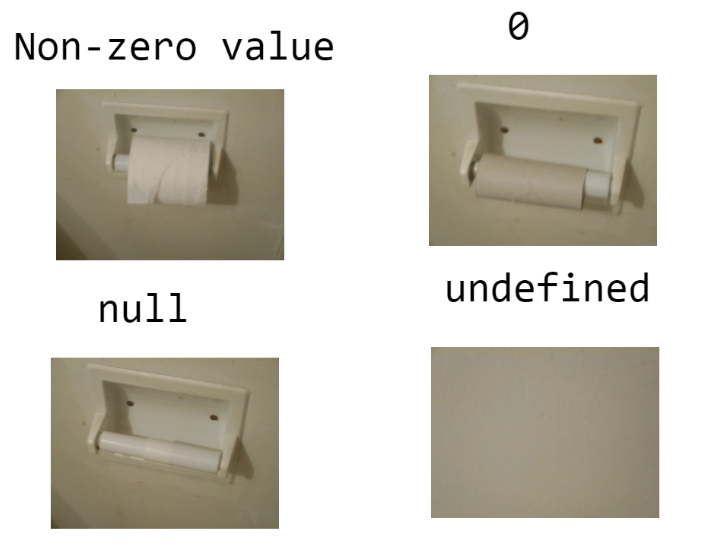
Confused about the differences between null, undefined, 0, etc.? Here's an amusing but accurate pictorial representation:
Object
There's a lot to say about objects, so we'll be devoting a whole class in a couple weeks to them!
Note that although Objects are a type, they are not considered a primitive type like the previous 5.
Be patient for now...
The typeof Operator
Sometimes, we have variables that we as the programmers may not know the type of.
Guess what? There's an operator for that!
The typeof operator returns a string indicating the type of its operand.
  let merica = 1776,
      stringy = "I salute you!",
      boolz = 5 < 3,
      mehNuffin = null,
      whoKnows;

  alert("merica: " + typeof merica);
  alert("stringy: " + typeof stringy);
  alert("boolz: " + typeof boolz);
  alert("mehNuffin: " + typeof mehNuffin);
  alert("whoKnows: " + typeof whoKnows);
Yes you saw right; the typeof null is "object" -- what a surprise! This is in fact a mistake in the original JS implementation that made it into the modern era.
Staunch defenders of JavaScript will claim that the type of null being "object" is such because it stands for a "placeholder" for an object which is yet to come!
Errors
You're going to have to deal with errors in your code -- that's a fact!
What will make dealing with them *less* painful is knowing how to identify them, and the types of errors that can occur.
A syntax error occurs when you make a typo or abuse the structure of JavaScript in some capacity. These errors are critical and will stop execution of your code immediately.
Here are a bunch of syntax errors -- what's wrong with each of the following statements?
let x == y;5.indexOf("derp");"testing".indexof("ing");let testing = "yay!"; alert(Testing);
A semantic / logic error occurs when your code has proper syntax, but has an incorrect outcome.
Here is a logic error for a script that is meant to convert your weight on the moon, which is 1/6 that of your earth-weight:
  let weight = 180;
  alert(weight / 5);
Yikes, that was pretty bad... if only you'd written a 6 instead of a 5!
Homework 1
Homework 1 has been posted! (click here)
This homework should give you a nice introduction to scripting and the topics we've covered this week plus those of next week.
At this point, you should be able to do everything except for Problem 7, and maybe a couple conceptual questions (the rest covered next week).