Review
Last week, we looked at operators in-depth, and spoke extensively about type-coercion.
Let's remember a few of the rules that our interpreter applies when we give operators different types!
Evaluate each of the following expressions. Determine the type of the final output.
  // typeof [15, RL]
  // + [13, LR]
  typeof "lima" + " bean"
  // * [15, LR]
  // +, - [13, LR]
  "5" * "5" - "5" + "5"
Now let's try a few harder ones concerting precedence and type coercion! Use the operators at-a-glance below (with their precedence levels and associativity listed) and write out each step of the evaluated expression.
() [19] |
. [18, LR] |
!, typeof [15, RL] |
* [15, LR] |
+, - [13, LR] |
>= [11, LR] |
=== [10, LR] |
&& [6, LR] |
|| [5, LR] |
  // #1
  let x = "123";
  !"2" + 1 * 3 - x.charAt(1) + x.charAt(2)
  // #2
  (typeof(5 - "5" || 5 >= 5)).charAt(0) === "b"
  // #3
  let x;
  0 || 5 === "5" && "0" || x
  // #4
  !("1" !== 1 > 1) + !"1" - (null || 2 && 3)
Objects
Returning to our peaceful grassy knoll and sun as illustrated in p5.js, suppose we want to add a little life to the scene... I give you, the disco cloud:
See the Pen Sun with Disco Cloud by Andrew Forney (@forns) on CodePen.
What about the implementation of the disco cloud is particularly unsustainable / will not scale well (hint: what happens when we want to add more clouds?)
It will become cumbersome to maintain the individual variables cloud1X, cloud1R, ..., cloud200X, cloud200R, ..., etc. and it is difficult to organize properties belonging to particular clouds.
Intro to Objects
In the first two weeks, we learned about all of JavaScript's primitive types: numbers, strings, booleans, null, and undefined.
We left Objects off until we could focus on them specifically, and that's just what we'll do today!
Objects are any value in JavaScript that are not numbers, strings, booleans, null, or undefined. Objects are useful for grouping variables into single "entities" with various attributes.
Objects have properties, which are labels given to its attributes that can be strings, positive integers, or named like variables.
Each property has a corresponding value, which can be any primitive type (like a string or number), or another object!
But enough definitions, let's take a look at some objects!
The object creation syntax is as follows, with comma-separated key-value pairs and a colon separating each property/key from its value:
{prop1: val1, prop2: val2, prop3: val3} OR
{"prop1": val1, "prop2": val2, "prop3": val3}
  // The "empty" object
  let soEmpty = {};
  // An object with 1 property
  let person = {
    name: "Andrew"
  };
  // An object with 2 properties
  let zombie = {
    name: "Brain B. Goode",
    peepsEaten: 10
  };
  // An object with 3 properties,
  // one of which is another object
  let survivor = {
    name: "Rick Grimes",
    walkersKilled: 137,
    weapon: {
      name: "Colt Python",
      ammo: 6
    }
  };
So why do we have objects anyways?
They help us organize our data! Who would want to type and keep track of variables named: survivor1Name = "Rick Grimes", survivor1WeaponName = "Colt Python", ... etc?!
Later in the course, we'll look at means of using objects to denote prototypical data organizations, that we can then use to be even more organized!
More on that later, first let's focus on the basic mechanics of objects.
Manipulating Properties
So we've got these great objects... how to we talk about the data collected in them? Better yet, how do we modify it?
There are two ways to refer to an object's properties:
The dot notation
obj.prop: used to access known / non-varying property names.The bracket notation
obj["prop"]: used to access variable property names that may not be known until the script is executed. Also, necessary for accessing string property names with characters other than numbers, letters, or underscores.
Note: in the dot notation, the property being accessed is NOT a string. In the bracket notation, the property is a string.
Accessing Properties
So now that we know the syntax of how to access a property, what can we do with it?
Essentially anything that we could with any other value! Let's try a few things:
  let survivor = {
    name: "Rick Grimes",
    walkersKilled: 137,
    weapon: {
      name: "Colt Python",
      ammo: 6
    }
  };

  // Basic access
  survivor.name           => "Rick Grimes"
  survivor["name"]        => "Rick Grimes"
  survivor.walkersKilled  => 137
  survivor.weapon         => {name: "Colt Python", ammo: 6}

  // Accessing with variable property
  let prop = "name";
  survivor[prop]          => "Rick Grimes"

  // Using methods and operators
  survivor.name.indexOf("Grimes")  => 5
  survivor.walkersKilled + 1       => 173
Now notice something else: the weapon property of our survivor object is itself an object!
Objects that are the values of properties within objects referred to as nested objects.
How do we access its properties? Easy!
  // (using the survivor object above)
  // Accessing nested properties
  survivor.weapon.name       => "Colt Python"
  survivor.weapon["name"]    => "Colt Python"
  survivor["weapon"].name    => "Colt Python"
  survivor.weapon.name.toUpperCase()  => "COLT PYTHON"
You should also be aware of a very common behavior when you're accessing object properties, specifically, ones that don't exist:
Attempting to access a property that does not exist in an object will return undefined.
Attempting to access any property of something undefined will yield a syntax error.
  // (using the survivor object above)
  survivor.carrrl      => undefined
  survivor.carrrl.hat  // [X] Syntax error!
Note: want to avoid a syntax error when a nested object *might* be undefined? Use logical AND (&&) to ensure that a property is defined; it will not evaluate its rvalue if its lvalue is falsy.
  // (using the survivor object above)
  survivor.carrrl && survivor.carrrl.hat  => undefined
Notice that survivor.carrrl.hat would normally give a syntax error, but because we first checked whether or not survivor.carrrl was defined (it isn't), the logical AND stops there and
returns undefined.
Setting Properties
Now the same way that we might change or declare new variables, we can also do for object properties.
Using the assignment operator (=), we can create or alter any properties of an object.
  // (using the survivor object above)
  // Changing a property
  survivor.name = "Daryl Dixon";
  survivor.walkersKilled = 142;

  // Adding a property
  survivor.gender = "male";
Deleting Properties
Suppose we don't want our object to have a property stored any longer. We can nuke it!
The delete operator removes a property from an object entirely.
  let survivor = {
    name: "Rick Grimes",
    walkersKilled: 137,
    weapon: {
      name: "Colt Python",
      ammo: 6
    }
  };

  // Delete the weapon
  delete survivor.weapon;

  // Survivor is now:
  // {name: "Rick Grimes", walkersKilled: 137}
Replace the cloudX, cloudR, cloudG, cloudB variables in our Disco Cloud example above with a cloud object and corresponding X, R, G, B properties. Make the necessary changes in drawCloud to account for this change.
Object References
Try to create another cloud from our example above by setting cloud2 = cloud and then copying the drawCloud
function (of course, not good style, but we'll look at solutions to keep our code DRY later). What is peculiar about the resulting behavior?
Earlier, we noted that objects behave a little bit differently than the primitive types with regards to how they are stored in variables and properties; let's look more at that now.
Primitive values are stored in variables themselves, whereas the "value" of an object is not the object itself, but a reference or pointer to the object.
That sounds a bit confusing at first, but a few pictures will help us understand...
Drawing Objects
The best way to understand the mechanics of objects are to draw pictures of them.
When we draw an object, we represent properties like their own "variables" boxed inside the containing object.
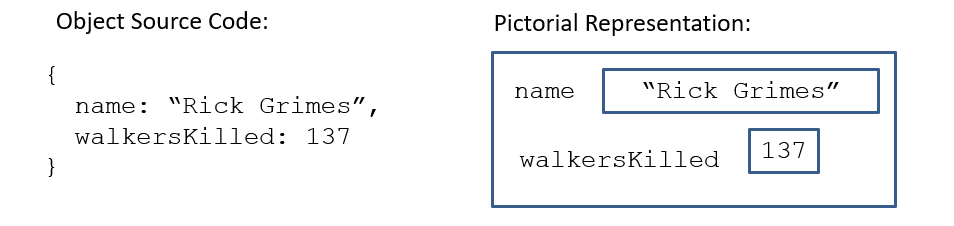
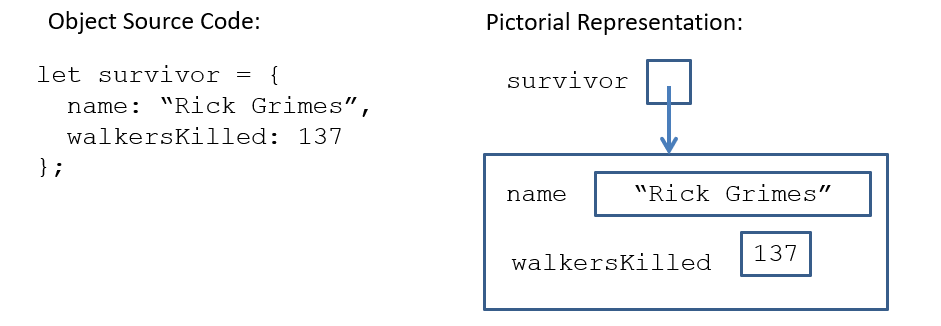
When we draw a variable instantiated to an object, we represent the variable as containing a pointer to that object, rather than the object itself.
Implications for Assignment
So if objects aren't stored inside of variables, then what happens when we try to assign other variables to variables containing an object reference?
Assigning a variable to the value of another variable containing an object pointer simply replicates the pointer without replicating the object.
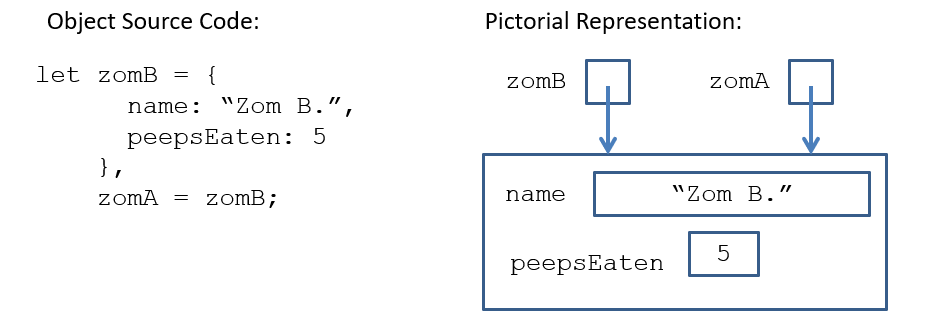
So above, this means that any time I manipulate or access the properties of zomA, I'm really talking about the same object as zomB!
Note: this behavior of copying the pointer is only manifest in objects, not primitive types!
Recall that primitive values are copied directly without any of this pointer business, since their values live "within the variables themselves."
So, for the assignment operator (=), we can think of primitives as copying the rvalue into the lvalue directly, and for objects as copying the pointer to the object in the rvalue into the lvalue.
What will the following script alert? Draw each variable and make appropriate changes to your picture as assignments are made.
  let zomB = {
        name: "Zom B.",
        peepsEaten: 5
      },
      zomA = zomB,
      oldHome = "Atlanta",
      newHome = oldHome;

  zomA.name = "Zom A.";
  alert(zomB.name);

  newHome = "BRAIIINS";
  alert(oldHome);
Object Creation
So what's happening when I use that curly bracket syntax? A couple definitions will help us understand:
An object literal is any expression denoting a new object; we've learned one such expression using the curly-brackets: { ... }
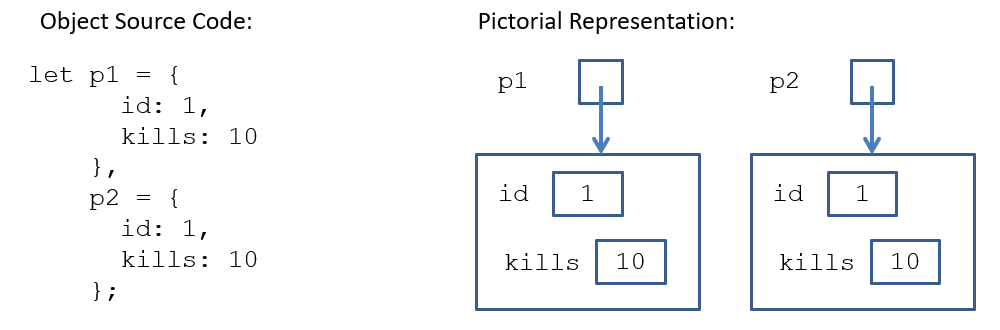
Any time we evaluate an object literal, a new object is created in memory.
The above point is the second major difference between objects and primitive types.
Whereas primitive literals don't create new entities in memory any time they're evaluated, object literals do.
So consider the following source code where we create two new objects in memory, even though they look identical:
Objects & Operators
Because of the above behavior, objects work a little differently than you might anticipate with some operators.
The strict equivalence operator (===) returns true if and only if the lvalue and rvalue are the same object in memory (i.e., the pointers point to the same object), regardless of the operands' properties or values.
This means that no two object literals can be strictly equivalent (===), since every evaluation of an object literal creates a new object in memory.
So when can strict equivalence return true for two objects? Let's take a look... with pictures!
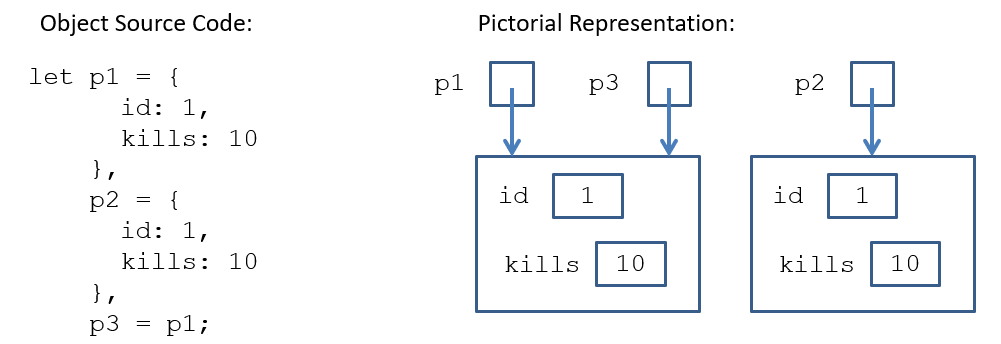
  p1 === p2   => false
  p3 === p2   => false
  p1 === p3   => true

  {x:1} === {x:1}  => false
All objects are considered truthy (even the empty object).
  Boolean({})    => true
  ! {x: 1}       => false
Fun with References
As if that last section wasn't complex enough, let's add some more layers of complexity!
Nested Objects & References
From the last section, we learned two important facts: (1) object literal evaluation creates a new object, and (2) assigning a variable to an object copies the reference to that object into the variable.
Let's see how these facts play with nested objects!
First off, let's create a nested object and see how to draw it:
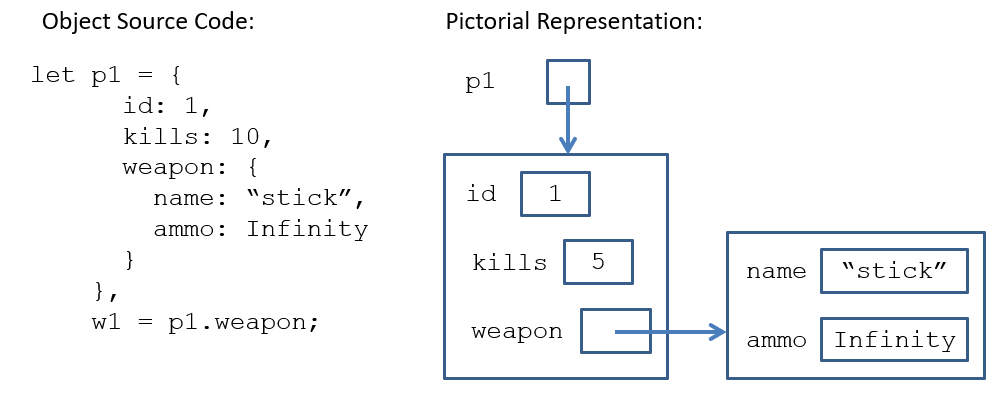
Now, suppose I create another reference to this nested object 0_o
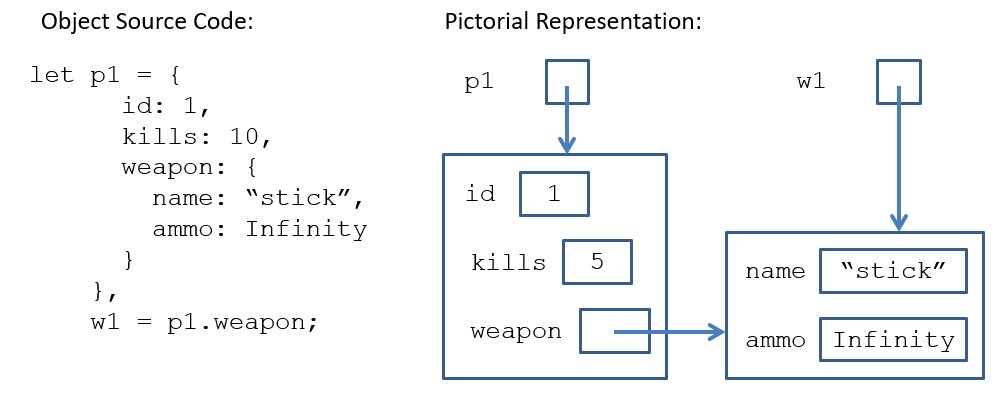
What happens to p1 if I assign w1.name = "really sharp stick!";
Self-reference
Self-reference: (see definition of self-reference)
OK that was a bad joke, but wasn't it worth it?
Self-reference is exactly what it sounds like: an object has a property that, shockingly, contains a pointer to itself! :O
Let's see what that looks like:
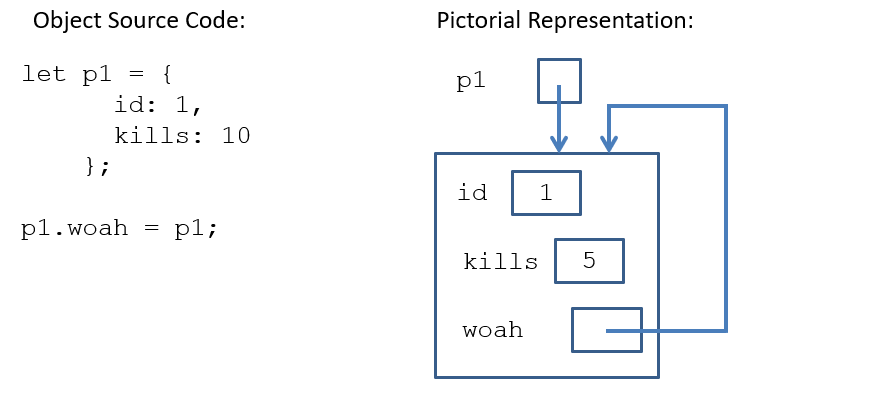
Self-reference can lead to hilarious, but still legal syntax.
  // using definition of p1 above:
  alert(p1.woah.id);
  alert(p1.woah.woah.woah.woah.id);
We'll look at the uses of self-reference later, but you should consider it now as a legal operation given the rules we've learned that govern objects!
Consider the following objects and (1) draw their pictorial representation and then (2) indicate what gets alerted at the end!
  let obj1 = {
        p1: {
          p1: 1,
          p2: 2
        }
      },
      obj2 = {
        p1: {
          p1: 3,
          p2: 4
        },
        p2: obj1
      },
      p1 = "p2";

  obj1.p2 = obj1;

  // Perhaps the most sinister example I've ever created
  alert(obj1.p2.p1.p2);
  alert(obj2.p1[p1]);
  alert(obj2[p1][p1].p1["p1"]);