Review
Last week was all about objects!
Let's do a quick exercise to remind ourselves...
Consider the following script, draw a picture representing obj, and then determine what it alerts.
  let obj = {
    x: 1,
    y: 2
  };
  obj.z = obj;
  obj.woah = obj.z;
  obj.woah.y = 3;

  alert(obj.woah.y);
  alert(obj.z.z.x);
  alert(obj.z === obj.woah);
  alert(obj === {x:1, y:3});
Arrays
Sometimes, it's handy to make lists of things.
We make lists quite often:
Grocery lists
TODO lists
Schedules of events
Several properties are common to our typical lists:
The collect and organize items
Each item can consist of a particular type
Each item is oriented in some sequence in the list
JavaScript is no different -- it's often convenient to talk about collections of data for ease of reference and ordering.
A JavaScript array is a special object that is used to form an ordered collection of items.
Just what are our "items" that we're collecting?
Why, any data type of course!
The array creation syntax is as follows, where each item in the array is comma-separated and between a pair of square brackets []:
[item1, item2, item3]
  // Homogeneous collections: arrays holding
  // items of the same type
  let nums = [1, 2, 3, 17, 42],
      strings = ["Hey!", "look how ordered", "I am!"],
      objs = [{prop1: 5}, {prop1: 3, prop2: 2}];

  // Heterogeneous collections: arrays holding
  // items of different types
  let potpourri = [5, "test", {prop: "woah!"}, undefined, null],
      inception = [[1, 2, 3], ["must", "go"], ["deeper"]];
Yes that's right, above, inception has arrays inside of arrays!
Arrays are Objects
Above, we said that arrays are just a special type of object used for creating collections of data...
Because they are objects, we know that certain rules apply to them that are special compared to the primitive types.
Recall that properties in objects can be labeled using positive integers. Arrays use this property-naming schema with the indexing starting at 0 for the first item.
So, we can think of the ordering in an array as each item corresponding to a numerical index starting at 0.
  // index:   0       1      2      3
  let arr = ["zero", "one", "two", "three"];

  // In object format, would look *similar* to:
  {
    0: "zero",
    1: "one",
    2: "two",
    3: "three"
  }
However, unlike normal run-of-the-mill objects, whenever we create an array, it will maintain a special property and methods specific to array operations. We'll look at a few of those next.
Every array maintains a length property, which tracks the number of elements in the array, and is kept equal to the largest index of an entity + 1.
  let nuffin = [],
      uno    = ["one thing"],
      tres   = [1, 2, 3];

  nuffin.length   => 0
  uno.length      => 1
  tres.length     => 3
Later, we'll see how this length property is updated as we add and remove items from arrays.
Arrays and References
Recall how objects differed from primitive types in two primary ways; the same are true for arrays.
Whenever we create a new array (e.g., using the [] syntax), it creates a new object in memory.
Arrays are not stored in variables or properties, but rather, we store a reference to the array.
For the same reason as objects, this means that strict equivalence (===) is never true between two arrays. It will only return true if the lvalue and rvalue are the same array in memory (i.e., the same reference).
We'll investigate these facts more in the coming sections.
How to Draw
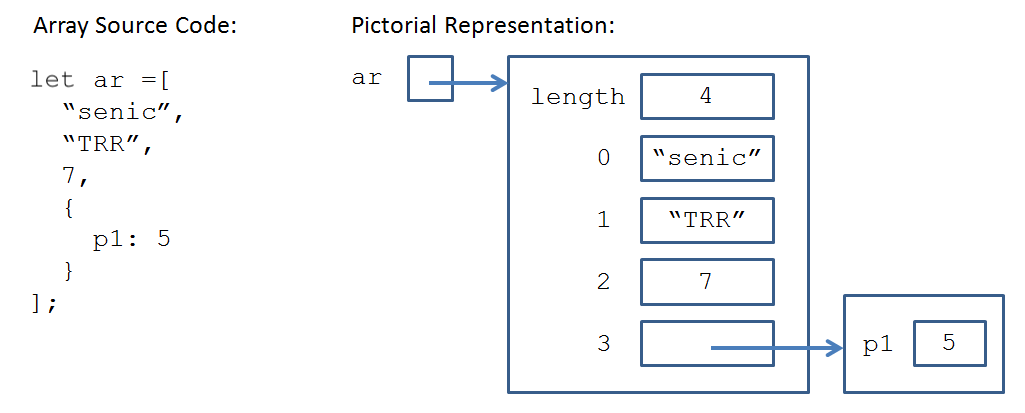
We can draw arrays exactly like how we draw any other objects, simply remembering that the properties are indexes, and that we have an extra property tracking the length.
Array Manipulation
Just like in our discussion of manipulating object properties, there are several ways to access, add, and remove elements from arrays.
Accessing Elements
To access an array element, unsurprisingly we use the bracketed access notation arr[index], which returns the element at the specified
index.
Note: just like with objects, attempting to access an index that does not exist in the array will return undefined.
  let arrYaReadyKids = [
    "who lives in a pineapple",
    "under the sea?",
    {
      name: "Spongebob Squarepants",
      species: "Sponge"
    }
  ];

  arrYaReadyKids[0]       => "who lives in a pineapple"
  arrYaReadyKids[1]       => "under the sea?"
  arrYaReadyKids[2].name  => "Spongebob Squarepants"
  arrYaReadyKids[3]       => undefined
Note: above, notice that arrYaReadyKids[2] is not the object itself, but indeed still a reference to the object.
Assignment
Again just like with objects, assignment to an array index is done the same way:
To assign a value to an array index, simply access the index of interest and use the assignment operator (=).
  let survivors = [
    "Rick Grimes",
    "Daryl Dixon",
    "Michonne"
  ];

  survivors[0] = "Carl Grimes";  // Replaces "Rick Grimes" at index 0
  survivors[3] = "Maggy Greene"; // Adds "Maggy Greene" at index 3
Now, the assignment operation looks pretty simple, but let's remember that arrays have the extra length property to maintain, which will presumably change if we add or
remove items.
The length property maintained in arrays is always updated to be the highest index assigned + 1 after adding an item.
So, let's look at what the length will be after a couple of assignments:
  let arr = [];
  arr[0] = 0;
  arr.length    => 1
  arr[5] = 10;
  arr.length    => 6
  arr[4]        => undefined
So just remember, although the length updates to be the highest index + 1, any unassigned indexes will remain undefined, even if they are at an index less than the length.
Methods to Add / Remove Elements
Suppose we wanted to add an element to the front of our array (i.e., at index 0) but wanted to maintain the ordering of already-present elements.
It would be a pain to manually set each element to be one index more than their current value.
Luckily, there are several array-specific methods that can help us:
A mutator method is a command that changes the object that calls it.
The unshift(element) array mutator method adds the given element to the front of the calling array, updating the length accordingly.
The push(element) array mutator method adds the given element to the back of the calling array, updating the length accordingly.
  let arr = [1, 2, 3];
  arr.push(4);    // arr now = [1, 2, 3, 4]
  arr.unshift(0); // arr now = [0, 1, 2, 3, 4]
  arr.length      => 5
The splice(start, numElements) array mutator method removes the calling array's next numElements starting at the given start index, and returns another array containing the removed elements.
  let arr = [1, 2, 3, 4],
      removed = arr.splice(1, 2);

  arr      => [1, 4]
  removed  => [2, 3]
Write a script that (using the following array of survivors) prompts a user for (1) an index and then (2) a name. You must replace the survivor at the index specified
in (1) with a new survivor with the given name in (2) with the format: {name: nameFrom2, kills: 0}
  let survivors = [
    {name: "Rick Grimes", kills: 137},
    {name: "Carl Grimes", kills: 37},
    {name: "Michonne", kills: 94}
  ];

  // User enters: 1
  // User enters: "The Governor"
  // survivors is now:
  // survivors = [
  //   {name: "Rick Grimes", kills: 137},
  //   {name: "The Governor", kills: 0},
  //   {name: "Michonne", kills: 94}
  // ]
Array Methods
Here are a few more useful array methods that are not mutators, i.e., they return interesting data, but do not change the calling array.
The indexOf(element) method returns the first index (i.e., closest to 0) of the array containing the given element by criteria of the strict equivalence operator (===).
In other words, if element === arr[i] (for some index i) is truthy, then we return i, or -1 if no such comparison is truthy for any element in the array.
  let arr = [
    1,
    "test",
    {x: 1}
  ];

  arr.indexOf(1)       => 0
  arr.indexOf("test")  => 1
  arr.indexOf("yo")    => -1
  arr.indexOf({x:1})   => -1  // Why does this happen?
The slice(start) method returns a new array composed of all elements of the calling array starting at (and including) the given index until its last element.
The slice(start, end) method returns a new array composed of all elements of the calling array starting at (but not including) the given start index until the given end index.
Again, note that slice is NOT a mutator, so the calling array is not changed at all from this operation.
  // Andrew's shopping list
  let toGet = [
    "Shaving cream",
    "Razor",
    "Aftershave",
    "Fake beard"
  ];

  toGet.slice(2)     => ["Aftershave", "Fake beard"]
  toGet.slice(4)     => []  // Empty array
  toGet.slice(1, 2)  => ["Razor"]
  toGet.slice(1, 3)  => ["Razor", "Aftershave"]

  // Note: toGet still contains the same 4 initial items since
  // slice is not a mutator
The s.split(str) string method returns an array of strings from the calling string s where each element is one that was separated by the given
str in s.
  let sent = "This sentence is *awesome*";

  // Split on the space character:
  sent.split(" ")    => ["This", "sentence", "is", "*awesome*"]

  // Split on the asterisk:
  sent.split("*")    => ["This sentence is ", "awesome", ""]
Notice above that when we split on the asterisk, we got an empty string for the last element, since no characters follow the last split on an asterisk.
You might also be wondering if we can go the other way around -- from array to string? Why yes, yes we can!
The arr.join(str) array method returns a string by joining together every array element in arr with the given str.
  let arr = ["This", "sentence", "is", "*awesome*"];

  // Join with the space character:
  arr.join(" ")        => "This sentence is *awesome*"

  // Join with the string " AIEE! ":
  arr.join(" AIEE! ")  => "This AIEE! sentence AIEE! is AIEE! *awesome*"
Write a script that (1) prompts a user for a sentence, and then (2) alerts true if the first word in the sentence is the same as the last word, false otherwise.
For example:
  // User enters: "days off are the best days"
  // alert: true
  // User enters: "but today is great too"
  // alert: false
Fun with Array References
Recall that arrays are objects, so we must remember that arrays themselves are not stored "inside" variables, but rather a reference, or pointer, to them is.
This means that we can have multiple variables pointing to, and potentially accessing / changing elements of, the same arrays in memory.
  let arr = [1, 2, 3, 4],
      arrAsWell = arr;

  arrAsWell[0] = 100;
  arr[0]       => 100
Remember to draw pictures to help you manage this sometimes confusing concept!
Multi-dimensional Arrays
A quick note about the syntax of dealing with array elements that are themselves arrays.
When an array contains elements that are themselves arrays, to access the elements of the inner-array, we simply chain together the bracketed access notation.
  let woadudeArr = [
    [1, 2, 3],
    [4, 5, 6]
  ];

  // First, access the sub-array at index 0,
  // then, access its element at index 0
  woahdudeArr[0][0]    => 1

  // First, access the sub-array at index 1,
  // then, access its element at index 2
  woahdudeArr[1][2]    => 6