Functions, Continued
In our early p5.js examples, we addressed the syntax and semantics of a simple type of function known as a procedure.
What is a procedure, what are its characteristics, and how is it useful?
A procedure is a function that takes no inputs, but essentially "labels" behavior to reduce repetition of code and separate concerns within the context of a larger script.
However, we also made analogy to mathematical functions, which differ in a couple of key respects: they define a mapping of some number of inputs to outputs, neither of which procedures had.
So, today, we'll look at how to define functions that take an input and produce an output, and observe
Functions in Mathematics
We're all familiar with functions in mathematics. The ubiquitous y = f(x) = m*x + b slope-intercept equation for a line tells us a couple of things:
I plug in a value for
x, sometimes called the argument...Based on that input value of
x, I get back a value foryequivalent tom*x + b(for some constants m and b)I expect that a number was returned from the calculation above
In mathematics, a function defines a relationship between some set of inputs to a set of possible outputs, where each input is related to exactly one output.
We'll see in a bit that the analogy in JavaScript functions is pretty close, albeit a bit more general.
But first, let's look at some reasons why we might need functions in JavaScript, and programming languages in general.
Functions in Programming
Let's look at the following script used to compute a triangle's hypotenuse and alert if it's less than some number, and see what's wrong with it.
What is wrong with scripts like this that might have quite a few different alerts each with different numbers?
  // Side 3, base 4, hypotenuse less than 2?
  alert(Math.sqrt(3*3 + 4*4) < 2);
  // Side 5, base 2, hypotenuse less than 4?
  alert(Math.sqrt(5*5 + 2*2) < 4);
  // ...
As we can see above, there are a lot of problems with code repetition that can be solved by using functions, in particular, they can help us with:
Keeping your code DRY: notice you're writing the same code over and over? Don't repeat yourself (DRY)! You could probably take a lot of similar-looking code, place it in a function body, and then simply call the function with different arguments whenever you need the desired behavior.
One change, one place: you've just written a whole script that relies on some value being, say, 5. Now, your boss comes in and tells you, "Oops, that 5 was meant to be a 6." Now, instead of having to change every 5 you have in the relevant script portions, you can change it in a function that's being called instead. Better also to store any numeric literals that might change over time in their own variable.
Code cleanliness: having an intuitively named function call in the place of tens, or hundreds, of lines of code can make the flow of a script much more obvious and easy for other programmers (and yourself!) to understand.
We'll look more at those points later.
Parameterized Functions
So... how exactly shall we think about functions that accept inputs and produce outputs in JavaScript?
In programming, a function describes a procedure to be executed based on zero or more parameters (inputs) and may return (output) a resulting value.
That said, there are two ways to think about what functions should do...
From the programmer's perspective, we care about making the function work correctly, but from a user's perspective, they care about inputs yielding a correct output, (typically) regardless of the internals of how it accomplishes that task; sometimes we call this the black box functional model.
Why do we call it the "black box?" Let's look at an illustration below:

Above, from the user's perspective, the procedure is irrelevant as long as they get an output matching their expectations for the given input.
Can you think of some examples for some procedures that might fit the "black box" model?
Anatomy of a Parameterized Function
OK, enough talk about functions... let's actually see one, eh?
The traditional parameterized function definition syntax defines a (1) function name, (2) any inputs called parameters, and (3) the function's body, or behavior.
Note: there are other syntaxes for function declaration that we'll see in the future
  // Parameters denote placeholders for inputs
  function functionName (param1, param2, param3) {
    // Function body
    // [Optionally] we can return an output
    return result;
  };
Let's dissect some of the elements of this function definition!
The function name is just the name of a variable! (as we'll see later in the course, functions are also objects, so we're just storing a pointer to the function in a variable with the given name)
The parameters are names to be used inside of the function body to refer to the user's inputs / arguments. They too are named like variables, are comma separated, and may be absent entirely in the case where our function takes no inputs.
The return value of a function is the value that is sent back to wherever it was called, and is indicated by the return keyword. If
a function never specifies a return value, then undefined is returned by default.
That's a lot of definitions! Let's look at some good, old-fashion examples:
  /**
   * A procedure that takes no input and returns no output.
   */
  function funky () {
    alert("I want you to take me to... FUNCTION TOWN!");
  };
  /**
   * A function that takes in two parameters, a base and a height,
   * and returns the hypotenuse of a right triangle with those
   * dimensions
   */
  function hypotenuse (base, height) {
    return Math.sqrt(base * base + height * height);
  };
The above function definitions define the template for executing the procedure in the function body.
Let's see how to use them next!
Function Calls
In the last section, we defined three functions, but we didn't use or call them. Let's see how that works now!
After having defined a function, you may call it with its inputs (if any) to execute its procedure and optionally, to receive its return value.
The function call syntax is funName(arg1, arg2, arg3), where funName is the name of the function being called, and the
numbered arguments are ordered values being passed as input.
As a matter of pedantry, when you call a function, the inputs are called arguments, and in the function definition, the inputs are called parameters.
Note, the arguments passed in the call correspond to the ordering of the parameters in the function definition.
The steps of a function call are as follows:
Copy the provided arguments into the function definition's parameter variables.
Execute the function body
The script will return to wherever the function was called when either:
The
returnkeyword is met inside of the function body, at which point we return the value specifiedThe end of the function body is reached, at which point it will
return undefined
Let's try to call some of our function definitions from the last section!
  /**
   * This function simply performs an alert and then
   * returns undefined. It takes no input.
   */
  var funky = function () {
    alert("I want you to take me to... FUNCTION TOWN!");
  };

  // Calling the function... a few times!
  funky();
  funky();

  // Remember what gets returned when a function specifies
  // no return value?
  var funk = funky();
  alert(funk);
  /**
   * This function takes in two parameters, a base and a height,
   * and returns the hypotenuse of a right trangle with those
   * dimensions
   */
  var hypotenuse = function (base, height) {
    return Math.sqrt(base * base + height * height);
  };

  // Note: below, 3 and 4 are the arguments, and in the
  // function, base and height are the parameters
  alert(hypotenuse(3, 4));  // Alerts 5
  alert(hypotenuse(6, 8));  // Alerts 10
Passing by Value
Re-call (pun intended) in our steps for a function call, we said that in step 1 the arguments are copied into the parameters.
In JavaScript, arguments are passed by value into their corresponding parameter, meaning that a copy of each argument is created in each of the parameters.
This is straightforward for primitive types, since copies are the primitive values themselves. But, for objects, we copy only the pointer to the object in memory, meaning that any changes we make to the object parameter are also represented in the object argument.
This was the reason we made a big stink about references and objects in the last lecture -- it becomes important for parameterized function calls!
Let's look at an illustrative example:
  let num = 5,
      str = "test",
      obj = {x: 1, y: 2};

  function fun (numParam, strParam, objParam) {
    numParam = 6;
    strParam = "not test!";
    objParam.x = 10;
  };

  // num, str, and obj are arguments passed by value
  fun(num, str, obj);

  // What will be modified by the above?
  alert(num);
  alert(str);
  alert(obj.x);
We can picture the assignment of the parameters to the argument values as follows (before the function body is executed):
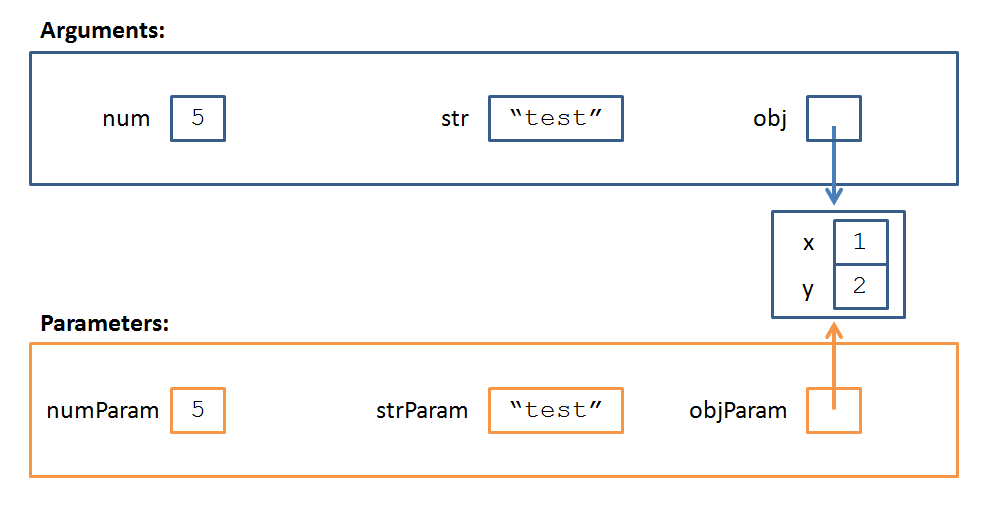
So what's the take-away from the above?
Primitive type arguments cannot be modified by the function, but object arguments can be!
Why do you think object reference arguments are passed into functions this way? What's the benefit?
Objects can be arbitrarily large, so if we instead copied them into new object in a function's parameters each time that function is called, it could be both a processing and memory expensive operation. Moreover, sometimes we may want to modify an argument from within a function -- passing references instead of object copies enables this behavior.
Let's try an example!
Fix the following Sun with Disco Clouds (Plural) animation using what we've learned about parameterized functions, above.
See the Pen Sun with Disco Clouds (Plural) by Andrew Forney (@forns) on CodePen.
Andrew's Style Corner: Functions
You might say this is a section about... functional style?
First off, let's talk about good indentation:
Good Style |
Bad Style |
|---|---|
  // Declaration has 1 space between function, funName,
  // parameters (), and the opening bracket
  function funName () {
    // Function body indented 2 sp. inside of the curly
    // brackets
    return "stuff";
  };
|
  // [X] Uneven spaces on signature
  function funName()   {
  return "stuff"}; // [X] Code on same line as bracket
  // [X] Function body not indented
|
Every function definition should have a brief multi-line comment (/* ... */) describing its expected inputs, outputs, and purpose.
Every function should be well named to indicate its purpose; generally functions are named to have some verb / action connotation.
Every function should have well named parameters indicating their purpose and connotation.
Good Style |
Bad Style |
|---|---|
  /*
   * getHypotenuse returns the hypotenuse of a right
   * triangle with the given base and height.
   */
  function getHypotenuse (base, height) {
    return Math.sqrt(base * base + height * height);
  };
|
  // [X] No top-level function description
  // [X] Poorly named function, parameters
  function f (b, h) {
    return Math.sqrt(b * b + h * h);
  };
|