Review
Last week we talked about functions! (we'll do so a little more today)
Write a function called isHomogeneousArray that takes as input a single array and returns true if and only if all elements are the same type. Arrays with 0
elements are considered homogeneous.
Hint: we only need to remember 1 type that we've seen, and then compare any other types we see to that!
  // Examples:
  isHomogeneousArray([])              => true
  isHomogeneousArray([1, 2, 3])       => true
  isHomogeneousArray([1, "two", 3])   => false
Test-Driven Development (TDD)
Working on large-scale projects can be a non-trivial endeavor, especially when different parts of the project rely on other parts.
For this reason, it is almost always desirable to make sure that each individual component of our projects are operating as intended, lest their errors spread to the larger whole.
As such, we need to make some assurances of the *quality* of the code that we produce (i.e., its correctness), which is done under the banner of Quality Assurance (QA).
Quality Assurance (QA) is, broadly, the maintenance of a level of a desired level of quality in a service or product.
In programmatic terms, QA involves making sure we test our code thoroughly.
Empirical Testing
When we just begin programming, most of us test our scripts (and in particular, our functions) empirically, through a series of alerts and console logs to verify their functionality.
Why is empirical testing OK for simple scripts but not necessarily more complex ones?
It does not scale -- it would be difficult to visually inspect the outputs of, say, 100 different functions tested in a variety of different ways to ensure quality code!
As such, we typically use a test harness to automate the testing process.
Test Harnesses
A test harness is a framework used to automate the testing process by verifying functionality of each component in a program under varying conditions.
Unit testing is the process of testing each individual component of a program separately, to make sure that any error in a component will not infect the whole.
Test Driven Development (TDD) is the process of writing tests for intended behavior FIRST, and then afterwards, writing the code that implements those expected behaviors.
Though you do not *have* to use a specific test harness in this class, it will make your life much, much easier.
One such harness for JavaScript files is what's known as qUnit.
qUnit is a unit-test framework for JavaScript that allows programmers to verify the correct behavior of individual functions.
Let's see how it looks in CodePen!
Disclaimer: much of the tutorial that follows is a hand-waving explanation for how to get qUnit to work; we'll understand how all of these components combine later in the course!
Step 0: Navigate to CodePen and, in the Settings > JavaScript, search for qUnit and add the script that is found. Note the version
which will look something like 2.6.2.
With that version found from the CodePen external script search, go to Settings > CSS > "+ add another resource" and then enter the following:
https://code.jquery.com/qunit/qunit-2.6.2.css
Step 1: Paste the following into the HTML box:
  <div id="qunit"></div>
  <div id="qunit-fixture"></div>
Step 2: Paste the functions you want to test into the top of the JavaScript box; we'll use the hypotenuse and wordCount functions from previous sections to demonstrate:
 function hypotenuse (base, height) {
   return Math.sqrt(base * base + height * height);
 }

 function wordCount (sent, word) {
   let count = 0;
   sent = sent.split(" ");
   for (let w of sent) {
     if (w === word) { count++; }
   }
   return count;
 }
Step 3: For each function you wish to test, create a QUnit test with the following format (warning, some magic incantations below, which will all be explained in time):
  QUnit.test("Name of Tests", function (assert) {
    // Test body
  });
Step 4: For each function tested, add some individual unit tests with a variety of inputs to your functions to make sure they are robust.
A unit single test will look like:
  // actual is the value your function gives (so call it here with arguments)
  // expected is the value you want to be returned from that call
  assert.equal(actual, expected);
Step 5: Run it!
Here's an example with a few tests for each of my functions. The results will appear in the CodePen window! Note that you can expand any test for details, which are especially useful whenever a test *fails,* since you gain information about how it failed.
  function hypotenuse (base, height) {
    return Math.sqrt(base * base + height * height);
  }

  function wordCount (sent, word) {
    let count = 0;
    sent = sent.split(" ");
    for (let w of sent) {
      if (w === word) { count++; }
    }
    return count;
  }

  QUnit.test("Hypotenuse Tests", function (assert) {
    assert.equal(hypotenuse(3, 4), 5);
    assert.equal(hypotenuse(8, 6), 10);
  });

  QUnit.test("WordCount Tests", function (assert) {
    assert.equal(wordCount("test this sentence", "sentence"), 1);
    assert.equal(wordCount("test this sentence", "this"), 1);
    assert.equal(wordCount("test this test", "test"), 2);
  });
Scope
Here's an important edge-case in variable naming we haven't really thought about yet -- largely because we just started talking about functions!
What do you think the following code is going to alert? (Hint: there's no reason for you to know this yet, and it might surprise you)
  function getName () {
    let name = "Werdna";
    alert(name); // [!] What alerts here?
  }
  let name = "Yenrof";

  getName();
  alert(name); // [!] What alerts here?
Oh snap! We haven't really considered what happens when we're using variables with the same name!
Is there perhaps some set of rules that will reliably tell us what variable we're referring to in different contexts? You betcha!
The notion of scope defines rules for where variables are defined and referencable, what their "lifespan" is in the code, and which variables in memory are referenced when two or more share the same name.
Every variable has some scope where we can talk about it, and to understand the rules for determining just where a variable lives, we need to understand the classifications of scope.
Before dealing with functions, we've been operating *almost* strictly in the global scope.
When using the let or const keywords to declare variables (which you almost always should), variables will "live" (and can therefore be referenced) in 3 categories of "boxes" or scopes:
Global scope: contains all variables declared outside of functions or blocks (see next scopes)
Functional / Local scope:
specific to each function definition, contains all variables declared within the particular function (including parameters). Do not exist outside of the function.Block scope:
specific to a particular control-flow block (like between the curly-brackets of an if-statement or loop body).
Scopes are nested such that all scopes are housed within the global scope, which may contain functional scopes, which then contain block scopes, etc.
Let's see how to depict this.
Let's look at where our name variables live in the previous example (assume we're examining our code where the arrow indicates):
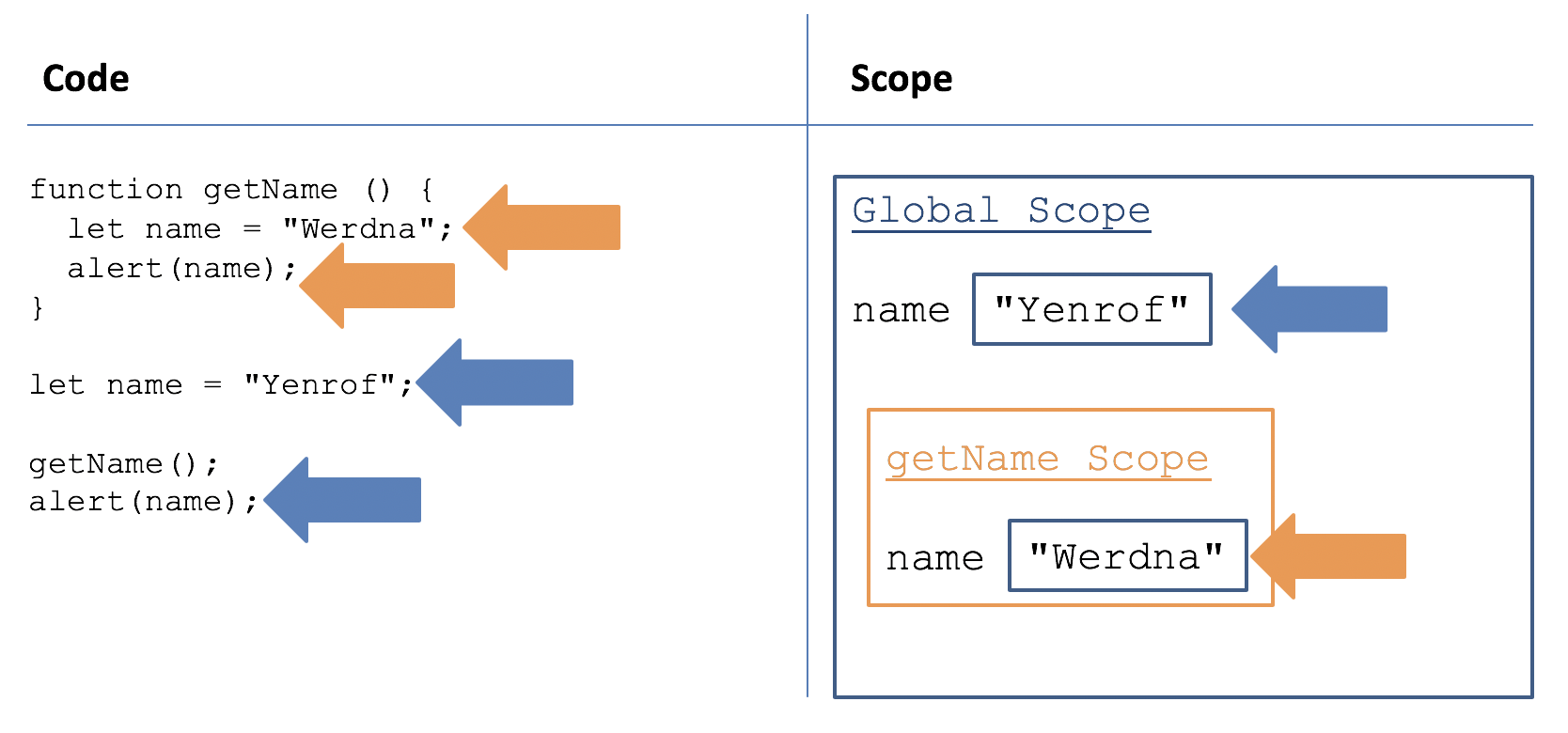
Here's another example where we now define a parameter for getName; see how it too is a variable that is local to the function?
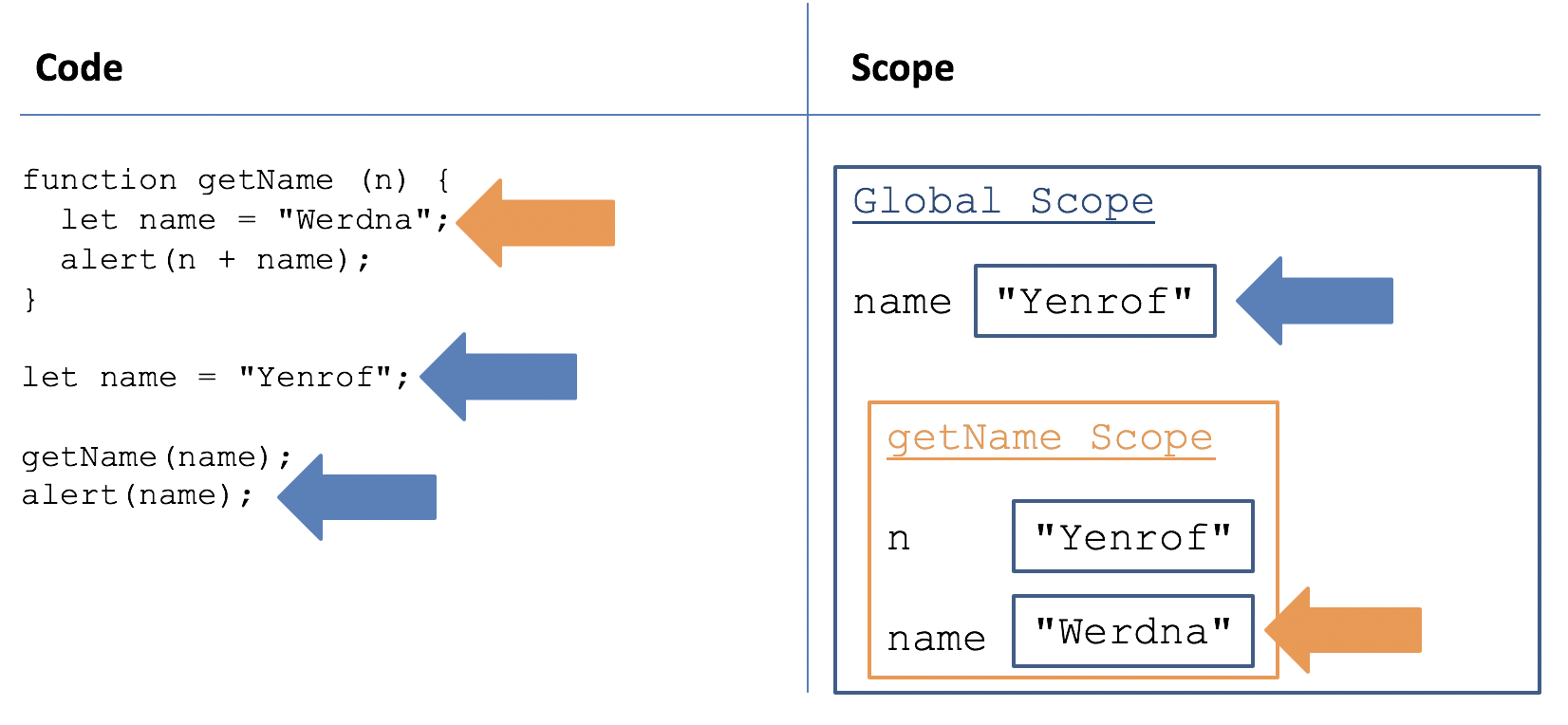
Contrast the above with even more localized scope contained in what we call a code block.
A block scope is a context for variables defined by a code block, namely, any control-flow body enclosed by curly brackets (like if-statement bodies, loop-bodies, and switch-bodies).
Variables declared inside of a block using the let keyword will remain local to the particular code block in which it was declared.
Why is this useful? Sometimes we don't want variables to persist after they've been used (e.g., an iterator is not always necessary to keep available outside of a for-loop).
  // alerts 0, then 1, then 2
  for (let i = 0; i < 3; i++) {
    alert(i);
  }

  // [X] Syntax Error: i is "out of scope" since it
  // only exists for use inside of the loop
  alert(i);
Why is the above actually desirable behavior? Why may we want to limit the lifespan of certain variables to certain localities?
(1) It wastes memory if we don't want to use i outside of the loop; (2) it "polutes" the namespace (i.e., the variable names used in a particular scope); (3) we may not want other parts of a script to be able to see / manipulate a variable outside of a code block.
So, to succinctly answer that question...
Scope is important because if we did not constrain variable names to a particular locality, we could never use the same variable name twice anywhere in a script!
That would be maddening, especially if we imported another user's library and had to make sure we never used a variable name that they used!
Who's Who?
So now that we have a picture of where variables live (their scope), how do we know which one we're talking about when we're referencing them?
Each statement we evaluate in our script is being executed within a scope as well. Which variables are referenced during runtime are contingent on what scope the statement is in.
For example, in our getName function above, when we alert(name); inside of the function body, we are evaluating some variable called name from within
the getName functional scope.
As such, we can develop rules for evaluating variables based on which scope each variable lives within, and in which scope the variable is being evaluated.
Because scopes are nested, evaluating some variable x will:
Use the evaluating scope's definition of
xif it has one, in which case we sayxshadows other definitions, ELSEUse the nearest containing scope's definition of
x, if one of the enveloping scopes has one, ELSENo scope (including the global) has a definition for
x, in which case: SYNTAX ERROR.
By analogy: Matryoshka Dolls! Each doll inside of the other can see the one(s) it's contained within, but not those inside of it.

Here's an example that demonstrates the nesting of scopes. See if you can determine what gets alerted at each alert statement!
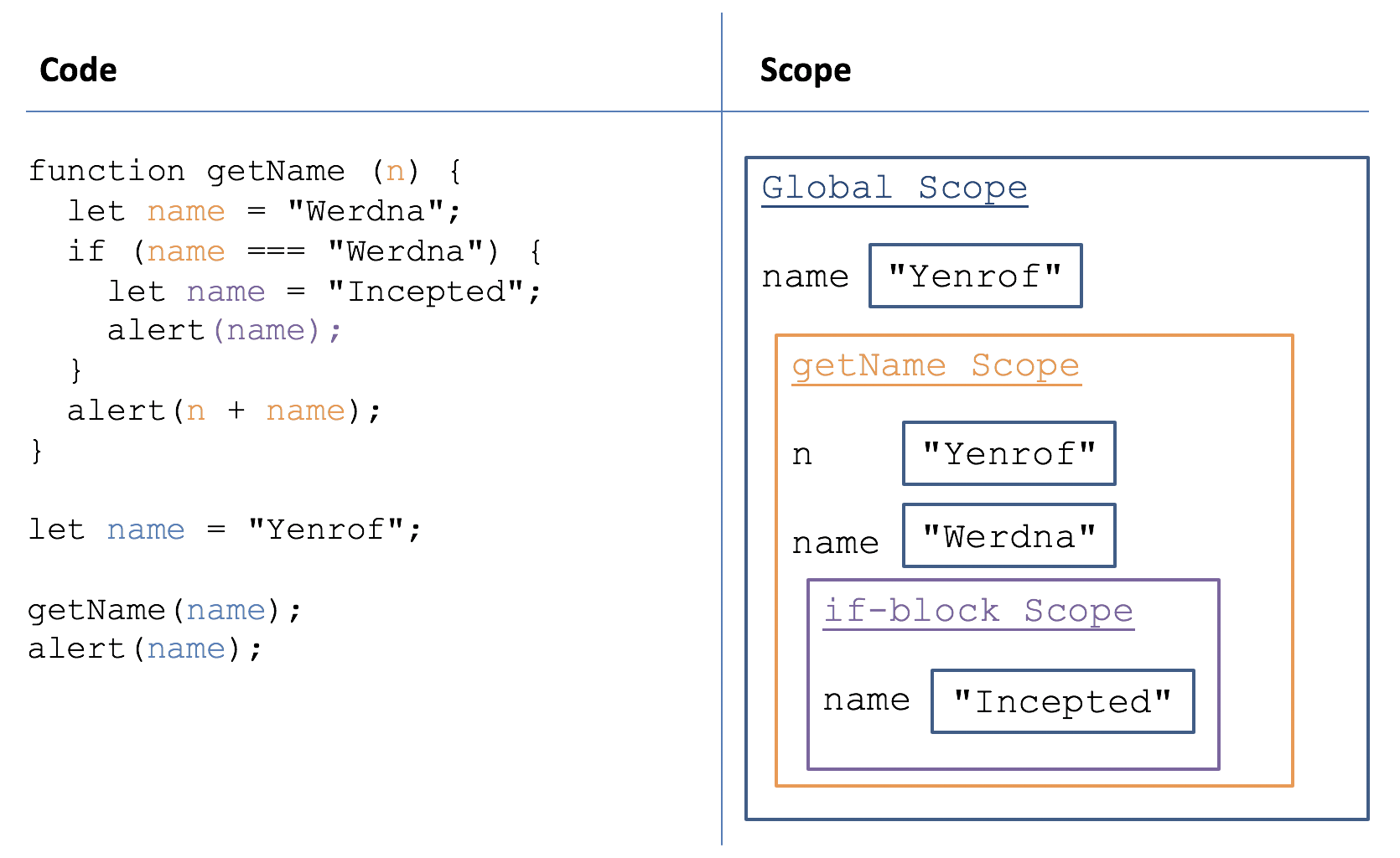
Let's do a bunch of examples!
For each of the following scripts, determine what values get alerted where indicated by the comment // [!], OR determine if there is a Reference error.
  // #1
  // Global x
  let x = 1;

  function funky () {
    alert(x); // [!]
  };

  funky();
  alert(x); // [!]
  // #2
  // Global x
  let x = 1;

  // Parameter x
  function funky (x) {
    alert(x); // [!]
  };

  funky(2);
  alert(x); // [!]
  // #3
  // Global x
  let x = 1;

  // NO MORE Parameter x
  function funky () {
    if (x === 1) {
	    x = 3;
    }
  };

  funky(2);
  alert(x); // [!]
  // #4
  // NO MORE Global x

  // Parameter x
  function funky (x) {
    if (x === 2) {
      // if-block x
	    let x = 3;
    }
    alert(x); // [!]
  };

  funky(2);
  alert(x); // [!]
Once more, when in doubt... draw it out!