Homework 1 - Are You Ever Infer It
Use Python 3.9+ for this assignment. **You may also work in groups of up to 3 people!**
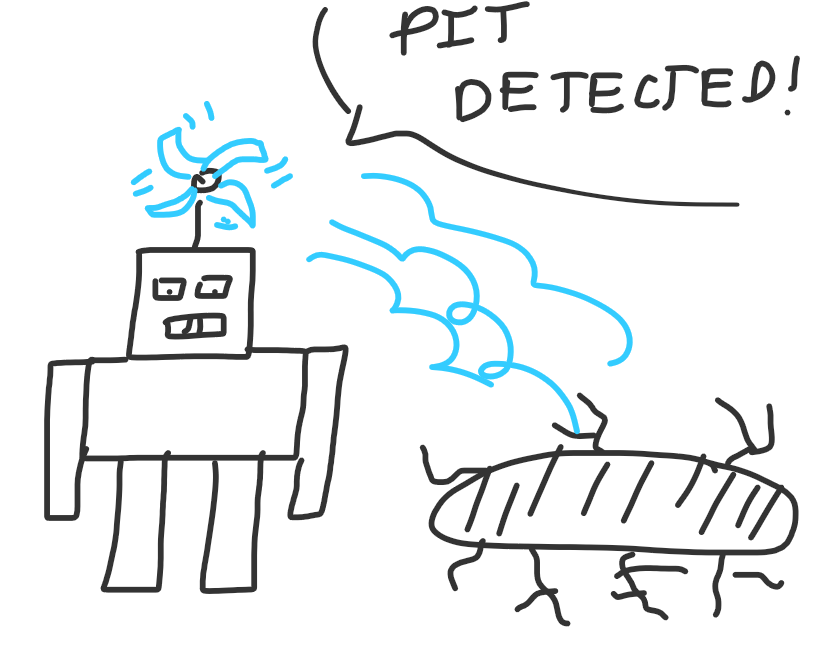
Your mission: Lead BlindBot, an artificial agent that is equipped with the power of logic as he plays "Pitsweeper" through a dark, perilous maze with bottomless pitfalls!
In terms of actual academic outcomes, this assignment will flex your knowledge on:
Data structure management and review using many set and dictionary methods.
AI topics of propositional logic, planning, and online learning.
Management of a complex codebase involving multiple modules.
Overview
The Environment
Your agent will be operating in a grid maze, as represented by an array of strings (where each string is a row in the maze, and each character in each string a cell at a particular row, col; note that this format is later converted to a list of list of strings where each string represents a single cell's character for ease of your manipulation).
However, in the present problem, perilous pits dot the dark landscape... and worse yet: we forgot to equip our agent (BlindBot) with nightvision, so it must rely only on the power of its head-mounted whirly-gig sensor to feel the strength of breezes leading to nearby pits.
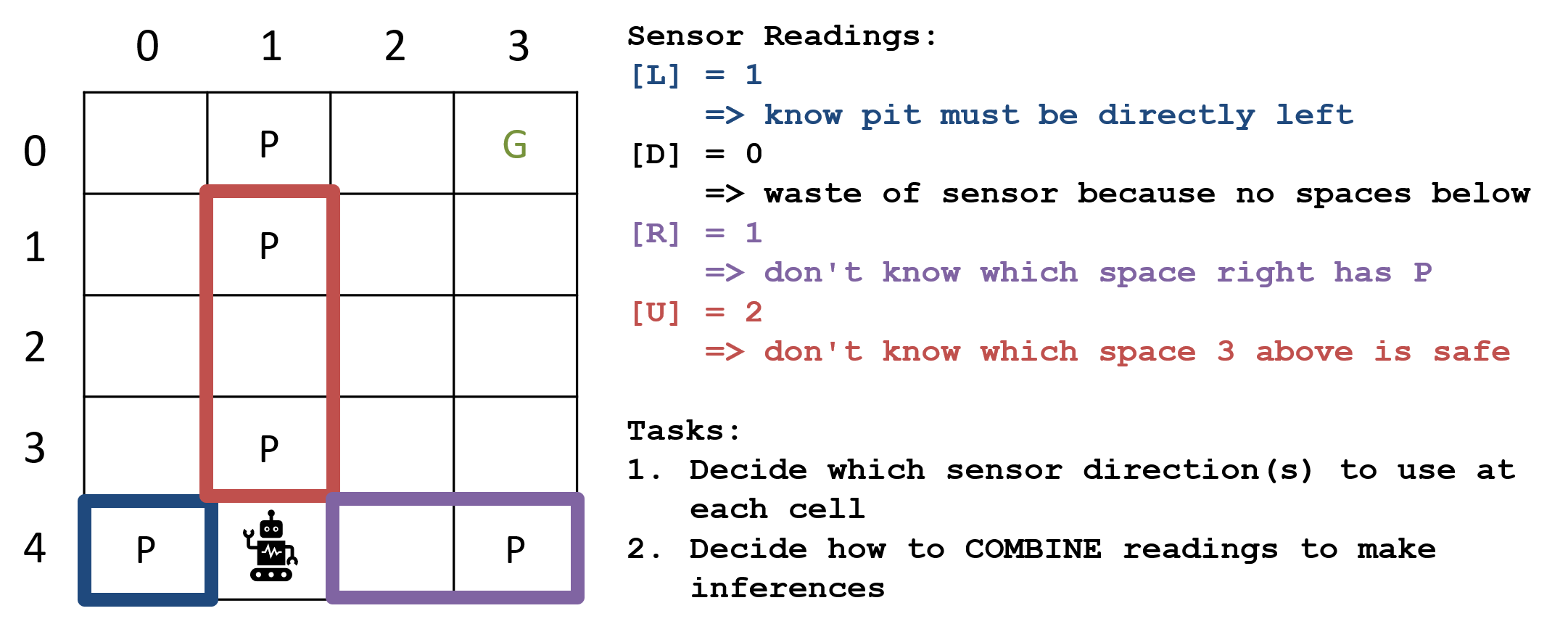
The good news: we've upgraded BlindBot's whirly-gig such that it can detect *how many pits* there are in a 3-tile line from its position to a chosen direction (slightly different from the pitfall example [pits and breezes] from lecture).
A maze can have multiple pits, but only one start location and goal, and for simplicity, we'll assume the only walls that exist in the environment are along the border. We'll also consider "valid" mazes to be those that have at least 1 safe tile surrounding the goal, and ALL safe tiles surrounding the start.
In particular, a maze is specified as a list of strings consisting of the following values:
Starting / Player Position [@]
Goal Tile [G]
Safe Square [.]
Pit [P]
Wall [X]
  # Example Maze 1:
  # Columns  Rows
  # 012345
  ["XXXXXX", # 0
   "X...GX", # 1
   "X..PPX", # 2
   "X....X", # 3
   "X..P.X", # 4
   "X@...X", # 5
   "XXXXXX"] # 6
Note: Because Mazes are lists of strings, rows correspond to the y axis and cols with the x, so for a given Maze m, we would have: $$(col, row) = m[row][col]$$ (observe how the indexing order of row and column are different in the tuple vs index access)
The Game
Once a maze "game" is started, Blindbot must explore, reason, and then proceed safely and efficiently from the start position to the goal.
More specifically, the steps of the game are as follows:
BlindBot is given his current
perceptionby the environment (his location, type of tile on which he's standing, and the results of any previous sensor readings).He is asked to
thinkabout what this perception tells him about his environment and the way to safely navigate it (e.g., by deducing where there are pits and where there are safe tiles).He returns a
Movechoice to the environment that must be a new location from those amongst the locations he's already visited PLUS the currentfrontier:namely, locations that BlindBot has not previously explored but which are directly *adjacent* to one that he has. The Move will also specify whether or not he wishes to use his whirly-gig sensor, and if so, in which direction ("U", "D", "L", or "R") to point it.The environment executes that move, and assesses the
cost, which is a function of how distant that move was and whether or not any pits were stepped upon. Moreover, there is a small cost to using the whirly-gig sensor.
The catch: Blindbot must navigate to reach the goal before his batteries run out!
-
Blindbot will be penalized points proportionate to the distance he travels between his current location and the next destination he sets (realistically, the notion that we want it to explore / move as little as necessary with battery reserves, desire to accomplish tasks quickly, etc.). Same with his sensor readings: they take a little extra battery to use!
For example, if he is currently at location
(3, 1)and travels next to location(2, 2)(a Manhattan distance of 2 tiles), he will lose 2 points from his score.Each use of the sensor detracts 1 point, but BlindBot can also elect to move without using the sensor.
Blindbot will be penalized 30 points if he falls into a pit -- it takes a lot of energy to pull yourself out!
The fun twist: if BlindBot reaches the goal before his battery expires, he'll earn 4 points for each pit he correctly identifies (a commission for the... Wumpus World... Charting... Society... or something). He'll LOSE 8 points for each pit incorrectly identified (lawsuits).
The Logic
BlindBots sensors are now directional and reach up to 3 tiles away from his current location, visualized below alongside what readings he would get:
The trick: to safely navigate mazes like the above requires active exploration to act, then think, then act again with new information, and also logic to deduce pits without needing to experience the pain of stepping on them ourselves.
Consider the following sensor readings taken in order as BlindBot moves from (2,4) (again, not his starting location in the maze but showing him move through mid-game).
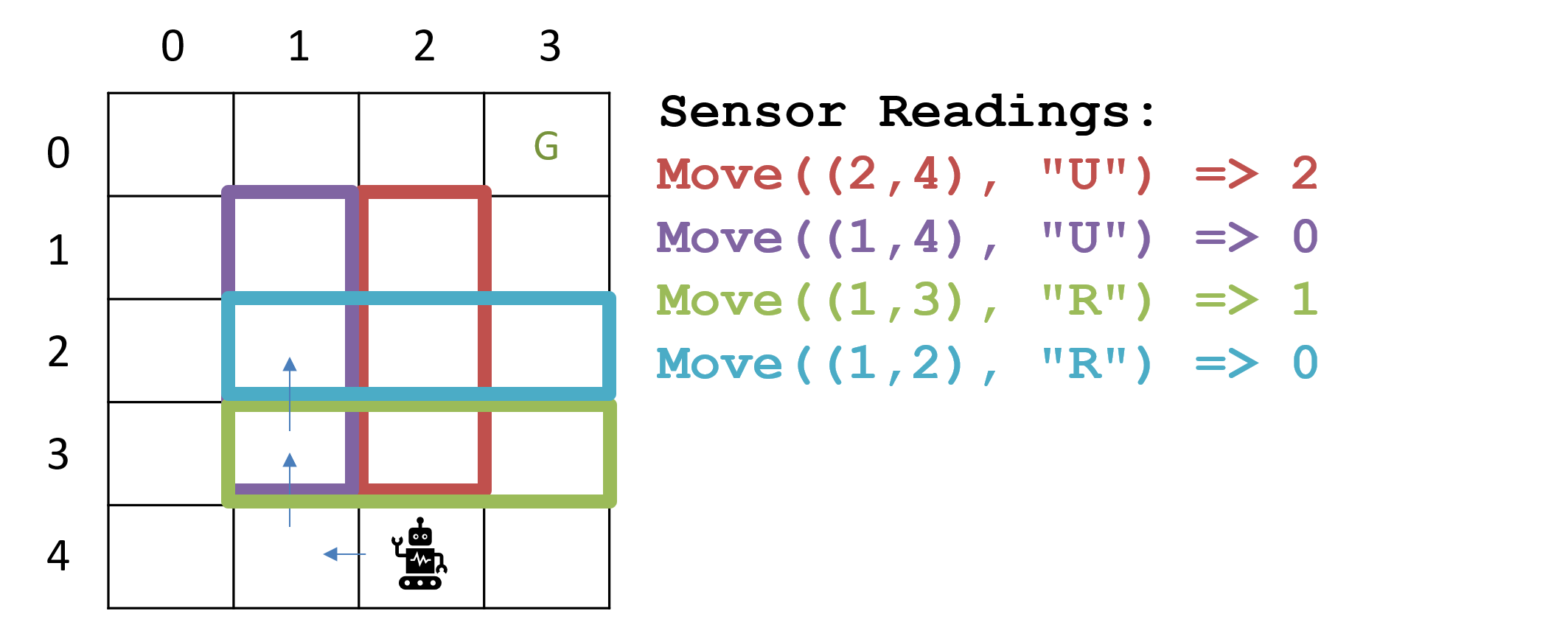
Combining the sensor readings from the above, where must there be pits and where do you know is safe to move?
There must be pits in (2,3) and (2,1), and all other spaces covered by the shown sensors must be safe!
Approach
To solve this "Pitsweeper" problem, we can employ the tools of propositional logic, dividing this task into two main components: (1) the knowledge base and (2) the agent that will make use of it.
Part 1 - MazeKnowledgeBase: will be used to deduce the locations of pit tiles given (1) the rules of Pitsweeper and (2) perceptions from active exploration.
Part 2 - MazeAgent: will be used to design your own BlindBot that uses the MazeKnowledgeBase and your own strategy for determining how to choose moves in the Pitsweeper environment!
What follows are details for implementing all of the above. Buckle up, this one's a wild ride!
Solution Skeleton
Start with the solution skeleton in-hand! Segments left for you to do are indicated by TODOs in comments:
General / Config Files:
mypy.ini, pytest.iniconfiguration files formypy, pytestrespectively. Do not change these!.gitignorea set of patterns for git to avoid committing. You may modify this file if your commit attempts to add any project files to the repo (e.g., VSCode.projectfiles orpycachefolders, which should not be submitted).
Part 1 Files:
maze_clause.pycontains the logic for structuring the clauses (recall: logical sentences that are a disjunction over propositions) that will be used for our inference procedure.maze_clause_tests.pyunit tests for the MazeClause methods you'll implement.maze_knowledge_base.pycontains the logic for... well.. the logic engine that will enable BlindBot's Pitsweeping capabilities in Part 2.maze_knowledge_tests.pyunit tests for the MazeKnowledgeBase methods you'll implement, plus some to test your MazeAgent's basic deductive capabilities.
Part 2 Files: (will also make use of Part 1 files).
constants.pycontains some constants used for the Pitsweeper problem, which you should reference during the course of your MazeAgent design (e.g., refer toConstants.PIT_BLOCKwhen you want to refer to the"P"maze entity rather than the string literal "P"). Do not modify or add to this file.environment.pycontains the logic for executing the Pitsweeper game. Some methods will be useful for your MazeAgent design, but otherwise, you do not need to understand the inner-workings of this module, nor may you modify this file!maze_agent.pycontains all of your logic for the MazeAgent -- the bulk of your work will be done here!maze_inference_tests.pycontains a sample of the unit tests that will be used to grade your MazeAgent's *inference capabilities*, i.e., just the way it processes information gained from perceptions -- make sure to test carefully!pitsweeper_skeleton_tests.pycontains a sample of the full maze_agent tests, everything from navigation to sensor direction choices, etc! Make sure to add your own tests!
Part 1.1: MazeClause

|
GenAI use for the entirety of Part 1 is BANNED for code production as it will shortcut your learning and generalizable skills (besides, there's not much code to write, the exercise is meant to teach you how to implement propositional logic systems from first-principles) though is always OK for understanding error messages, interpreting skeleton code, etc. as outlined in the syllabus. |
Your mission: implement a basic, slightly restricted propositional logic inference engine for use in our Pitsweeper Problem!
To start, MazeClauses will compose your KB, which will then be used to perform inference.
The steps you'll take to accomplish this:
Complete the resolution operation between different MazeClauses, which will be the programmatic object used to represent propositional clauses in the Pitsweeper setting.
Complete the storage structure of clauses in a MazeKnowledgeBase.
Complete the proof by contradiction query operation for arbitrary MazeClauses in the MazeKnowledgeBase.
Problem Specification
We will be implementing a simplified propositional logic inference engine with the following restrictions:
We will only support a knowledge base in Conjunctive Normal Form (CNF), i.e., conjoined clauses.
All queries will thus also be clauses.
We will implement inference using proof by contradiction + resolution.
To accomplish the above, we will implement two classes:
MazeClause: represents a clause in a Maze problem wherein each proposition is local to a particular grid location, \((x, y) = (col, row)\)
MazeKnowledgeBase: represents a CNF KB in which all entries are MazeClauses. The KB can be told rules and facts, and then asked queries about them.
Once we have the above, the second part of this assignment will allow us to use our implementations in BlindBot's pursuit of safety!
This latter portion will benefit from your own creative solutions for how to tractably approach the Maze Pathfinding with Pitfalls problem.
Inference Strategy
This assignment will have you implement resolution inference + proof by contradiction, a purely symbolic inference algorithm to be performed on MazeClauses in a MazeKnowledgeBase.
Note: there are entire fields of study that have explored inference algorithms and different strategies with different pros and cons. We will use a simple variant herein, but you should be aware that there are many.
The pseudocode for Resolution Inference is given in a following section.
There are more efficient approaches in existence, and some optimizations that you might make to the algorithm given (e.g., clever storage of clauses in your knowledge base), but you will receive full credit for implementation of the resolution inference strategy as listed.
Representing MazePropositions + Clauses
Recall that a clause is a disjunction of literals (i.e., positive or negated propositions) such that: $$Clause = P_1 \lor \lnot P_2 \lor P_3 \lor ...$$
Because we are tailoring this inference engine to a Maze problem, each of our MazePropositions will have a symbolic name and a
grid location associated with it. We will represent this as a 2-tuple: (Symbol, Loc)
For example, to represent that there is a Pit in cell (1, 1), we might use the proposition \(P_{1,1}\). Since both the symbol and grid location are
part of the proposition's name, we will represent the MazeProposition as a 2-tuple: ("P", (1, 1))
For mypy typing, the type of a MazeProposition will thus be tuple[str, tuple[int, int]]. Any where you see this type in the
code, remember that it's a MazeProposition!
Importantly, a MazeProposition ("P", (1, 1)) is considered different from the same symbol at a different location, like ("P", (2, 2)), or
a different symbol in the same location like (".", (1, 1)) (although you will only ever need to use one symbol for Pitsweeper: "P").
In a MazeClause, we will not explicitly list the connective "or" between each proposition (as it is implied by virtue of being a clause), but we will instead represent them as mappings of MazePropositions to whether or not those propositions are negated in the clause.
Storing Clauses
Internally to a MazeClause, we will store the individual disjoined propositions as a dictionary with MazeProposition keys, and values determining whether those propositions are negated in the MazeClause (True for positive, False for negative).
For example, the clause: \(P_{1,1} \lor \lnot P_{2,1} \lor P_{0,1}\) would be represented as a dictionary:
{("P", (1,1)): True, ("P", (2,1)): False, ("P", (0,1)): True}
This representation will be convenient for the inference engine due to the ability to quickly lookup what propositions are present in a clause, as the keys will be indexed in the map.
Vacuous (AKA Valid) Clauses
However, during the course of inference, we may find that some clauses that we derive add nothing to our inferences.
In propositional logic, a sentence is called valid if it is vacuously true in every world.
For example, the clause \(\alpha = S \lor \lnot S\) is valid because \(\alpha\) will be true in all possible worlds.
BIG RED WARNING: In the following spec, I use the term "valid" by the above, formal definition -- NOT the sense that a clause is valid if it is "well-formed" or... well... any other definition except the above.
Valid clauses may be legal inferences, but should be avoided as additions to our KB because they do nothing to constrain the set of possible worlds.
MazeClause Attributes & Construction
As such, MazeClauses maintain two attributes:
propsa dictionary mapping MazePropositions to their negated status in the clause.valida boolean flag indicating whether or not the MazeClause is valid (NOTE: this is the propositional logic definition of valid, as defined above). A MazeClause is only "valid" if it is true in all possible worlds.
Constructor
Your first task will be to implement the MazeClause constructor, documented and stubbed as follows:
  def __init__(self, props: Sequence[tuple]):
      """
      Constructs a new MazeClause from the given list of MazePropositions,
      which are thus assumed to be disjoined in the resulting clause (by
      definition of a clause). After checking that the resulting clause isn't
      valid (i.e., vacuously true, or logically equivalent to True), stores
      the resulting props mapped to their truth value in a dictionary.

      Example:
          The clause: P(1,1) v P(2,1) v ~P(1,2):
          MazeClause([
              (("P", (1, 1)), True),
              (("P", (2, 1)), True),
              (("P", (1, 2)), False)
          ])

          Will thus be stored a dictionary of the format:

          {
              ("P", (1, 1)): True,
              ("P", (2, 1)): True,
              ("P", (1, 2)): False
          }

      Parameters:
          props (Sequence[tuple]):
              A list of maze proposition tuples of the format:
              ((symbol, location), truth_val), e.g.
              (("P", (1, 1)), True)
      """
      self.props: dict[tuple[str, tuple[int, int]], bool] = dict()
      self.valid: bool = False

      # [!] TODO: Complete the MazeClause constructor that appropriately
      # builds the dictionary of propositions and manages the valid
      # attribute according to the spec
The parameter to the constructor is a list of tuples describing the propositions in the clause, formatted as: [(MazeProposition, NegationStatus), ...]
For example, the clause \(P_{1,1} \lor \lnot P_{2,1} \lor P_{0,1}\) is constructed as:
[(("P", (1, 1)), True), (("P", (2, 1)), False), (("P", (0, 1)), True)]
This is passed as a list rather than a set / dictionary for ease of programming the resolution algorithm later.
If a clause is valid by construction, its valid flag should be set appropriately, and propositions cleared. For example:
\(P_{1,1} \lor \lnot P_{1,1}\) is valid and therefore the constructor should empty self.props and set self.valid = True
Re-read those last 2 sentences! If, during construction, you discover that the clause is valid/vacuous, it is logically equivalent
to True and therefore should contain *NO* propositions.
I have provided the following methods that will validate your correct constructor implementation and are used in the tests that follow.
   def get_prop(self, prop: tuple[str, tuple[int, int]]) -> Optional[bool]:
      """
      Returns the truth value of the requested proposition if it exists
      in the current clause.

      Returns:
          - None if the requested prop is not in the clause
          - True if the requested prop is positive in the clause
          - False if the requested prop is negated in the clause
      """

  def is_valid(self) -> bool:
      """
      Determines if the given MazeClause is logically equivalent to True
      (i.e., is a valid or vacuously true clause like (P(1,1) v P(1,1))

      Returns:
          - True if this clause is logically equivalent with True
          - False otherwise
      """

  def is_empty(self) -> bool:
      """
      Determines whether or not the given clause is the "empty" clause,
      i.e., representing a contradiction.

      Returns:
          - True if this is the Empty Clause
          - False otherwise
          (NB: valid clauses are not empty)
      """
Here's a handy way to disambiguate the different types of clauses we might be dealing with:
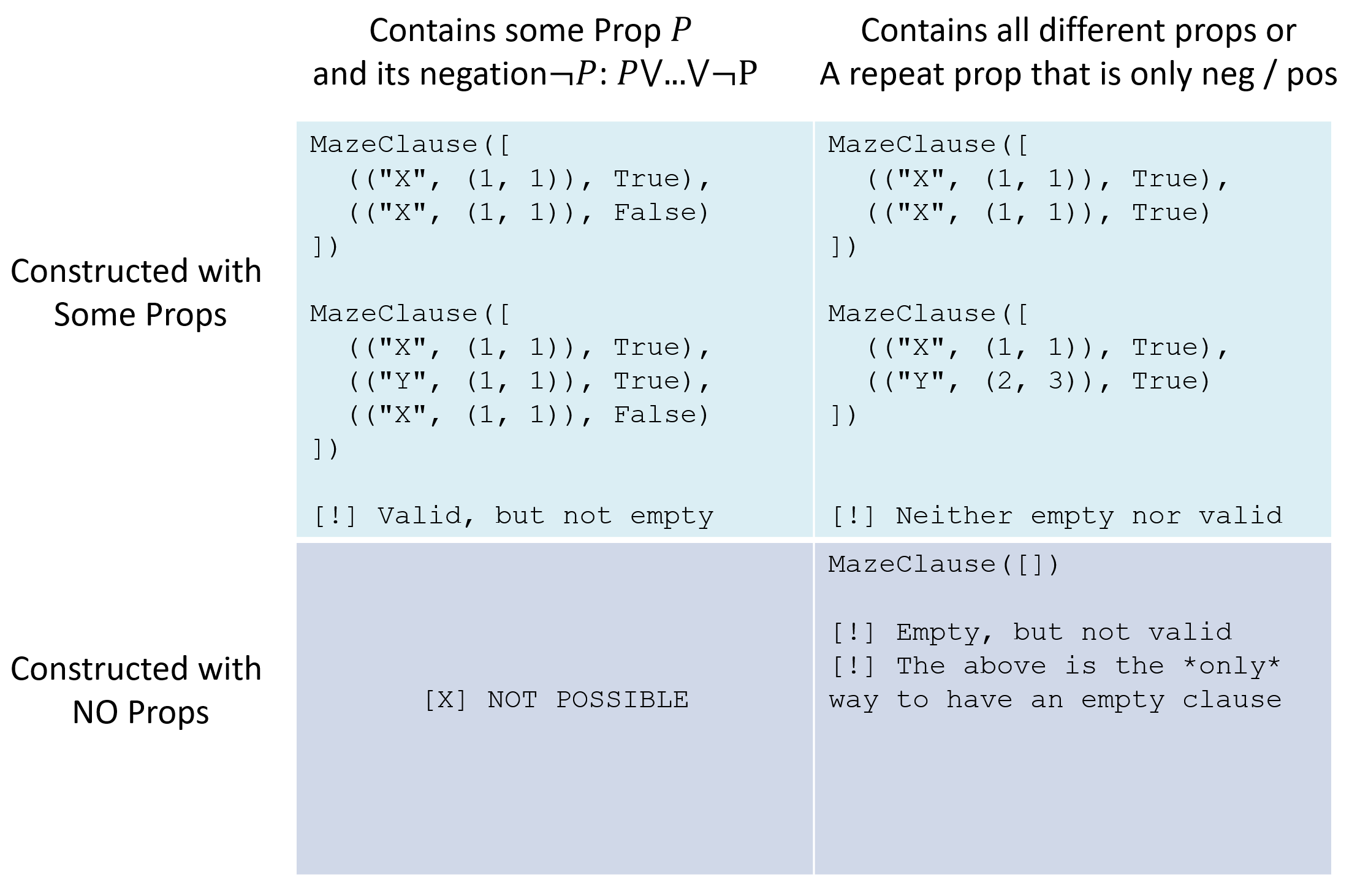
In addition to these methods, I have given you an equivalence test between MazeClauses (__eq__), and a hash function (__hash__) so that
MazeClauses can be stored in sets (useful for the next step), as well as overrides for __len__ and __str__ for debugging. [Optionally] There are some
other provided methods like a __deepcopy__ (for creating property-equivalent copies of MazeClauses) and to_serializable for if you are extra ambitious
and do some fun stuff with parallelism later.
Once you've completed the constructor, run the following command in the terminal / test the MazeClause constructor tests in maze_clause_tests.py:
pytest -k mazeclause_construction
If the above tests passed, you're all set for the next problem!
Resolution
Up next: resolving some clauses (and not just what St. Nick does on New Years Eve).
  @staticmethod
  def resolve(c1: "MazeClause", c2: "MazeClause") -> set["MazeClause"]:
      """
      Returns the set of non-valid MazeClauses that result from applying
      resolution to the two input.

      [!] We return a set of MazeClauses for ease of dealing with sets in
      other contexts (like in MazeKnowledgeBase) even though the set
      will only ever contain 0 or 1 resulting MazeClauses.

      Parameters:
          c1, c2 (MazeClause):
              The two MazeClauses being resolved.

      Returns:
          set[MazeClause]:
              There are 2 possible types of results:
              - {}: The empty set if either c1 and c2 do NOT resolve (i.e., have
                no propositions shared between them that are negated in one but
                not the other) or if the result of resolution yields valid clauses
              - {some_clause}: where some_clause is a non-valid clause either
                containing propositions OR is the empty clause in the case that
                c1 and c2 yield a contradiction.
      """
Parameterized by two MazeClauses, c1, c2, and returns a set containing all clauses that could be inferred by resolving c1
with c2.
Hint: since by assumption our MazeClauses are... well.. clauses, this is as simple as finding the complementary propositions in each and then adding a new clause with the remaining propositions in each to the resulting set.
Note1: resolution is *not* a mutator, meaning the propositions in the original clauses c1 and c2 should be left unperturbed.
Note2: if resolution produces a valid clause, it should be ignored / not added to the result set (since adding True to the CNF KB does nothing).
Note3: although this method returns a *set* of MazeClauses, that set will only ever consist of 0 (the clauses do not resolve or resolve to a valid clause) or 1 MazeClause (the clauses resolve to something not vacuously true). The return type being a set is convenient for the MazeKnowledgeBase implementation that follows.
Once you've completed resolve, run the following command in the terminal / test the MazeClause class entirely in maze_clause_tests.py:
pytest maze_clause_tests.py
If the above passes, now, with your MazeClauses successfully specified, let's now use them in a Knowledge Base!
Part 1.2: MazeKnowledgeBase
Recall that a CNF KB is a conjunction of clauses such that: $$KB = Clause_1 \land Clause_2 \land Clause_3 \land ...$$
Because of this assumed format, we will simply maintain a KB that is a collection of MazeClauses, with the logical-and \((\land)\) implied.
The MazeKnowledgeBase class will contain your implementation of both the CNF Knowledge Base (KB) and resolution inference algorithm.
Towards this end, it need only maintain a single attribute:
clausesa set of MazeClauses composing the knowledge of the KB.
Our MazeKnowledgeBases really only need to support two basic operations: tell and ask
  def tell (self, clause: "MazeClause") -> None:
      """
      Adds the given clause to the CNF MazeKnowledgeBase
      [!] Note: we expect that no clause added this way will ever
      make the KB inconsistent, but this naive assumption is done
      to save on computational efficiency and relies on your clauses
      being constructed correctly. Test carefully!

      Parameters:
          clause (MazeClause):
              A new MazeClause to add to this knowledgebase
      """
      self.clauses.add(clause)

  def ask (self, query: "MazeClause") -> bool:
      """
      Given a MazeClause query, returns True if the KB entails the query,
      False otherwise. Uses the proof by contradiction technique detailed
      during the lectures.

      Parameters:
          query (MazeClause):
              The query clause to determine if this is entailed by the KB

      Returns:
          bool:
              True if the KB entails the query, False otherwise
      """
      # [!] TODO: Implement the proof-by-contradiction knowledgebase
      # query procedure here!
Note: the MazeKnowledgeBase class also has some given helper methods, get_simplified_clauses, simplify_from_known_locs, simplify_self
that are not needed for this problem, but will be employed in Part 2. Ignore these for now!
ask Method
Let's implement the ask method as specified above and detailed in the pseudocode below!
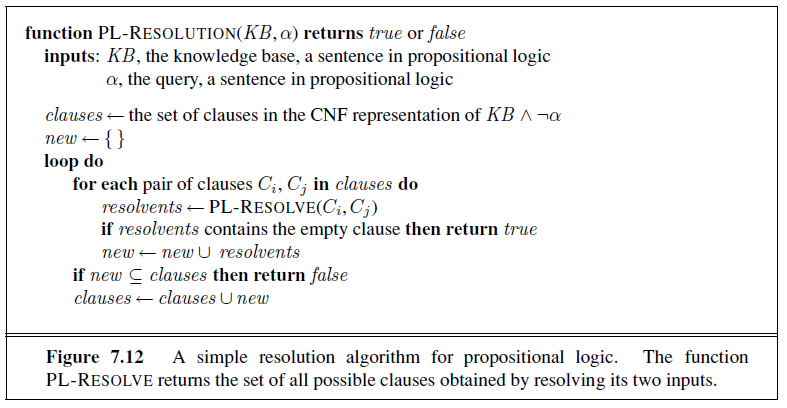
Warning: recall that clauses derived during proof by contradiction should not be considered permanent members of
the KnowledgeBase! The KB should be in the same state post-query as it was pre-query. This is why the first line in the pseudocode copies
the existing clauses into a temporary copy clauses for the duration of the proof by contradiction.
Once you've completed ask, run the following command in the terminal / test the MazeKnowledgeBase class entirely in maze_knowledge_tests.py:
pytest maze_knowledge_tests.py
Use of the MazeKnowledgeBase in the construction of your MazeAgent will thus proceed in two, iterated phases for this assignment:
tellthe KB (1) any experiences that are discovered in the maze through exploration, e.g., that there's no pit in some location, and (2) the logical rules for dealing with sensor tiles (detailed in the next section).askthe KB if it entails a given clause: namely, whether or not it can conclude that a pit is in a suspicious location.
Let's see how to use these next!
Part 2: MazeAgent

|
GenAI use for the entirety of Part 2 is allowed! This portion is sophisticated enough such that, even if you choose to use GenAI, you will still need to develop your own heuristics and strategies in designing your agents, just use GenAI to save you keystrokes when appropriate. |
In Part 2, we will now employ your MazeKnowledgeBase in an online agent operating in the Pitsweeper Environment: good old BlindBot!
Designing Blindbot
BlindBot starts with several key pieces of knowledge:
[Given] The dimensions of the maze, its starting location, and the location of the goal. It does *not* know the position of any pits in advance.
[For you to encode] "The way the world works," including rules / facts that:
BlindBot's sensors will warn it how many, if any, of the 3 tiles from BlindBot's location towards the chosen sensor direction ("U", "D", "L", "R") are pits.
Every goal tile and the initial state are safe (i.e., are not pits)
The tiles in the cardinal directions around the initial tile are safe.
Every goal tile has *at least* one adjacent safe tile (cardinal directions).
Your task: imbue BlindBot with logic, the ability to intelligently explore and efficiently prioritize moves that it makes it from the initial state to the goal without falling into a pit!
With these details in place, let's look at the specifics of what you've been given and what you have to do.
constants.py
For starters, the following class constants and static methods are available to you and can be accessed via the Constants class:
  class Constants:
      '''
      Simulation / Maze constants important for the Pitsweeper problem

      [!] IMPORTANT:
        - YOU MUST NOT TOUCH THIS FILE AT ALL, NO EDITS OR ADDITIONS!
          Any changes will be overwritten during testing
        - If you need additional constants shared between your files,
          make your own damn module
      '''

      # The following are staticmethods to prevent tampering,
      # I've got my eye on you, even if through this comment
      @staticmethod
      def get_min_score () -> int:
          """
          Returns the minimum score that, if reached, will end the game,
          and bring great shame to your agent
          """
          return -120

      @staticmethod
      def get_pit_penalty () -> int:
          """
          Returns the cost of stepping into a Pit... you're not dead just...
          like... really inconvenienced
          """
          return 30

      @staticmethod
      def get_pit_correct_guess_bonus () -> int:
          """
          Returns the bonus for correctly identifying a pit
          """
          return 4

      @staticmethod
      def get_pit_wrong_guess_penalty () -> int:
          """
          Returns the penalty for incorrectly identifying a pit
          """
          return 8

      @staticmethod
      def get_sensor_penalty () -> int:
          """
          Returns the cost of using the sensor
          """
          return 1

      @staticmethod
      def get_sensor_range () -> int:
          """
          Returns the number of tiles in the specified direction that the sensor can detect pits
          """
          return 3

      # Maze content constants
      WALL_BLOCK  = "X"
      GOAL_BLOCK  = "G"
      PIT_BLOCK   = "P"
      SAFE_BLOCK  = "."
      PLR_BLOCK   = "@"
      UNK_BLOCK   = "?"
      DIRECTIONS  = {"U", "D", "L", "R"}
environment.py
The Environment class contains the necessary attributes and methods for configuring the maze, displaying the environment, and for both initializing and interacting with your agent.
You shall not modify anything but the main method in environment.py, nor do you need to, though there are some components of which you should be aware.
Environment
Although this is not a "problem" for you to solve, per se, you'd be wise to examine the following public methods made available in the Environment class that you'll be able to use during your Agent's construction.
Note: the Environment in which the agent is operating is passed as an argument to its constructor, which is how you can access these methods!
  def get_player_loc (self) -> tuple[int, int]:
      """
      Returns the player's current location as a maze tuple

      Returns:
          tuple[int, int]:
              The player's current location, a (c, r) tuple
      """

  def get_goal_loc (self) -> tuple[int, int]:
      """
      Returns the goal tile's location as a maze tuple

      Returns:
          tuple[int, int]:
              The goal's location, a (c, r) tuple
      """

  def get_agent_maze (self) -> list[list[str]]:
      """
      Returns the agent's mental model of the maze, without key
      components revealed that have yet to be explored. Unknown
      spaces are filled with "?"

      [!] Useful for your agent to maintain its own copy of the maze
      for record-keeping. The agent's self.maze attribute will be
      displayed at every tick of environments wherein VERBOSE = True

      [!] As the agent moves around the maze, the agent's representation
      will also be updated by the environment for any encountered cells;
      any INFERRED cells will need to be changed by you. To make this easier,
      the maze is converted to a list of list of strings, so each cell is
      its own maze entity that can be assigned to.

      Example:
          # True    # Agent's (returned by this method)
          XXXXXX    XXXXXX
          X...GX    X???GX
          X..PPX    X????X
          X....X    X????X
          X..P.X    X????X
          X@...X    X@???X
          XXXXXX    XXXXXX

      Returns:
          list[str]:
              The agent's view of the maze
      """

  def get_playable_locs (self) -> set[tuple[int, int]]:
      """
      Returns the set of ALL positions within the playable maze

      Example:
          012345        env.get_playable_locs()
          XXXXXX 0      => {(1,1), (1,2), (1,3), ... , (4,5)}
          X...GX 1
          X..PPX 2
          X....X 3
          X..P.X 4
          X@...X 5
          XXXXXX 6

      Returns:
          set[tuple[int, int]]:
              The set of all locations into which the player may move
      """

  def get_explored_locs (self) -> set[tuple[int, int]]:
      """
      Returns the set of ALL locations that have previously been explored /
      moved upon.

      Example:
            012345      Starting Location: (1,5)
            XXXXXX 0    Previous Moves: (2,5), (3,5), (4,5), (1,4)
            X???GX 1    env.get_explored_locs()
            X????X 2    => {(1,5), (2,5), (3,5), (4,5), (1,4)}
            X????X 3
            X@?P?X 4
            X..1.X 5
            XXXXXX 6

      Returns:
          set[tuple[int, int]]:
              The set of all locations into which a player has already moved
              (you should never need to repeat movement onto a tile)
      """

  def get_frontier_locs (self) -> set[tuple[int, int]]:
      """
      Returns the set of ALL unexplored and playable locs that have at least
      one explored neighboring tile.

      Example:
            012345      Starting Location: (1,5)
            XXXXXX 0    Previous Moves: (2,5), (3,5), (4,5), (1,4)
            X???GX 1    env.get_frontier_locs()
            X????X 2    => {(1,3), (2,4), (3,4), (4,4)}
            XF???X 3
            X@FPFX 4    [!] Example to the left artificially adds "F" tiles to
            X..1.X 5    denote the frontier, which will not be displayed in-game
            XXXXXX 6

      Returns:
          set[tuple[int, int]]:
              The set of all locations into which a player may legally move next
              (some of which will be more dangerous than others -- tread lightly!)
      """

  def get_cardinal_locs (self, loc: tuple[int, int], offset: int) -> set[tuple[int, int]]:
      """
      Returns a set of the 4 adjacent tiles at the given offset/distance to the given loc
      that are also in the set of playable locations (i.e., ignoring locations like walls)

      Example:
          012345        env.get_cardinal_locs((1,5), 1)
          XXXXXX 0      => {(1,4), (2,5)}
          X...GX 1
          X..PPX 2      env.get_cardinal_locs((3,3), 2)
          X....X 3      => {(1,3), (3,1), (3,5)}
          X..P.X 4      (5,3) missing above because it's a wall
          X@...X 5
          XXXXXX 6

      Parameters:
          loc (tuple[int, int]):
              2-tuple indicating a maze location, (x,y) or (c,r)
          offset (int):
              The distance of requested tiles from the given loc

      Returns:
          set[tuple[int, int]]:
              The set of all *playable* maze locations within that distance of offset from
              the given loc
      """

  def get_directional_locs (self, loc: tuple[int, int], direction: str, max_distance: int) -> set[tuple[int, int]]:
      """
      Returns a set of locations in the specified direction from the given location,
      up to the maximum distance, that are within the playable maze boundaries.

      Parameters:
          loc (tuple[int, int]):
              2-tuple indicating a maze location, (x,y) or (c,r)
          direction (str):
              The direction to check: "U", "D", "L", or "R"
          max_distance (int):
              The maximum distance to check in the specified direction

      Returns:
          set[tuple[int, int]]:
              The set of all valid maze locations in the specified direction
              within the maximum distance
      """

  def start_mission (self) -> int:
      """
      Manages the agent's action loop and the environment's record-keeping
      mechanics; the general order of operations at each action loop are:
      1. The agent's think method is fed the current perception: its location
         and the type of tile it is currently standing on as well as the sensor
         reading in the direction of a scan if one was made. It is also optionally
         given the remaining time to complete the mission and the current score.
      2. The agent returns the next tile it wishes to move to along the
         frontier | explored tiles (moves that are not in this set will be considered invalid
         and will end the game immediately with a max penalty score) along with the
         desired sensor direction (if any)
      3. The move is enacted, and penalty of that move added to the score
      4. Once the agent has reached the goal, it is eligible for a bonus score
         for each pit tile it correctly identifies. It is penalized for each pit
         tile it incorrectly identifies.

      Returns:
          int:
              The overall score (sum of penalties) encountered by the agent during
              the game, with a minimum score threshold that cannot be exceeded as
              defined in Constants.py.
      """
The Environment also manages the game state, but you do not need to care about most of its internals.
Warning / Recall: in Python, attributes and methods beginning with an underscore (_) are "private" and should not be accessed
outside of the class. Failure to heed this warning will severely penalize your agent's score!
To run your agent through a maze (for empirical testing only), simply make any maze selections in the Environment's main method (bottom of the file),
and call python environment.py.
maze_agent.py
The MazeAgent class specifies the BlindBot's logic system and all attributes related to its state -- it is where ALL of your work will be done!
In particular, note the "givens" of the MazeAgent constructor:
  def __init__ (self, env: "Environment", perception: dict, time_limit: Optional[float] = None, score_threshold: Optional[int] = None) -> None:
      """
      Initializes the MazeAgent with any attributes it will need to
      navigate the maze.
      [!] Add as many attributes as you see fit!

      Parameters:
          env (Environment):
              The Environment in which the agent is operating; make sure
              to see the spec / Environment class for public methods that
              your agent will use to solve the maze!
          perception (dict):
                The starting perception of the agent, which is a
                small dictionary with keys:
                  {"loc": (x, y), "tile": tile_type, "sensor_num": sensor_reading, "sensor_dir": sensor_direction}
                where sensor_reading is the number of pits detected (0-3) or None
                if no sensor reading was taken, and sensor_direction is the direction
                the sensor is pointing or None if no sensor was used in the move.
          time_limit (Optional[float]):
              Time limit in seconds for the mission. If None, no time limit is enforced.
          score_threshold (Optional[int]):
              Score threshold for the mission. If None, uses Constants.get_min_score().
      """
      self.env: "Environment" = env
      self.goal: tuple[int, int] = env.get_goal_loc()
      self.time_limit: Optional[float] = time_limit
      self.score_threshold: Optional[int] = score_threshold if score_threshold is not None else Constants.get_min_score()

      # The agent's maze can be manipulated as a tracking mechanic
      # for what it has learned; changes to this maze will be drawn
      # by the environment and is simply for visuals / debugging
      # [!] Feel free to change self.maze at will
      self.maze: list = env.get_agent_maze()

      # Standard set of attributes you'll want to maintain
      self.kb: "MazeKnowledgeBase" = MazeKnowledgeBase()
      self.possible_pits: set[tuple[int, int]] = set()
      self.safe_tiles: set[tuple[int, int]] = set()
      self.pit_tiles: set[tuple[int, int]] = set()

      # [!] TODO: Initialize any other knowledge-related attributes for
      # agent here, or any other record-keeping attributes you'd like
You may (read: should) add any attributes in the constructor that you deem necessary for your agent's task.
The env parameter is a reference to the Environment object in which the MazeAgent is operating.
The perception parameter is a dictionary that will contain information from your agent's sensors, with key-values:
{"loc": (x, y), "tile": tile_type, "sensor_num": sensor_reading, "sensor_dir": sensor_direction}
For example, if BlindBot is currently standing on a safe spot at tile (1, 2) and used his sensor in the "U" direction, discovering
2 pits somewhere in the 3 tiles above him, the perception would look like: {"loc": (1, 2), "tile": ".", "sensor_num": 2, "sensor_dir": "U"}.
Along with initializing any attributes relevant to your MazeAgent, the constructor should initialize the agent's beliefs about the environment, as implemented in some Knowledge Base (hey, good thing we made one of those in Part 1 -- include your KB modules in this part as well)!
You shouldn't initialize *all* rules about the environment in the KB at the start (e.g., leave the inference about pits to *during* exploration), but some will be helpful to do now, and others can be added as BlindBot explores its environment.
think Method
Your agent's lifespan will be spent doing the following tasks, in sequence:
Perceiving the type of tile that it is currently standing on and any sensor information (updating knowledge when necessary)
Thinking / Planning about where it should go next from amongst options along the environment's provided frontier or a previously explored location (see environment methods above) PLUS if it should use its sensor, and if so, in what direction.
Acting in accordance with its plan, which may include adapting to pits it discovers in its way.
At present, your agent simply returns a random move along the frontier -- we'll need to improve upon this, or at least at the start, incorporate the knowledge gained from each explored tile!
  def think(self, perception: dict, remaining_time: Optional[float] = None) -> Move:
      """
      The main workhorse method of how your agent will process new information
      and use that to make deductions and decisions. In gist, it should follow
      this outline of steps:
      1. Process the given perception, i.e., the new location it is in and the
         type of tile on which it's currently standing (e.g., a safe tile, Pit
         tile, or Goal tile), and any sensor readings.
      2. Update the knowledge base and record-keeping of where known pits and
         safe tiles are located, as well as locations of possible pits.
      3. Query the knowledge base to see if any locations that possibly contain
         pits can be deduced as safe or not (when needed! Beware over-querying as
         this will cost you a lot of time).
      4. Use all of the above to prioritize the next location along the frontier
         (or previously explored locations) to move to next, as well as the
         direction of a sensor scan (or None if you do not wish to scan)

      Parameters:
          perception (dict):
              A dictionary providing the agent's current location, tile type,
              and optional sensor reading, of the format:
              {"loc": (x, y), "tile": tile_type, "sensor_num": sensor_reading, "sensor_dir": sensor_direction}
              where sensor_reading is the number of pits detected (0-3) or None
              if no sensor reading was taken, and sensor_direction is the direction
              the sensor is pointing or None if no sensor was used in the move.
          remaining_time (Optional[float]):
              Remaining time in seconds for the mission. If None, no time limit is enforced.

      Returns:
          Move:
              The Move object that your agent will try to execute next.
      """
      # TODO: Implement your think method here! Currently just returns a random move
      next_loc: tuple[int, int] = random.choice(list(self.env.get_frontier_locs()))
      scan_dir: str = random.choice(list(Constants.DIRECTIONS))

      return Move(next_loc, scan_dir)
The tricky part: figuring out what a perception tells you about your environment / knowledge.
Let's start with the easy cases:
  012345        # Case 1: Safe all the way down
  XXXXXX 0      > Previous Moves: {}
  X??@?X 1      > Location: (3, 1)
  X????X 2      > Perception: Safe tile [.], Sensor Dir: "D", Sensor Num: 0
  X????X 3      > Deduction: We're safe in 3 tiles below us since the sensor
  X????X 4        reading gave us a 0!
  X???GX 5
  XXXXXX 6

  012345        # Case 1: Danger all the way down
  XXXXXX 0      > Previous Moves: {(started at (4, 1))}
  X??@?X 1      > Location: (3, 1)
  X????X 2      > Perception: Safe tile [.], Sensor Dir: "D", Sensor Num: 3
  X????X 3      > Deduction: There are 3 pits in the 3 tiles below us since the
  X????X 4        sensor reading in that direction yielded a 3!
  X???GX 5
  XXXXXX 6

  012345        # Case 3: Danger a bit away
  XXXXXX 0      > Previous Moves: {}
  X???@X 1      > Location: (4, 1)
  X????X 2      > Perception: Safe tile [.], Sensor Dir: "D", Sensor Num: 2
  X????X 3      > Deduction: There are 2 pits in the 3 tiles below us since the
  X????X 4        sensor reading in that direction yielded a 3... however, since we
  X???GX 5        also know that the tiles surrounding the initial state are safe,
  XXXXXX 6        we conclude that they are in (4, 3) and (4, 4) -- there's even one
                  more inference you can make from this finding -- do you see it?!

  012345        # Case 4: Two pits ambiguously below us
  XXXXXX 0      > Previous Moves: {(started at (4, 1))}
  X??@?X 1      > Location: (3, 1)
  X????X 2      > Perception: Safe tile [.], Sensor Dir: "D", Sensor Num: 2
  X????X 3      > Deduction: This is the hard part because seeing a 2 yields 3 possibilities:
  X????X 4        > Pits in {(3,2), (3,3)}, Safe: {(3,4)}
  X???GX 5        > Pits in {(3,2), (3,4)}, Safe: {(3,3)}
  XXXXXX 6        > Pits in {(3,3), (3,4)}, Safe: {(3,2)}

  012345        # Case 5: ONE pit ambiguously below us
  XXXXXX 0      > Previous Moves: {(started at (4, 1))}
  X??@?X 1      > Location: (3, 1)
  X????X 2      > Perception: Safe tile [.], Sensor Dir: "D", Sensor Num: 1
  X????X 3      > Deduction: This is ALSO hard because seeing a 1 STILL yields 3 possibilities:
  X????X 4        > Pits in {(3,2)}, Safe: {(3,3), (3,4)}
  X???GX 5        > Pits in {(3,3)}, Safe: {(3,2), (3,4)}
  XXXXXX 6        > Pits in {(3,4)}, Safe: {(3,2), (3,3)}

  # ... PLUS many other cases you shouldn't have to specially handle
  # *if you've structured your logic properly!*
Let's think about the patterns in the hard cases: Cases 4 and 5
In the table below, let \(X, Y, Z\) represent pits in several maze locations and observe how logical sentences can be formed from our rules:
| Case | Rule |
|---|---|
Case 4: 2 pits somewhere in the 3 possible sensor tiles \(X, Y, Z\) |
\((X \land Y \land \lnot Z) \lor (Y \land Z \land \lnot X) \lor (X \land Z \land \lnot Y)\) |
Case 5: 1 pit somewhere in the 3 possible sensor tiles \(X, Y, Z\) |
\((X \land \lnot Y \land \lnot Z) \lor (Y \land \lnot X \land \lnot Z) \lor (Z \land \lnot Y \land \lnot X)\) |
The problem: The above is not in Conjunctive Normal Form! We need clauses to be stored in our KB, so:
Converting these to CNF is tricky, but there IS a pattern!
| Case | CNF Rule |
|---|---|
Case 4 |
\((X \lor Y) \land (X \lor Z) \land (Y \lor Z) \land (\lnot X \lor \lnot Y \lor \lnot Z)\) |
Case 5 |
\((\lnot X \lor \lnot Y) \land (\lnot X \lor \lnot Z) \land (\lnot Y \lor \lnot Z) \land (X \lor Y \lor Z)\) |
See the pattern? Good! Now implement this for your think method! (hint: make a helper method that adds this knowledge to the KB)
Remember, all MazePropositions that deal with pits should be of the format: (("P", loc), truth_val) for example, saying that there's a pit in (1,1) looks like
(("P", (1,1)), True)
There aren't any standalone tests for your think method, but continue to the next problem is_safe_tile to make sure its
perception-processing capabilities are working properly.
is_safe_tile Method
Assuming now that your agent's think method AT LEAST integrates the right information from its perceptions, let's see what inferences it can tell us!
The agent's is_safe_tile(loc) method can be used during online deductions or in unit tests for determining whether or not a tile given in the provided
location is safe (i.e., sans Pit).
This can be done by querying the knowledgebase from previous experience encountered in the maze.
  def is_safe_tile (self, loc: tuple[int, int]) -> Optional[bool]:
      """
      Determines whether or not the given maze location can be concluded as
      safe (i.e., not containing a pit), following the steps:
      1. Check to see if the location is already a known pit or safe tile,
         responding accordingly
      2. If not, performs the necessary queries on the knowledge base in an
         attempt to deduce its safety

      Parameters:
          loc (tuple[int, int]):
              The maze location in question

      Returns:
          One of three return values:
          1. True if the location is certainly safe (i.e., not pit)
          2. False if the location is certainly dangerous (i.e., pit)
          3. None if the safety of the location cannot be currently determined
      """
Warning: remember that if your KB returns False, this simply means that the query is not entailed by the KB -- NOT
necessarily that the negation of the query is. See lecture notes for more info on this warning!
Once you've completed the is_safe_tile method, run the following command in the terminal to run the inference tests in maze_knowledge_tests.py:
pytest maze_inference_tests.py
Optimization
Now that you have the essentials of the logic in place, it's time to tighten a few bolts to really make your agent perform well.
This part is left largely up to you, but some hints:
How your agent prioritizes locations along the frontier to minimize cost
How your agent knows to avoid pits along the frontier (unexplored locations adjacent to explored ones)
How to choose when to use your sensor (remember it carries a cost!), and if so, in what direction?
How to log and query locations that your agent believes to be suspicious (beware: some queries can take a long time and be intractable given the timeouts!)
Improving the efficiency of your knowledge base by using the provided
MazeKnowledgeBasemethods likesimplify_self, which, given a set of locations known to be pits or not pits, will reduce the size of the KB.These methods are half-finished skeletons, provided as-is and can actually be improved if you so choose!
Adding any last deductions of pit locations possible when your agent has reached the goal:
  def get_pit_tiles (self, remaining_time: Optional[float] = None) -> set[tuple[int, int]]:
      """
      Returns the set of all tiles that are known to contain a pit.

      Parameters:
          remaining_time (Optional[float]):
              Remaining time in seconds for the mission. If None, no time limit is enforced.

      [!] You can modify this method as long as it returns the set of tiles
      the agent believes are pits at the end! Read spec for scoring implications.
      """
      # TODO: MUST return self.pit_tiles, but you can add any preprocessing logic
      # before this that you wish
      return self.pit_tiles
Optimizing any time-sensitive operations (note that you're given the remaining time for the test when running the integration tests as parameters in certain methods like think and get_pit_tiles), including "above and beyond" approaches like using multiprocessing to perform queries at the end.
Once you've finished all of your fine-tuning, you can play around with the sample mazes in environment.py to witness your agent's
performance step-by-step:
python environment.py
The REAL test is then making sure it performs well on a variety of mazes, a sample of which can be found alongside their score thresholds and timeouts in
pitsweeper_tests.py; to run these, simply execute: pytest pitsweeper_tests.py
Remember: you can always run specific tests / patterns with Pytest's -k argument, e.g., to run ONLY the easy tests:
pytest -k pitsweeper_easy
And with that -- whew! Time to celebrate! That was a lot!
Solution Restrictions
Recall: Since this is a large Homework assignment, you may work in groups of 3 and make a single submission, but no more than 3! These groups need not be the same as your classwork ones, and you can work solo if you'd prefer.
Problem 1
Simplifications:
Assume that the KB begins inference consistent (i.e., we will never tell our KB inconsistent information like \(tell(S)\) and \(tell(\lnot S)\) except during proof by contradiction).
Note that the KB is structured for scalability such that it could be used to solve more complex environments with different propositional symbols, but for the purposes of Pitsweeper, the only maze prop symbol you'll ever need is "P" for pit.
Restrictions:
While you must design your reasoning system from first principles, you may use whatever Python collections you see fit to help you accomplish this assignment (hint: the
itertoolspackage andsetoperations will be useful here!).
Problem 2
Simplifications:
All grading mazes will have a solution that can be met below the requisite score threshold, and none of which will require BlindBot to make a risky guess.
As such, your agent will ALWAYS start on a safe tile, and there will ALWAYS be a deducable safe path to the goal... how you use your knowledge base and sensors to find that, however, is up to you.
Assume that no walls are found inside the maze except for along the borders.
Hints
Problem 1
Not sure where to start? Read through the prop. log. course notes and Ch. 7 of your textbook -- you'll get a good feel for the task at hand!
Start early and ask questions! I'm here to help! Although this is not a particularly long part of the assignment (not a whole lot of code to write), it does require you to invest some early brain power to plan the best approach.
Having trouble with some of the combinatorics in resolution inference? Check out the
itertoolsmodule andsetoperations.
Problem 2
Implementing your
thinkmethod may benefit from adding other data structures to your MazeAgent that tracks the tiles that it has already explored, or that are safe to explore, or that it is "curious" about, and should query for safety with new information. Moreover, tiles that are possible exploration candidates may be better explored by some heuristic, e.g., that prioritizes tiles to explore that are closer to a goal. The same approach could be applied for choosing whether or not to use your sensor, and if so, in what direction.KB not performing as you expected? It might be because your input rules are lacking certain expressiveness, or are not properly templated, or you're not asking the right queries. Design your own unit tests in
maze_inference_tests.pyto diagnose -- this can be a good way to divide the labor amongst group members too!Not sure where to start? Read through the search and prop. log. course notes (Algorithm 7.20 in your text has a decent outline, albeit with some complications that you don't need to worry about) -- you'll get a good feel for the task at hand!
Ready to test a solution but aren't sure if it's good enough for the unseen grading tests? I'm fairly generous, but a good rule of thumb is to take the number of explorational moves *needed* to safely deduce a path, plot the optimal course / costs between them, and then add -5/-8/-15 for easy/medium/hard mazes for padding.
Start early and ask questions! I'm here to help! This is a challenging assignment that will require you to involve much of this class' tools (+ those of Data Structures + Algorithms) to solve.
Testing & Grading
Part 1 Grading [50%]
I've given you the complete unit tests for both MazeClauses and MazeKnowledgeBases; you'll get full credit for Part 1 if you pass the following!
  pytest maze_clause_tests.py       # (Worth 25%)
  pytest maze_knowledge_tests.py    # (Worth 25%)
Part 2 Grading [50%]
Making sure your inference capabilities are set up correctly should be priority number 1 in Part 2. You'll have gained 25% on your grade if you pass all of the inference tests, though only a sample handful are given in the skeleton!
pytest maze_inference_tests.py
Ready to integrate everything? Passing the pitsweeper_skeleton_tests.py gives a good chance that you'll earn the remaining 25% of Part 2, but there
are some unit tests I've withheld to make sure you can validate your own solution quality too!
pytest pitsweeper_skeleton_tests.py
Some notes about pitsweeper tests:
Each has a generous timeout in wall-clock time that is specified in the test file (e.g., EASY_TIMEOUT, etc.). You will have this much time to complete the test (i.e., reach the goal and return any deduced pits), and the time remaining is given to various methods in your agent class should you wish for logic to account for this.
If you fail to complete the test within this time, your agent's score for that maze will be considered the max penalty as specified in constants.py.
In order to make sure your agent didn't just get "lucky" with a solution, each maze given is run in its original AND reversed format, which are specified as unit tests that have "_reversed" appended to them.
Failing any tests in the above will yield partial credit, usually at the cost of -2/-3 per missed test depending on the class average.
Failing to complete or having syntax errors in ANY part of the above will yield a 0 for that section. You cannot receive credit for each subsequent portion without completing the previous without syntax errors (e.g., you will not receive credit for any work in maze_knowledge_base.py if you had syntax errors in maze_clause.py -- logic errors will still provide partial credit)
LASTLY, mypy compliance will be checked and a -3 penalty assessed to your submission if there are ANY mypy errors after running mypy .
from within the project's src folder!
Friendly Competition
To make things interesting: the groups whose agents achieve the best score on a wide swath of my grading mazes will receive some bonus points!
Your agent's competition score will be scored as the TOTAL across ALL pitsweeper grading tests, which can be read from the output from running the pitsweeper tests, above:
  [!] Tests completed:
      > Easy Tests:                XX/XX completed,        Average: XXX
      > Medium Tests:              XX/XX completed,        Average: XXX
      > Hard Tests:                XX/XX completed,        Average: XXX
      > TOTAL Score:               XXX (this will be your competition score)
The higher your competition score (i.e., the lower the cost), the better! To sweeten the pot:
1st Place: +8 HW 1 Points (and bragging rights)
2nd Place: +4 HW 1 Points
3rd Place: +2 HW 1 Points
Submission
You will be submitting your assignments through PostCommit!
What
Complete all classes that accomplishes the specification above, in the project structure given in the skeleton above.
How
To clone this assignment (if you need a refresher), consult the guide here:
To submit this assignment:
Simply push your final, submission copy to the PostCommit repository associated with you or your group.
If you worked in a group (3 individuals maximum), ensure that your PostCommit group includes all members, and place all group members' names IN THE README.md in the project directory.
PostCommit Quiz!
Recall: sometime following the deadline of this assignment, there will be an in-class PostCommit Quiz for you to practice your technical interview skills! See in-class announcements for date and preparation.