Assignment 5 - Matches Made in Heaven
This assignment will get your Agentic Matchmaking skills to competition-grade!
...and what better time to practice than for the world cup to soon be gracing our town (or has recently come and gone if I forget to update this time-sensitive line in the spec, which, let's be honest, I'm going to).
This is also a BONUS assignment that will net you +50% of your missing credit on your lowest assignment score (since we're so close to the end of the semester!). E.g., if your lowest assignment score was an 80%, completing this assignment can net you as much as +10% for a reasonably correct solution (+10% = 50% of the missing 20% from getting an 80% on the other assignment).
As you complete your assignment, you may be asked to make additions to your Report or Recordings, which will be artifacts you generate alongside your programmatic component. These requirements are tagged in purple boxes like this one so don't miss them!
For any written response, you should collect your answers in a single PDF that clearly indicates which answers pertain to which questions from the spec.
For any recorded / video response, you should upload a video to a hosting service like YouTube, Vimeo, Box, etc. and include a link in your report.
Important: for any video resource, ensure that you can access it without being logged into your account before submitting!
Solution Skeleton
Start with the solution skeleton in-hand!
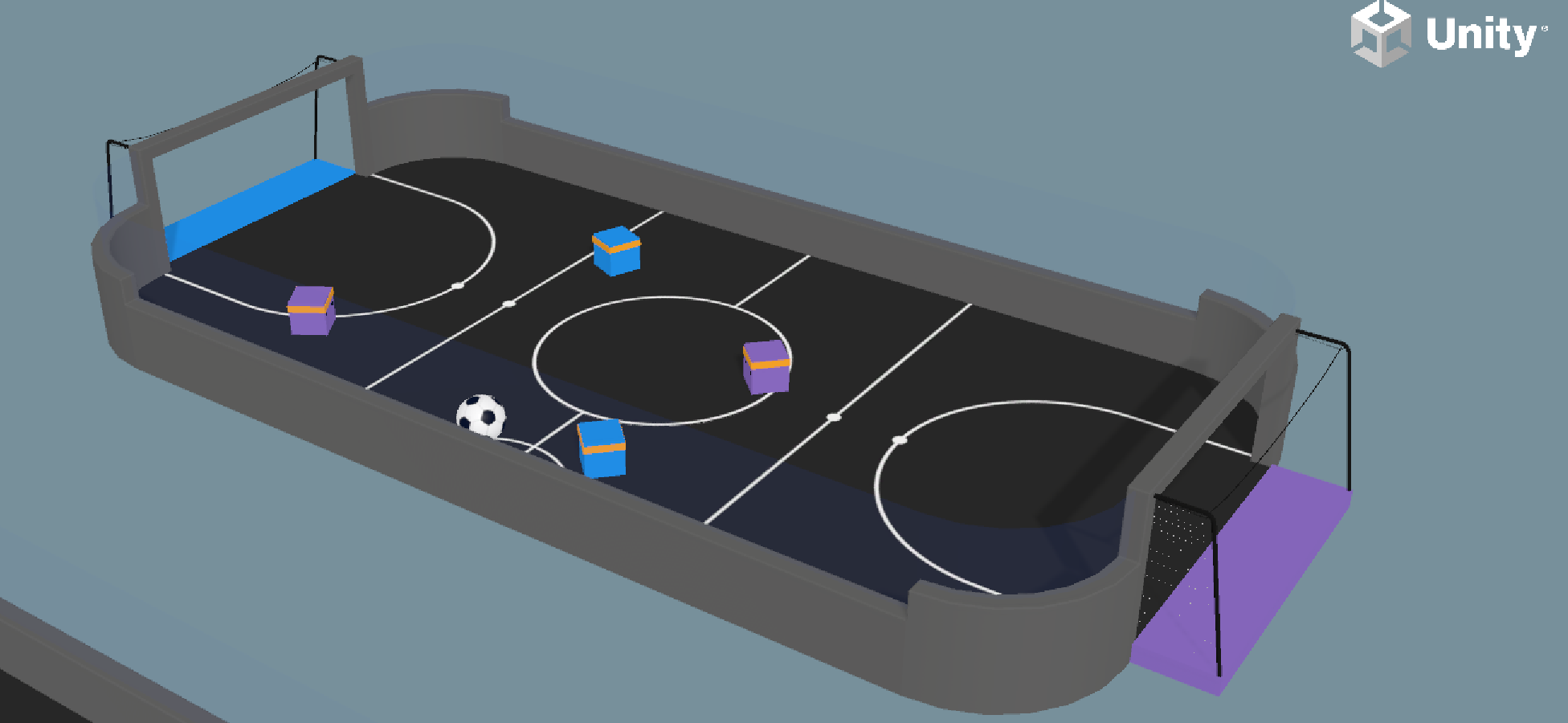
Because I can't be bothered to make a new environment, we're going to use the SoccerTwos environment from the ML-Agents examples (see Assets/ML-Agents/Examples):
Setup
READ FIRST: You must complete the following setup before you're able to complete the assignment!
Importantly: you MUST download and use Unity Version 2023.2 for this assignment (you should
be prompted to download it when loading into your editor).
Once open in the Unity Hub, ensure that you can open the Assets/ML-Agents/Examples/Soccer scene and that all assets are visible.
This project uses the following FREE asset packs (credit to their creators):
Specifications
The Simulation: Each Simulation consists of N rounds of Best of 5 games of 2v2 soccer with matches made by you: the Matchmaker!
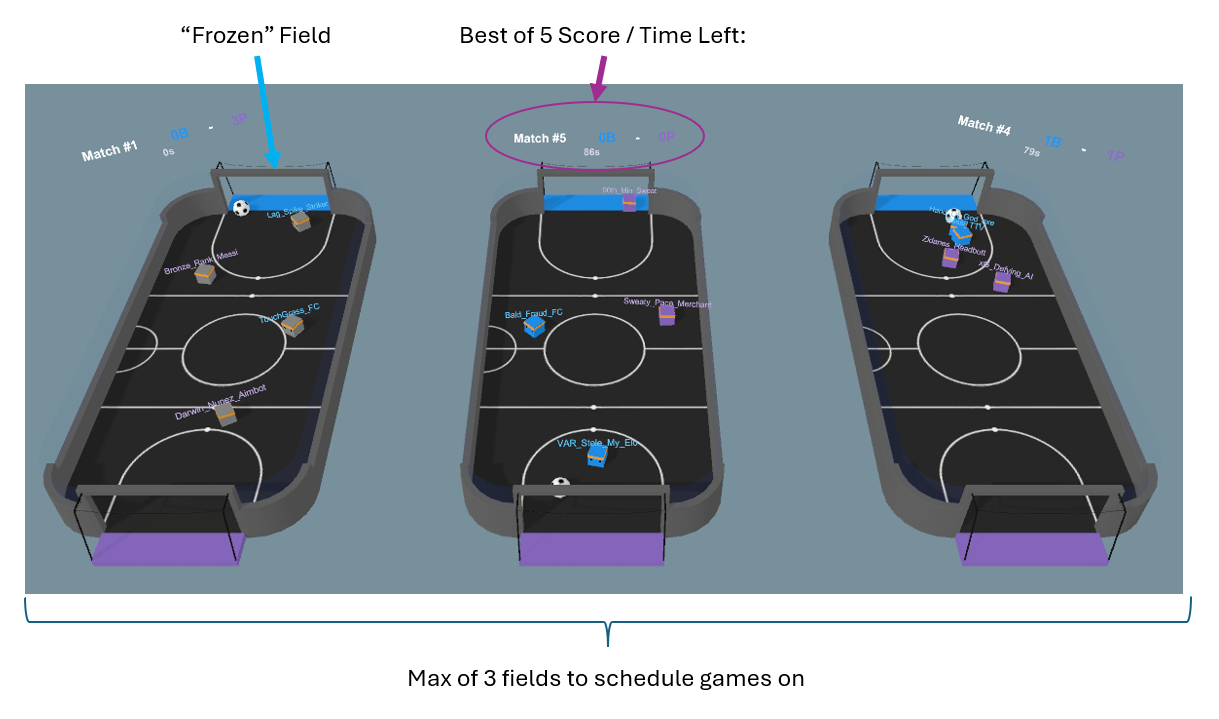
More specifically, the process is as follows:
The simulation begins with a pool of 15 players, each of which is controlled by a reinforcement learning model of various quality.
Curious to see the competition? You can examine each model's number of training samples by their suffix, e.g., "SoccerTwos-999460" is an agent that has had almost 1mil training samples. You can also see the True Elo they achieved during self-play, so the simulation knows their "objective" skill...
That said, your Matchmaker will NOT know the True Elo scores and will need to figure that out through Match Outcomes! To obscure the names of these models, each Player will be randomly renamed from one of a number of meme-y soccer-related Xbox gamertags at the start the sim.
There are a max of 3 Fields on which the Matchmaker may schedule games of 2v2 soccer from amongst the pool of players, and all players initially begin in the pool.
This is to simulate settings wherein there are finite server resources in which to make matches (which you'd be familiar with if you've ever tried to play a multiplayer game at launch!). Moreover, our players take no breaks! All players that begin in the player pool will always either be in a Match or waiting in queue.
A Field becomes "available" both (a) at the start of the simulation (all 3 are available) and (b) a Match on that field ends.
Each time a Field becomes available, your Matchmaker's
public Match ScheduleGame(Dictionary<string, float> playerWaitTimes)method will be invoked, (once for each available Field at the time) providing the current pool of unique playerNames mapped to their current time waiting in the queue from which you may:Construct and return a new Match, in which you choose the player names of those to place on the Blue and Purple teams.
Return null, indicating that you wish to wait until the player pool widens (perhaps there are no good matches to make or not enough players for a game). This will make the Field of the ending Match "Frozen" visually, though all of its players were returned to the player pool.
Once a Match is formed, your chosen players will attempt to bend it like Beckham... or... curb it like... cubham? I dunno, it's week 5... Anyways, they'll play a game best of 5 goals or the timer expires (default of 90s, whichever happens first), at which point the Game Outcome is reported back to your Matchmaker.
Here you'll learn the Match's score and a reminder of who was on what team -- now's your chance to do some recordkeeping to try and figure out each player's skill!
This process repeats until all MatchRounds specified in the Soccer Settings GO have been scheduled, or you make an oopsie and return null for all available Fields (in which case the player pool will not change and your Matchmaker still refuses to make a match lul).
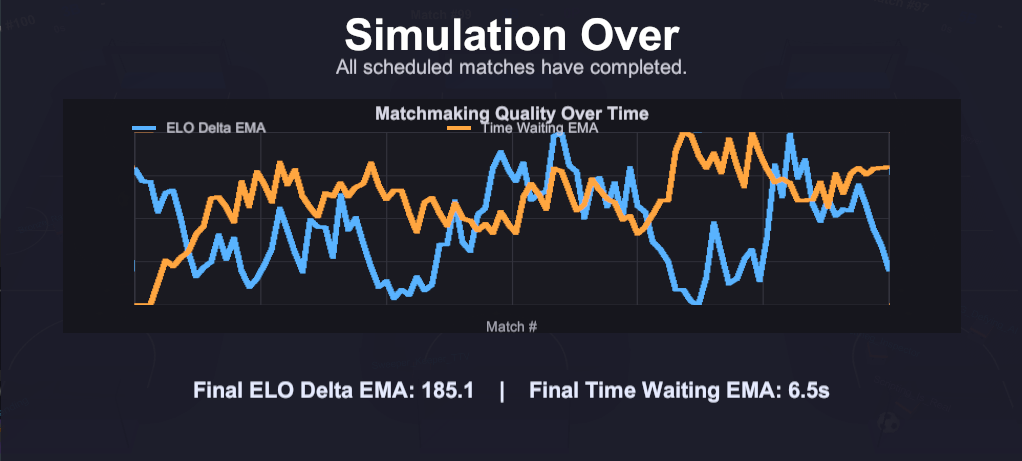
At the simulation's conclusion, you'll be greeted with the SimulationOverScreen that gives some stats on the match, including:
ELO Delta EMA: For each Match, we'll sum together the True ELOs of each agent on each team and then look at the difference between those for the Match. We would thus consider a "fair" match (for this sim's purposes) to have an ELO Delta close to 0. To show your system's learning, we use an Exponential Moving Average (EMA) to examine the change in ELO Delta over time, expecting that it should start large and end small.
Player Wait Time EMA: another EMA of the average time that players spend waiting for a Match. It's expected that this will start off smaller and then grow to some stable value once the ELOs of agents have been more accurately established.
[Don Thy Vuvuzela]
Let's start by just getting you familiar with the environment.
Go to the
Assets/ML-Agents/Examples/Soccer/Scenes/SoccerMatchmakingand Run the scene with the default SoccerSettings to see 5 Matches played out with randomly selected teams.Find the SoccerSettings GameObject and change the Simulation Time Scale to 5 -- observe what happens (this will be useful when running more comprehensive tests later).
Finally, in your report, as you watch the Matches unfold, record (a) what traits of players appear to signal that they are "higher skill" vs. "lower skill", and (b) how you might operationalize these traits as automatically measured features.
You won't have to implement these features as-is yet, but having this recorded serves as a nice way to state your hypotheses of what *might* make a good system to reflect on later.
[Find Thy Crickets]
...for it is time to do some MATCHMAKING! (cue Mulan music)
Open Matchmaker.cs in the Scripts folder of the Soccer scene and study the current placeholder implementations of the two methods you'll implement:
  /// <summary>
  /// Returns a single match from the available player pool, or null if fewer than 4 players are free.
  /// </summary>
  public Match ScheduleGame(Dictionary<string, float> playerWaitTimes)
  {
      var available = playerWaitTimes.Keys.OrderBy(_ => Random.value).ToList();
      if (available.Count < 4)
      {
          return null;
      }

      var group = available.Take(4).ToList();
      var shuffled = group.OrderBy(_ => Random.value).ToList();
      return new Match(
          shuffled.Take(2),
          shuffled.Skip(2).Take(2));
  }

  /// <summary>
  /// Receives the outcome of a completed match. Use this to update skill estimates by player name.
  /// </summary>
  public void ObserveOutcome(MatchOutcome outcome)
  {
      var blueScore = outcome.Score["BlueScore"];
      var purpleScore = outcome.Score["PurpleScore"];
      var blueNames = string.Join(", ", outcome.Match.BlueTeam);
      var purpleNames = string.Join(", ", outcome.Match.PurpleTeam);
      Debug.Log($"Match outcome: Blue {blueScore} - Purple {purpleScore} ({blueNames} vs {purpleNames})");
  }
Currently, teams are assigned at random from the pool of available players, which *does* have one perk: players get maximum time in-game and not in queue! ...the downside, of course, is that the noobs find themselves in the same lobbies as the pros, so the noobs are crushed and the pros are unchallenged -- lose lose! You're going to improve this by implementing *some* form of Skill Based Matchmaking that overhauls the two methods above. The tricky parts:
All of this is happening in real-time!* This means that every second a Player spends outside of a Match will be recorded as waiting time... but sometimes, making a fair match takes time for the pool to give you the players you need to make things even!
(* well, possibly accelerated depending on your choice for Simulation Time, but this parameter scales all time-based measurements too)
This also means that some players that you *wish* you could put on the same team are split between being in an active match and being in the queue, so you'll need to make some judgment calls on when to balance queue times and match quality, especially when you may or may not know each player's true skill rating early-on.
Complicating things further: this is a TEAM setting, which means that BOTH members of your team get blamed for a lost / celebrated for a win even if one of them was really carrying / throwing. You'll need a way through repeated samples to tease out just who's responsible for good performance vs. poor.
Your goal: over 100 MatchRounds (set in SoccerSettings) achieve an EMA or Average ELO Delta BELOW 100.
Once you're ready to document your matchmaker's test, go to SoccerSettings and set MatchRounds to 100 and Simulation Time Scale to some higher value to speed things up (while the agents' actions are still visible) and record the simulations playing out. Include a link to this video in your report.
Alongside this video link, include a screenshot of the SimulationOverScreen with graph and stats.
Finally, include a paragraph explaining your Matchmaking process, its successes, and its challenges, and especially, its costs in terms of queue wait times compared to the baseline random assigner. ALSO include the full code for your Matchmaker class.
IMPORTANT: Do these report steps NOW before continuing on to the next problem.
IMPORTANT: Make a commit and push it right after this, you're going to make some changes to your approach next!
[Pad Thy Stats]
Notably, your matchmaking system in the above might be considered a little primitive because it ONLY considers game outcomes / wait times as part of its strategy. Let's change that!
Reminder: GenAI use is welcome for these assignments, and you'll probably want to recruit that in the following changes!
Take a look at the SoccerMatchmakingManager, in particular, its RecordMatchStats method, and contemplate some additional stats you could record as a Match is in progress that might give more player-specific performance metrics. E.g., in a shooting game, you might record a player's accuracy percentage or KDA values. Update your Matchmaker's ObserveOutcome method such that the MatchOutcome now reports these additional per-player stats.
Using these new stats, revamp your Matchmaker to take them into consideration when deciding each player's skill levels.
Re-run the big 100-match simulation you ran in the previous problem and take a screenshot of the SimulationOverScreen for your report.
In a paragraph, describe your new player-specific skill traits and discuss the impact they had on your matchmaking success. Additionally, include the full code for your new Matchmaker class.
Hopefully at this point your submission has scored a GOOOOOOOAL (do they even still do that in common soccer parlance? meh.)
Grading
Your submission will be graded on successful completion and report on all Problems listed above. Each are weighted equally.
Since some portions leave some room for creativity / interpretation, feel free to reach out if you have questions of whether or not your approach meets the stated spec.
Submission
You will be submitting your assignments through GitHub Classroom!
What
Complete all requested sections of the skeleton above AND finalize your report in a /doc/ subdirectory as shown in the skeleton before
pushing your finished project to your GitHub Classroom repo.
How
To clone this assignment (if you need a refresher), consult the guide here:
To submit this assignment:
Simply push your final, submission copy to the GitHub Classroom repository associated with your account.
Place your name(s) at the top of *all modified* files AND in the accompanying
readmefile.